
Notepad v3.0.6
Braden Farmer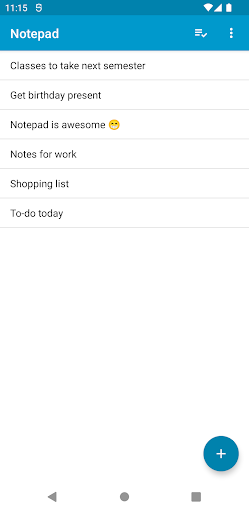


About this app
Developer Description
A simple, bare-bones, no-frills note taking app
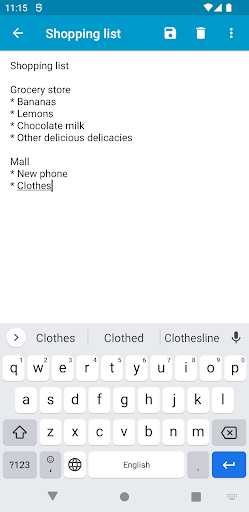
• Quickly create and save plain-text notes
• Optionally create rich-text notes using Markdown or HTML
• Beautiful, easy-to-use UI with Material Design elements
• Dual-pane view for tablets
• Share notes to and receive text from other apps
• Auto-saves drafts
• View Mode for notes with clickable links
• Sort notes by date or by name
• Keyboard shortcuts for common actions (see below)
• Import and export notes to external storage
• Zero permissions and absolutely zero ads
• Open-source
Keyboard shortcuts
Search+M: launch Notepad from any application
Ctrl+N: New Note
Ctrl+E: Edit Note
Ctrl+S: Save
Ctrl+D: Delete
Ctrl+H: Share
What's New
Version Information
- Version
- 3.0.6
- Downloads
- 500K+
- Updated on
- Sep 22, 2024
- Released
- Feb 10, 2014
- Requires
- Android 5.0
Statistics
Google Play Rating History
Rating Distribution
Downloads Over Time
Notepad has been downloaded times. Over the past 30 days, it averaged downloads per day.
Shaded area shows 30-day prediction based on historical trends
Historical data collection started recently. More data points will be available over time.
Notepad users say on Google Play
 A Google user
While all other features of your app are okay there are 2 of features that are most irritating. 1. After reading the contents of a text file when one exits to the main menu where a list of other text files are displayed, instead of remaining at the last opened filename, the list jumps to the first file. 2. Similarly while wanting to edit a text file, instead of displaying the first line and first sentence the cursor jumps at the last word of the last sentence. Implement these 2 improvements.
 argalax
Good app. One request for the developer: please remove the "Delete Note" button from the note viewing/editing screen. Few times I have accidentally deleted a note. The Delete and Save buttons are close together and the confirmation prompts to save and delete look similar at glance. Deleting the note from the main screen (with long press) is sufficient. Thanks.
 Yes I Am Paranoid
Nice simple app. However it would be nice to know that your notes are not saved outside of the app. I just upgrade to new device. Migrated data from old device, but all of my notes were not transfered because I didn't export them first. I no longer have access to old device so hundreds of notes gone.
 Mostly Harmless
Copy & paste functionality has become degraded following last year's update. There appears to be a marked lack of transparency on the part of the developer/Github to identify exactly where user data (text) files are stored. This has caused many problems when trying to recover archived Notepad files from one device for transfer/subsequent import into the same version of Notepad on another (newer) device.
 Olofu Mark
DO NOT INSTALL. The app is buggy. Chunks of existing texts gets irrecoverably deleted or overwritten as you type. You lose a lot of vital information in a blink of an eye without any remedy. App is no longer under maintenance. bizzare.
ApkTrusted Ratings & Reviews
More from Braden Farmer
See more apps



Similar Apps

Weekly Planner Journal
Paid

Noteshelf - Notes, Annotations
Paid

UpNote - notes, diary, journal
Free

CLG Color
Paid

Color Notes, Notebook, Notepad
Free
Inkpad Notepad & To do list
Free

AI Journal Notebook - Reflectr
Free

Evernote - Note Organizer
Free

FocusNote: To-Do List
Paid

touchnotes
Free

Huion Note : Easy note-taking
Free

Rocketbook
Free

ColorNote Notepad Notes
Free
Notepad - Notes、Todo、Memo
Free

Mind Notes: Note-Taking Apps
Free

Task Motivation Quotes
Paid
Scan this QR code to download

Forwarding you to the page at Google Play market in seconds...
Open Google Play market now