
FreshBooks Invoicing App v1.24.38
FreshBooks Cloud Accounting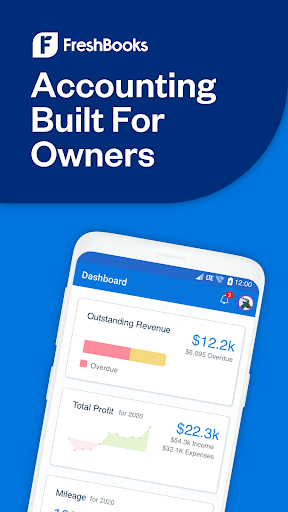


About this app
The FreshBooks Invoicing App solves the problem of tedious and disorganized invoicing and expense tracking for small businesses and freelancers, benefiting those who need a streamlined and professional billing process. Compared to alternatives in the Business category, FreshBooks stands out with its user-friendly interface and robust feature set, although its pricing model may be a deterrent for some. With a high user rating and moderate download numbers, FreshBooks has established itself as a reliable choice. However, its lack of a free trial period for its premium features may make it less appealing to new users.
Pros
- The FreshBooks Invoicing App has an impressive 4.4-star rating, indicating a high level of user satisfaction with its performance and feature set.
- With over 500,000 downloads, FreshBooks has demonstrated significant social proof, suggesting that it is a widely accepted and trusted solution for invoicing and expense tracking.
- The app's developer, FreshBooks Cloud Accounting, is a well-established company with a professional website and dedicated support email, providing users with a sense of security and reliability.
- The app's offline capability and lack of ads enhance the overall user experience, allowing users to work efficiently without interruptions.
- FreshBooks' regular updates ensure that the app stays current with the latest features and security patches, protecting user data and preventing potential issues.
Cons
- The FreshBooks Invoicing App's pricing model, which includes in-app purchases ranging from $21.00 to $65.00 per item, may be a significant deterrent for small businesses or individuals with limited budgets.
- Although the app has a high user rating, some users may find the interface and feature set overwhelming, particularly if they are not familiar with accounting or invoicing software.
- The lack of a free trial period for premium features may make it difficult for new users to determine whether the app meets their needs before committing to a purchase.
- FreshBooks' focus on invoicing and expense tracking may limit its appeal to users who require a more comprehensive accounting solution.
Best for: The ideal user for the FreshBooks Invoicing App is a small business owner, freelancer, or independent contractor who requires a streamlined and professional invoicing and expense tracking solution, has a moderate level of technical skill, and is willing to invest in a premium product to simplify their financial management and improve their overall productivity.
Developer Description
Invoice Maker & Expense Tracking
FreshBooks is a comprehensive invoicing and accounting software designed for business owners and their clients. It helps you manage your books, client relationships, and overall business more efficiently.
Key Features:
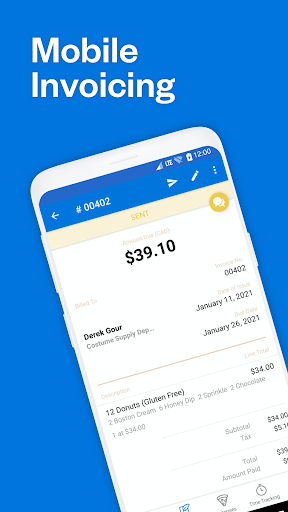
Creating Invoice (Invoice Maker) - FreshBooks also offers easy and professional invoicing, allowing you to impress your clients with invoices that clearly show all the work you've done, and follow up with automated payment reminders if needed.
Expense Tracking - Expense tracking is also made easy with FreshBooks. You can snap photos of receipts on the go or import expenses from your bank account, then organize and assign them to clients, so you're always ready for tax time.
Mileage Tracking - One of the key features of FreshBooks is its mileage tracking, which automatically tracks your business trips as you drive and categorizes them for potential tax deductions.
Time Tracking - Time tracking in FreshBooks makes it easy for your team to log billable minutes, so you don't miss any billable time that can be costly. You can also automatically add billable time to invoices, ensuring all time is accounted for.
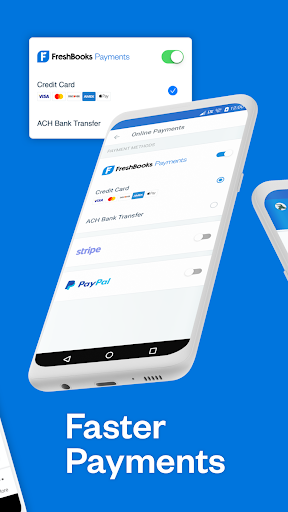
Online Payment Options - FreshBooks offers automated online payments, providing your clients with many different ways to pay and making it easier for you to get paid faster. It can help improve your cash flow and turn a trickle of payments into a waterfall.
Manage Your Clients - With FreshBooks, you can stay connected to your clients and manage your business on-the-go through its mobile app, so you're not tied to your computer all the time.
Generate Reports - You can run reports in FreshBooks anytime to see how your business is doing. It tracks every dollar in and out of your business, and with its easy-to-use double-entry accounting tools and reports, you can see your profitability, cash flow, and spending habits.
Great Customer Support - FreshBooks also has an award-winning customer support team that's always ready to help you with any questions or issues you might have. You can speak to a real human within three rings, making it easy to get the help you need.
1-866-303-6061
support@freshbooks.com
Privacy Policy: https://www.freshbooks.com/policies/privacy
Terms of Service: https://www.freshbooks.com/policies/terms-of-service
Privacy
Given that the FreshBooks Invoicing App requires no permissions, users can be confident that their data is secure and not being unnecessarily accessed. However, as with any accounting app, it is essential to use strong passwords and enable two-factor authentication to protect sensitive financial information. Users should also regularly review their account activity and report any suspicious transactions to FreshBooks' support team.
Tips
To get the most out of the FreshBooks Invoicing App, users should start by setting up their account and customizing their invoice templates to suit their business needs. Additionally, users can optimize their workflow by utilizing the app's automated expense tracking and billing features, which can save time and reduce errors. Regularly syncing data with the cloud will also ensure that financial information is up-to-date and accessible across all devices.
What's New
In-app purchases
$21.00 - $65.00 per item
Version Information
- Version
- 1.24.38
- Downloads
- 500K+
- Updated on
- Nov 4, 2025
- Released
- Aug 29, 2016
- Requires
- Android 8.0
Statistics
Google Play Rating History
Rating Distribution
Downloads Over Time
FreshBooks Invoicing App has been downloaded times. Over the past 30 days, it averaged downloads per day.
Shaded area shows 30-day prediction based on historical trends
Historical data collection started recently. More data points will be available over time.
FreshBooks Invoicing App - Google Play Rankings
Top Rankings
| Rank | Country | Category | List | Change |
|---|---|---|---|---|
| — |
Ranking History in
No ranking data available yet. Rankings are updated daily.
#37 in Top Grossing Business in United States
#29 in Top Grossing Business in Canada


#44 in Top Grossing Business in United Kingdom

#48 in Top Grossing Business in Australia


FreshBooks Invoicing App users say on Google Play
 Allison Inhelder
This app has saved my life, and my small graphic design business. It is so intuitive! I love the timer tracking and the way you can set up projects/clients and details. However, I do wish the lower price option allowed you to have more than 5 clients, the jump from 5 clients to 50 in the next price bracket is very large for us small businesses. I will never have more than 8 clients, so I wish it wasn't such a large jump.
 Travis Goff
great little app for small business ive used the app for about 4 years now and it has been really great and has been making steady progress. one problem that i do have is that when using the app mode on a tablet you cant rotate the app in screen. its a small inconvenience but, it does make it harder to outfit some of my crew with simple and affordable systems to use while tracking work and sales on the go.
 Evy Susilo
The mileage tracking doesn't work. Been turning the auto tracking off and on multiple times in trying to get it to work, but no result.
 Alex Friedberg
It's missing everything I need. Doesn't have project tracking AT ALL, expenses can't be assigned to a project. There's a glitch currently that doesn't set expenses as billable correctly. Mileage tracking is only available in the app, but doesn't allow on demand tracking. Only automatic 24/7 tracking or manual mileage entry. There's so many missing features in my daily workflow I still have to use the web page in desktop mode to access everything.
 JAshley Cleaning Co.
it's mileage tracker is 100% garbage. unlike all the other driving apps this gem doesn't work at low battery, it doesn't let you create locations so it's more accurate. it does have a good start and stop time. But if you ever dare to go below 20% battery it turns off. And when do you get it charged up you'd think it would turn back on right!?,? nope it will never turn back on unless you open the app. they won't change thing and just make you pretend you can . watch for the generic reply
ApkTrusted Ratings & Reviews
Similar Apps
ProBooks: Invoice Maker
Free

Quotation Maker
Free

Quick Bill Admin
Free

Square Invoices: Invoice Maker
Free

Square Appointments Beta
Free

Receipt Tracker App - Dext
Free

Meta Ads Manager
Free

Rydoo
Free
Invoice Maker - Simple Invoice
Free
Square Point of Sale Beta
Free

Status Saver App
Paid

Workplace from Meta
Free
Site Audit Pro
Paid
Scan this QR code to download

Forwarding you to the page at Google Play market in seconds...
Open Google Play market now