
SoundWire Full-Audio Streaming vVARY
GeorgieLabs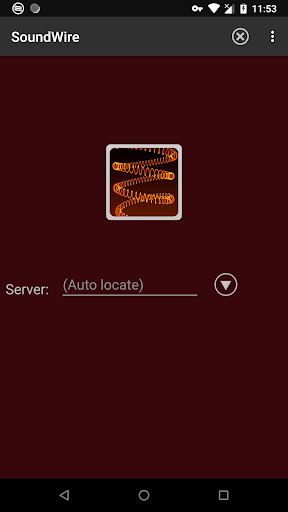

About this app
Developer Description
Turn your Android device into wireless headphones / wireless speaker
- A remote speaker or wireless headphones
- A way to listen to music and movies from your computer anywhere around your house, or further over cell networks
- A wireless extension of live audio from your PC-based music system
SoundWire does audio mirroring (audio cast). You can use any music player on your PC or laptop like Spotify, YouTube, or iTunes and stream the live sound over WiFi directly to your Android device.
This is the full version of SoundWire. It enables unlimited Opus audio compression, can handle up to 10 connections at the same time, and has no ads or interruptions. It also has a special Pro Mode to set and display buffer latency precisely in milliseconds.
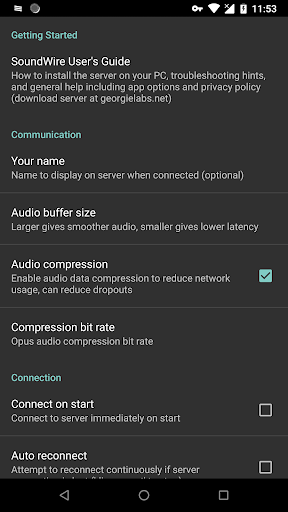
SoundWire has low latency (audio delay), which means it can even be used to listen to the soundtrack of a movie or YouTube video while you watch (**Note you must adjust the buffer size in app settings for low latency). There are other uses too... SoundWire can work as a baby monitor or listening device with a computer such as a netbook that has a built-in microphone. Hook up turntables to your computer's line input and stream a live DJ set to another part of the house over WiFi, or anywhere else over 3G/4G (additional network setup may be needed for 3G/4G).
Features
- Live audio capture and streaming to multiple clients
- Excellent sound quality (44.1 / 48 kHz stereo 16-bit, PCM or Opus compression)
- True low latency (unlike AirPlay, Airfoil)
- Easy to use
- Compression option greatly reduces network usage
- Stream audio from PC to PC running x86 virtualized app (Linux/Windows)
- Save everything you hear to a file (MP3 or WAV)
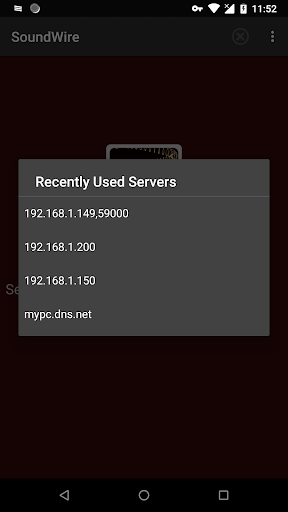
Before using SoundWire on your Android device you must install and run the SoundWire Server application on the Windows/Linux PC or laptop which is your source of music, web audio streaming, or other sounds. Raspberry Pi is also supported. Download the server at https://georgielabs.net
For more information see the SoundWire guide at https://georgielabs.net/SoundWireHelp.html
If you have any problems please see the troubleshooting tips at the above link. For example if you get choppy audio try restarting your wireless router, then try the other troubleshooting suggestions in the guide. If you get a message saying the app is not licensed and this message is incorrect then please check your internet connection and try again.
Please rate the app and comment on Google Play to let us know what you think of SoundWire. If you have a question or bug report send email to soundwire@georgielabs.net.
SoundWire Google Play icon by Jet Markov courtesy of Jeremiah Strong.
What's New
Made app quit completely on "back" while not connected.
Updated launcher icon.
Various small UI and bug fixes.
Version Information
- Version
- -
- Downloads
- 10K+
- Updated on
- Sep 14, 2025
- Released
- Oct 31, 2011
- Requires
- Android Varies with device
Statistics
Google Play Rating History
Rating Distribution
Downloads Over Time
SoundWire Full-Audio Streaming has been downloaded times. Over the past 30 days, it averaged downloads per day.
Shaded area shows 30-day prediction based on historical trends
Historical data collection started recently. More data points will be available over time.
SoundWire Full-Audio Streaming - Google Play Rankings
Top Rankings
| Rank | Country | Category | List | Change |
|---|---|---|---|---|
| — |
Ranking History in
No ranking data available yet. Rankings are updated daily.
#34 in Top Paid Music And Audio in Brazil



SoundWire Full-Audio Streaming users say on Google Play
 jakehead20
Amazing app. The only thing missing is being able to transmit audio from the client to the server, but this is fine as it is. I've noticed that some people complain about the latency, but they haven't even tried enabling pro mode. Latency sensitive work should be done only while using pro mode, as it lets you set the buffer in milliseconds. From there, you just have to tweak the other settings like compression and latency steering to get the quality you need.
 SamPosts
Good overall, essentially the free version with more features. There are occasional issues, such as the latency dropping to ~30ms and becoming extremely choppy, despite me having the latency set to 750ms in the options menu. Reconnecting did not fix the issue, it eventually resolved on its own, but still frustrating.
 ―
―
Please add support for upcoming Pipewire-JACK2 in a Play Store Beta 🙏🏼 Edit: it's decent enough Over wifi if I adjust settings and ports to get it to work -- But tethered phone to my PC's ethernet as a hotspot even with settings are matched... it won't connect, it sees them as separate networks. Could there be a beta ring for early/faster update releases? 🤔
 A Google user
I used to use this app at my old place of living. I rent elsewhere now and it will no longer connect. I have checked all the settings, I can only assume the port number is wrong however I have no way of finding a different port number. No instructions on the website. No instructions on the server for the PC. No instructions on the app. Help me with this and I will give you 5 stars. Thanks for any help.
 James Ratliff
Spent an hour trying to get the server connected on my laptop and after allowing all permissions and allowing it through the firewall, reading article and article and watching several YouTube videos I still can't get the damn thing connected. Waste of $4.
ApkTrusted Ratings & Reviews
More from GeorgieLabs
See more apps


Scan this QR code to download

Forwarding you to the page at Google Play market in seconds...
Open Google Play market now