Rename Photos and Videos v1.14.0-pro
Maximilian Schillinger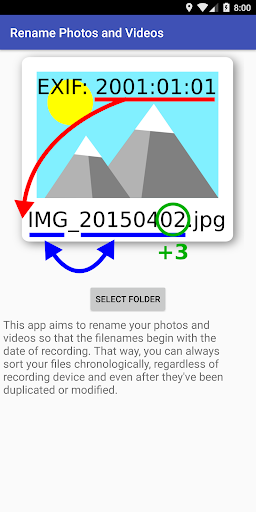


About this app
Developer Description
Rename your photos and videos so that the filenames begin with the date taken.
Background:
If you want to view your photos and videos in a chronological order within a gallery app, sorting by filename often doesn't work since photo filenames begin with "IMG_" or "PANO_" and videos with "VID_" or "MOV_" (depending on your device). Panoramas and videos will be shown last.
Sorting by EXIF date taken doesn't work either since videos don't contain EXIF data. They will be shown last (or first).
Sorting by filesystem's "date modified" usually works fine on the original device. But when you copy your files to another device, the date of copy will be the new "date modified", which disrupts the original chronological order of the files.
For these reasons, it makes good sense to rename your photos and videos with this app before transferring them to another device (smartphone, tablet or PC), so that all filenames begin with the date taken.
Features:
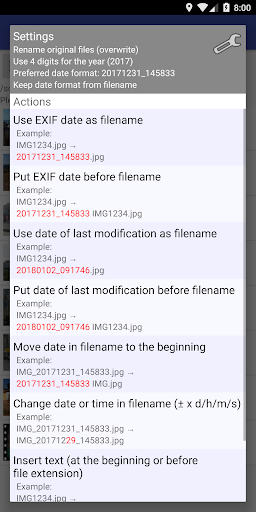
▶ Rename your photos and videos using
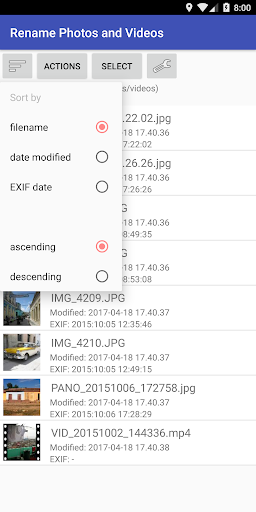
• date used in filename
• file modification date
• EXIF date (only photos, videos don't have one)
▶ Add your own text at filename beginning or before file extension
▶ Rename all photos and videos in a folder at once or choose individual files
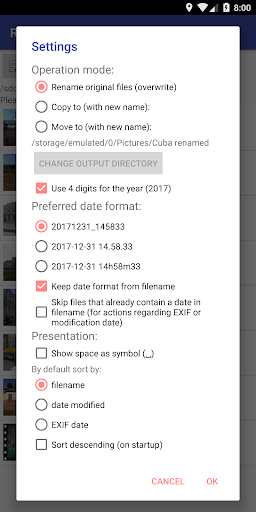
▶ 3 operation modes:
• Overwrite original files
• Create copies with new names
• Rename files and move them to another folder
▶ Recognized date formats (in filenames):
• IMG_YYYYMMdd_HHmmss.jpg (OnePlus 3T, LG Nexus 5 and many more)
• MMddYYHHmm.mp4 (some LG devices)
• many more
▶ Write recognized dates in a short or a long format:
• 20170113_145833
• 2017-01-13 14.58.33
• 2017-01-13 14h58m33
▶ Write years with four or two digits
▶ Or define your own pattern (new in version 1.10.0)!
▶ If your files are named like "CIMG1234.jpg" or "DSC-1234.jpg", rename them using the EXIF date (if available) or file modification date (if correct)
▶ Correct wrong dates in filenames by adding/subtracting days, hours, minutes and/or seconds
▶ Supported file formats: jpg/jpeg, png, gif, mp4, mov, avi, 3gp
▶ Write access to external SD cards in Android 5 and newer (and in many cases also in Android 4.3 and older)
What's New
Version Information
- Version
- 1.14.0-pro
- Downloads
- 1K+
- Updated on
- Aug 12, 2025
- Released
- Apr 18, 2017
- Requires
- Android 4.4
Statistics
Google Play Rating History
Rating Distribution
Downloads Over Time
Rename Photos and Videos has been downloaded times. Over the past 30 days, it averaged downloads per day.
Shaded area shows 30-day prediction based on historical trends
Historical data collection started recently. More data points will be available over time.
Rename Photos and Videos users say on Google Play
 A Google user
This app is based on a simple but clever concept. It is easy to use and does its work quickly and reliably, even with large file sets. It is too good to receive less than a five star rating but one improvement might be to allow the file list to be sorted by default in descending order, to show the most recent files at the top of the list. Many thanks to the developer for making this a settings option in version 1.8.0.
A Google user
Works but I take burst photo so and I need milliseconds as well. Yes exif data. Using user defined pattern: yyyyMMdd_HHmmss_SSS
A Google user
I like this app in theory but it caused some issues for me. When I used the exif option, sometimes the file name didn't end up matching the exif date shown beneath it. Also, I don't like having spaces or parentheses, so I had to get another renamer to take those out. Ultimately I couldn't use it because of the exif not matching. Maybe my files were the issue somehow, but I'd think the file would match the shown date on the app regardless.
A Google user
...app failed first 3 usage attempts; on 4th attempt, crashed with Java error.
 nik cr
Really Stupid program. Can't rename just name. Every staring ask me the same question. Again and again, and again....
ApkTrusted Ratings & Reviews
More from Maximilian Schillinger
See more apps


Similar Apps

FaceViral: AI Video Face Swap
Free

TIKTOK Meme
Paid

eZy Watermark Photos Pro
Paid

Mindset Shifter
Paid

3D Photo: Imager
Paid

PicMonkey Photo Editor
Free

Task Motivation Quotes
Paid

Banano Pro İmage Generator
Paid

Daily Good Deeds
Paid

Minimalist Challenge
Paid

Video Converter Pro
Paid

CirclePlug
Free

On Point Barbershop
Free

SelfieCity
Free

PhotoSpot: For Travel Planning
Free

Goal Planner Mini
Paid
Scan this QR code to download

Forwarding you to the page at Google Play market in seconds...
Open Google Play market now