
GS Weather 7 Watch Face v2.4.3
GS Watchfaces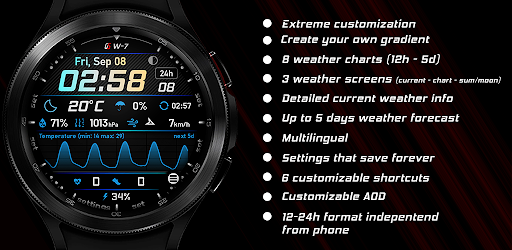



About this app
Developer Description
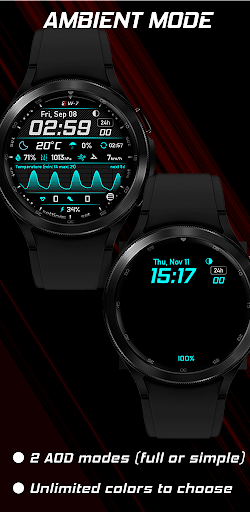
Premium Wear OS Weather watch face
Please check the tap guide or launch the quick guide from the watch face setting menu, to find out the watch face functions.
It is necessary to install this app on your mobile for the watch face to function properly. Please make sure to install it there first.
The watch face can be optionally controlled from your phone (a separate application needs to be installed on your phone). This gives you the ability to control all watchface settings, backup and restore customizations, and receive notifications from the watchface when the battery drops to the level you have set, or your heart rate bpm reaches the limit you have set.
Download the Android companion app here https://play.google.com/store/apps/details?id=com.gs.watchfaces
The weather icons and data shown on the chart data weather screen correspond to the chart vertical ticks and change depending on the chart span.
Please note that the weather info is only "shown" on the watch face, the data is provided by openweathermap.org and not from your phone's weather app. I do not have any responsibility for the weather conditions the watch face shows.
For any inquiries or problems, you may have, please contact me on social media or send me an email to mailto:support@gswatchfaces.com. I will be more than happy to assist you and hear your thoughts.
What's New
Version Information
- Version
- 2.4.3
- Downloads
- 1K+
- Updated on
- Sep 18, 2025
- Released
- Dec 2, 2021
- Requires
- Android Varies with device
Statistics
Google Play Rating History
Rating Distribution
Downloads Over Time
GS Weather 7 Watch Face has been downloaded times. Over the past 30 days, it averaged downloads per day.
Shaded area shows 30-day prediction based on historical trends
Historical data collection started recently. More data points will be available over time.
GS Weather 7 Watch Face - Google Play Rankings
Top Rankings
| Rank | Country | Category | List | Change |
|---|---|---|---|---|
| — |
Ranking History in
No ranking data available yet. Rankings are updated daily.
#38 in Top Grossing Weather in Philippines
GS Weather 7 Watch Face users say on Google Play
 David Churchill
Very informative and customizable (WearOS version)
 Kacey J
Doesn't install on Galaxy Watch 8 or install an app on Galaxy S25 Ultra. Refunded once because I thought there was a problem and then repurchased. Says its installed on Phone but it's not. No app to install on watch. Play Store doesn't even have an option to "open" the app, just uninstall. I now no longer have an option to Refund.
ApkTrusted Ratings & Reviews
More from GS Watchfaces
See more apps
GS Weather 9 Watch Face
Paid
GS 4 Seasons Watch Face
Free

GS Weather 8 Watch Face
Paid
GS Weather 11 Hybrid Watchface
Free

GS Weather 10 Watch Face
Paid
GS Digital 18 Watch Face
Free
Wear OS Toolset Complications
Free
GS Hybrid 7 Watch Face
Free
GS Weather 4 Watch Face
Paid
GS Hybrid 6 Watch Face
Free
GS Weather 5 Watch Face
Paid

GS Weather 6 Watch Face
Paid
Similar Apps

SamWatch Digital XVIII
Paid
![[KNA009] DARK VIEW icon](https://play-lh.googleusercontent.com/UFwc0omK4gu-lkBmXCAC_RXGlNoYTLQTGyRVxOzNllnuzbyyX_OtFjMof3T0XLpEUBO0)
[KNA009] DARK VIEW
Paid

Weather Forecast Short Term 99
Free
Health Tracking - Km/Mi - RE28
Free

MD285 Digital watch face
Free

MD217 Digital watch face
Free

NOD Watch Face
Paid

PER49 Digital Watch Face
Paid
![[KNA015] CRESCENT icon](https://play-lh.googleusercontent.com/ti1orTMCEZwaoCbG-MDyiq7CwLLTJGZ-lYBocqpGIQ4G1crZ-k03Ck1XVG4wPP_u8mk)
[KNA015] CRESCENT
Paid

Iris551 Multi-Function Digital
Paid
DF068
Paid
MD282 3D Digital watch face
Paid

SamWatch Digital Weather 5
Paid

MD219 Minimal watch face
Free

AD BrieF - Watch Face
Paid

DF087
Paid
Scan this QR code to download

Forwarding you to the page at Google Play market in seconds...
Open Google Play market now