GPS Photo Viewer v1.4.2
JK.Fantasy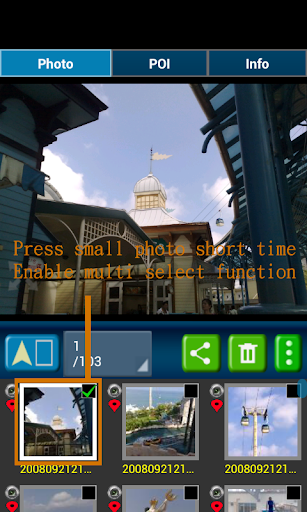



About this app
Developer Description
Edit photo's latitude and longitude. Support batch processing.
When you go to travel and take a picture, I suggest you to enable camera's GPS.
After you enable camera's GPS function, then the GPS latitude and longitude will record in the captured photo.
This application is help you to check the photo have a GPS info or not. And help to launch the Google map.
If your photo (jpeg file) doesn't have a GPS info, this application also can help you to edit it. So you can know where to take this picture.
A few years later, you also know where this place is.
Memories are important thing in our life.
So remember enable GPS when take a picture!!!
Function :
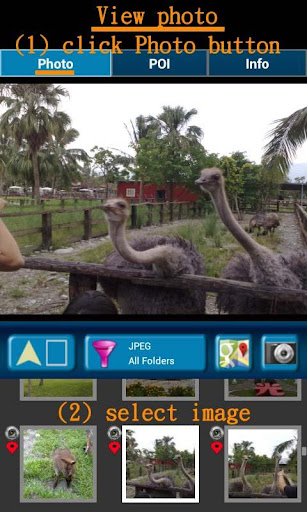
1. Fast check/edit photo's GPS information.
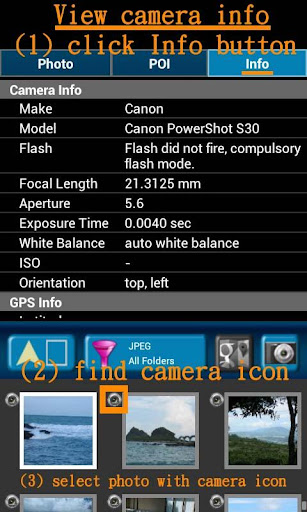
2. Fast check photo's camera information.
3. Navigate GPS-POI in google map.
4. Launch to "google map application" with photo's GPS location.
5. When launch this application, the final selected photo will be shown. So it is quickly to index the final selected photo. It is convenient!
Purpose :
1. You can copy your GPS photos to your friends, and then they can go there if they are interest.
2. Want to know where to take the picture. (Take a GPS photo when park your car, you will find your car easily.)
3. Want to know the "focal length", "aperture", "ISO" value in the photo.
V1.1.0:
1. change MAP to google map V3.
a) support traffic/weather/panoramio layer.
b) support street view.
c) support place search.
V1.1.1:
1. Support edit photo's latitude/longitude. (Only JPEG file can edit latitude/longitude)
(a-1) Press the small photo a long time to enable photo multi-select.
(a-2) Select photos. (up to 20 photos)
(a-3) Select option button, then tap "edit poi" button to enter edit-page.
Others :
1. It could be slow at first time loading image. After decoding finish, it will be fast.
2. Remember turn on GPS funtion when you take a picture. And the photo will contail GPS info.
3. Your phone need already install "google map application" and "google play service" before run this application.
4. Tap the small picture for some time, share/delete/rename/rotate function will enable.
PS: In the Line/Facebook photo sharing, latitude and longitude info will be removed. If you want to share the latitude and longitude info, we recommend to use email/Gmail.
[Q&A] :
1. How to capture a photo that contain a GPS tag?
Ans:
1) Enable `Use wireless networks` and `Use GPS satellites` in `Location services` page.
2) Enable WIFI or 3G/4G network for fast locaton search.
3) Enable GPS function in the camera application.
【PS】
Please like us on Facebook. Give us the power of love.
https://www.facebook.com/jkfantasy
What's New
1. Fixed share photo failed in some app after Android 7.0.
2. Improve share button.
a) share photo(s) and text
b) share photo(s) only
c) share text only
3. Show SD-icon if that file is stored in SD card.
V1.4.2:
1. App's bug fix for some devices.
In-app purchases
$1.97 per item
Version Information
- Version
- 1.4.2
- Downloads
- 1M+
- Updated on
- Oct 22, 2019
- Released
- Feb 16, 2013
- Requires
- Android 4.0
Statistics
Google Play Rating History
Rating Distribution
Downloads Over Time
GPS Photo Viewer has been downloaded times. Over the past 30 days, it averaged downloads per day.
Shaded area shows 30-day prediction based on historical trends
Historical data collection started recently. More data points will be available over time.
GPS Photo Viewer users say on Google Play
 A Google user
Very intuitive. Nearly zero learming curve. POI shows where the photo was taken. Please note that Whatsapp and Wechat remove EXIF metadata from photos automatically. That's why you only get blank data for photos received via Whatsapp.
 James “Jim” Phillips
Good app for locating a photo's locations showing gps lat/long and visually on Google Maps or Google Earth. Not alot of intrusive ads to annoy you.
A Google user
Used to be good. Now crashes under Android 6.1 Lenovo Yogi. No updates...
A Google user
* App doesn't support landscape mode on tablets * In fullscreen mode, the photos don't rotate to match the screen * No option to show folders in a tree structure
A Google user
so if I want to basically make a picture it doesn't give the name of the person or the city or the information instead. Like, snapping the photo and giving me information about the place am going or am at or the person. This app is ridiculous.
ApkTrusted Ratings & Reviews
More from JK.Fantasy
See more apps



Similar Apps

Earth Map App - Live Cam View
Paid

GPS Navigation Route Planner
Paid

Qibla Direction- GPS Compass
Paid

GPS Essentials
Free

Gaggle Paragliding, Ultralight
Free

Bike Route Planner
Paid

Windmate
Paid

Video Recorder
Paid

CompanyCam
Free

Song Detector
Free

My Emotional Compass
Paid

HiiKER: The Offline Hiking app
Free

Timestamp Camera Pro
Paid

5Wheels
Paid

BaseMap: Hunting Maps and GPS
Free

Mergin Maps: QGIS in pocket
Free
Scan this QR code to download

Forwarding you to the page at Google Play market in seconds...
Open Google Play market now