
Weekly Planner - Agenda v10.2.1
Weekly Planner



About this app
Developer Description
Your schedule planner, as easy as paper. Manage tasks with to-do list, reminders
Feeling overwhelmed by your busy schedule? Take control and organize your life with Weekly Planner, the intuitive and powerful digital planner designed to bring clarity to your week.
See Your Whole Week at a Glance:
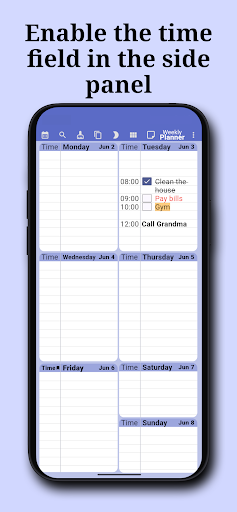
Our unique single-screen view lets you see your entire week's schedule instantly. No more endless scrolling or switching between views. Planning your days has never been easier or faster!
Effortless Navigation:
Simply swipe left or right to navigate between weeks. Look ahead to plan future events or glance back at past accomplishments seamlessly.
Key Features:
Visual Weekly Overview: See all seven days on one screen.
Simple Navigation: Swipe easily between weeks.
Rich Text Formatting: Customize your entries! Use bold, italics, colors, and more to highlight important tasks and appointments. Make your planner visually appealing and easy to read.
Automatic Backup with google drive: Never lose your plans! Your data is securely backed up automatically, giving you peace of mind.
Share Your Planners: Collaborate effortlessly! Share specific planners with friends, family, or colleagues for coordinated scheduling. Perfect for work planner or family organizer needs.
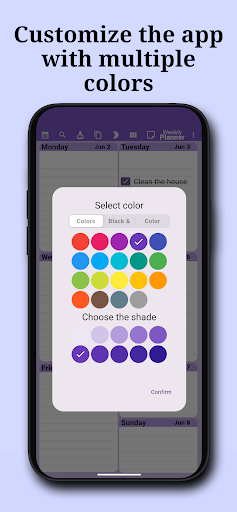
Highly Customizable: Tailor the app to your preferences. Adjust layouts, themes, and settings to create the perfect planning environment for your routine.
Dedicated Notes Section: More than just a planner! Use the separate notes feature as your digital notepad or journal. Jot down ideas, reflections, or important information without cluttering your schedule.
Custom Notifications: Stay on track! Set reminders for specific events or tasks so you never miss an important deadline or appointment.
Home Screen Widgets: Access your daily planner and upcoming tasks quickly right from your home screen with convenient widgets.
Your All-In-One Planning Solution:
Weekly Planner is the ideal tool whether you need a:
Daily Planner
Work Planner
Study Planner
Task Manager
To Do List & Checklist tracker
Personal Diary or Journal
Manage your tasks, build a productive routine, create comprehensive to do lists, and keep everything neatly organized. It combines the functionality of a schedule keeper, notepad, and task manager into one easy-to-use app.
Stop juggling multiple apps. Organize your life efficiently with this comprehensive organizer. Get started today with this powerful, Core planning features are available for free.
Download Weekly Planner now and transform the way you manage your week!
[Minimum supported app version: 9.9.7]
What's New
2- Exporting as a PDF or image allows you to choose future years
3- Text search is faster
In-app purchases
$1.39 - $200.00 per item
Version Information
- Version
- 10.2.1
- Downloads
- 1M+
- Updated on
- Dec 31, 2025
- Released
- Mar 27, 2021
- Requires
- Android 8.0
Statistics
Google Play Rating History
Rating Distribution
Downloads Over Time
Weekly Planner - Agenda has been downloaded times. Over the past 30 days, it averaged downloads per day.
Shaded area shows 30-day prediction based on historical trends
Historical data collection started recently. More data points will be available over time.
Weekly Planner - Agenda users say on Google Play
 Glen Corbin
It is easily the best basic planner I have come across. Very user-friendly. You will figure out the entire app in about 2 minutes. It is very intuitive, and it has a flow unlike any other I've come across. Everything is set up for efficiency. I can quickly develop lists for individual days, moving from week to week, or dates in the future, change font colors, highlight text, add numbering, checkboxes, etc. very quickly. This is what I've been looking for. It's so basic but impressive, really.
 Jami Donges
I needed something for a bunch of Dr. appointments that I was the driver for plus some of my own. so far this has worked out pretty well . I have it on my home screen so when a new appointment pops up I just pull up the weekly planner there's plenty of space on each day for addresses , times, and that's exactly what I needed . plus you can also pull up a note for grocery lists or your thoughts or whatever . it's easy to switch from notes to the planner and from week to week or the next month
 Compliance Team
I purchased the subscription, but there is an issue if the data sync between the mobile and desktop application. anything updated in mobile app does not sync. if fact the apps show different data even when synced in same google id
 Abdul Hafiz
okay
 мусорка
после обновления все стало платным, вы серьёзно? это был лучший планировщик, и скатился в худший
ApkTrusted Ratings & Reviews
More from Weekly Planner
See more apps

Similar Apps
Weekly Planner - Diary, Notes
Free

Business Calendar 2 Planner
Free
DigiCal Calendar Agenda
Free

Daybook - Diary, Journal, Note
Free

Simple Calendar - easy planner
Free

My Diary - Daily Journal, Lock
Free
To Do List with Reminder
Free
To-do list - tasks planner
Free
Notepad Notes
Free
Inkpad Notepad & To do list
Free

Notepad - simple notes
Free

Color Notes, Notebook, Notepad
Free

Structured - Daily Planner
Free

TimeTune - Schedule Planner
Free
School Planner
Free

Daily Planner Organizer: Brite
Free
Scan this QR code to download

Forwarding you to the page at Google Play market in seconds...
Open Google Play market now