
KMPlayer - All Video Player v35.12.222
PANDORA.TV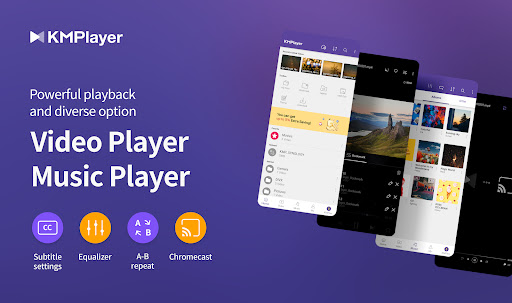

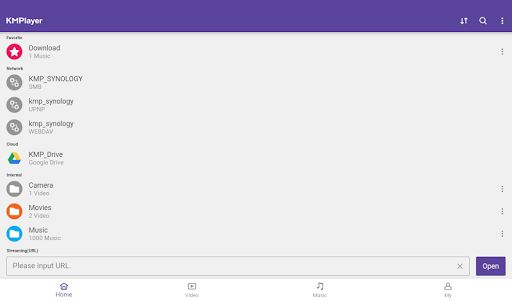
About this app
KMPlayer - All Video Player solves the problem of providing a comprehensive video playback experience, benefiting users who seek a reliable and feature-rich video player. With over 10 million downloads and a 4.1-star rating, it stands out among alternatives in the Video Players category, although its aggressive monetization model may be a turn-off for some users. Compared to other video players, KMPlayer offers a wide range of features, but its lack of permission requests raises questions about its data collection practices. Overall, it is a solid choice for users seeking a versatile video player, but with some caveats.
Pros
- KMPlayer boasts an impressive download count and high user rating, indicating a well-received and reliable video playback experience.
- The app's feature set is comprehensive, making it a great choice for users who want a versatile video player.
- The developer, PANDORA.TV, has a reputation for maintaining and updating their apps regularly, ensuring that KMPlayer stays relevant and secure.
- The app's offline capability and lack of permission requests make it a great choice for users who value their privacy and want to minimize data usage.
- KMPlayer's accessibility features and performance optimization make it a great choice for users with varying technical skill levels.
Cons
- The app's monetization model, which includes ads and in-app purchases, may be aggressive and annoying for some users, potentially disrupting their video playback experience.
- The lack of permission requests raises questions about the app's data collection practices and how it manages to provide its features without requesting any permissions.
- Some users may find the app's interface and feature set overwhelming, particularly if they are looking for a simple video player.
- KMPlayer's compatibility with certain devices may be limited, potentially leading to performance issues or crashes.
Best for: The ideal user for KMPlayer is a tech-savvy individual who values a comprehensive and feature-rich video playback experience, is willing to tolerate some ads and in-app purchases, and has a need for a reliable and versatile video player that can handle a wide range of file formats and playback scenarios.
Developer Description
Play Video and Earn Money on KMPlayer!
👉 Feedback, ideas, and events—all welcome.
https://cobak.co/en/space/392
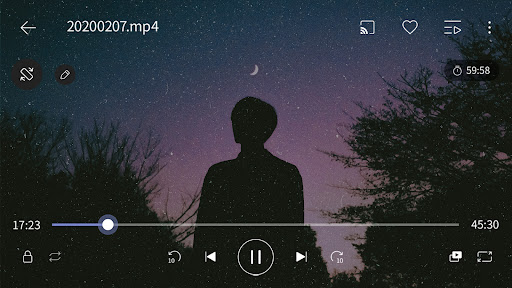
KMPlayer is a perfect media player that can play all forms of high resolution videos, music, and subtitle files.
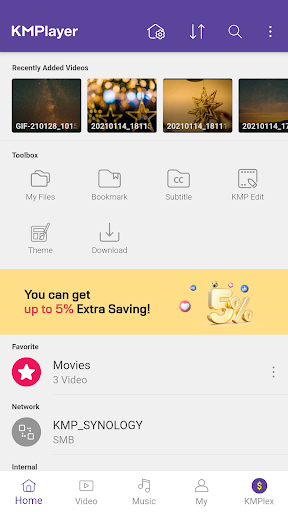
Along with the flawless playback, enjoy the rich features of the player including quick button, bookmark, subtitle settings, and play speed settings!
KMPlayer has now created KMPlex!
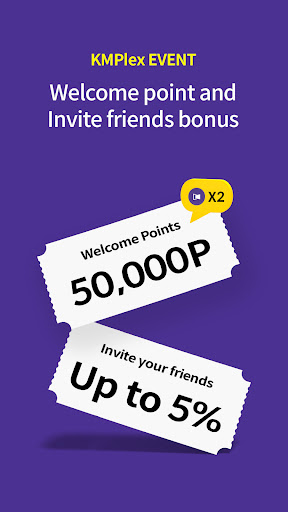
Succeed in mission on KMPlex to earn points, and exchange the points with listed coins. ( Exchangeable coins: MovieBloc Token (MBL), Cobak Token (CBK) )
🎞️ KMPlayer 🎞️
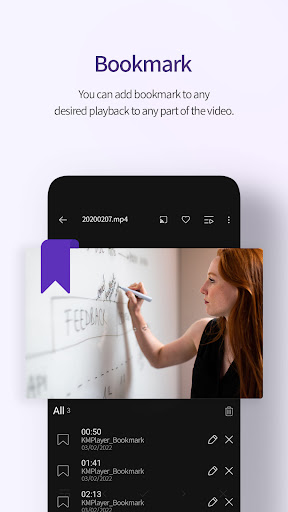
· Bookmark: Add bookmark to the time points to playback any sections you wish to cherish
· Control Color: Change brightness, light intensity, hue, saturation, and gamma information
· Expand & Contract: Expand & contract the video screen being played
· Section Repeat: Repeatedly play a section from point A to point B
· Quick button: Quickly set the player options
· Equalizer: Save separate equalizers for music & video
· Subtitle Settings: Change color, size, and position of subtitles
· Chromecast Support : Watch video on TV using Chromecast
· URL Playing: Enter URL to play any videos on the web (streaming)
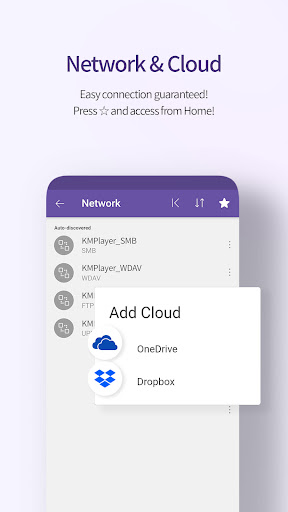
· Network: Supports FTP, UPNP, SMB, WebDav
· Cloud: Supports Dropbox, OneDrive
< Supported Formats >
Video and music : AVI, MP3, WAV, AAC, MOV, MP4, WMV, RMVB, FLAC, 3GP, M4V, MKV, TS, MPG, FLV
Subtitle : DVD, DVB, SSA/ASS Subtitle Track, SubStation Alpha(.ssa/.ass) with full styling.SAMI(.smi) with ruby tag support, SubRip(.srt), MicroDVD(.sub/.txt), VobSub(.sub/.idx), SubViewer2.0(.sub), MPL2(.mpl/.txt), TMPlayer(.txt), Teletext, PJS(.pjs) , WebVTT(.vtt)
💰 KMPlex 💰
Participate in various missions to earn points!
Exchange these earned points with coins and simultaneously send them to your Wallet!
< How to earn coins on KMPlex >
· Access KMPlex through KMPlayer and create your Wallet
· Participate in various missions and earn points (Make sure to participate in the special release event!)
· Collect points to exchange with listed coins ( Coins currently supported: MBL, CBK )
✨ KMPlayer VIP (in-app purchase) ✨
· Torrent client: Real-time play while the downloading
· Cut video & audio: Select a section of a video and audio to cut
· Create GIFs: Create lively GIFs from videos
· MP3 converter: Extract the audio in videos to MP3 files quickly and easily
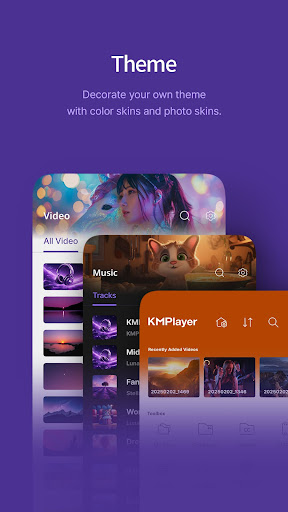
· VIP themes: Create your personal unique theme from various options
< Subscription Details >
· Free trial is limited to 1 time per Google Play account.
· After the free trial period, the selected paid subscription plan will automatically be renewed and charged.
· Subscriptions canceled 24 hours prior to the end of the free trial won’t be charged.
· Subscription can be managed and canceled at any time from Google Play settings.
▶ Permission Details ◀
< Required >
*Over Android 11
All files access: Requesting permission to access photos, music, and videos stored in the device
You can set this permission by Settings->Security and privacy->Privacy->Permission manager->Files and media->See more apps that can access all files->All files access.
(It may look different depending on the type. Search for access to all files in settings)
*Under Android 11
Storage space: Requesting permission to access photos, music, and videos stored in the device
< Optional >
Phone: User Authentication is used to get points.
Notifications (Over Android 13): send notifications
Draw over other apps: Requesting permission to use pop-up play.
* You may use the basic service without agreeing to the optional permission. (However, features requiring optional permissions will not be available.)
▶ Message from the Developers ◀
KMPlayer’s development team are always open to your opinions to further improve the App. Feel free to request new features and please provide us with plentiful feedback.
Email: support.mobile@kmplayer.com
Privacy
Given that KMPlayer requests no permissions, it is likely that the app collects data through other means, such as its advertising model. Users should be cautious when using the app and consider using a VPN or ad-blocker to minimize data collection. Additionally, users should review the app's terms and conditions to understand how their data is being used.
Tips
To get the most out of KMPlayer, users should first explore the app's settings and features to customize their video playback experience. Additionally, users can optimize the app's performance by closing unnecessary background apps and adjusting the app's video quality settings. Finally, users can integrate KMPlayer with other apps, such as file managers, to streamline their video playback experience.
What's New
- Video: Folder Tab Added.
- Mylist: 'Add Media' Function has added.
- Fixed volume manipulation error during playback
- Arabic translation corrections
- Other: Bug fixes
Thank you.
In-app purchases
$1.99 - $19.99 per item
Version Information
- Version
- 35.12.222
- Downloads
- 10M+
- Updated on
- Dec 22, 2025
- Released
- Mar 19, 2014
- Requires
- Android 7.0
Statistics
Google Play Rating History
Rating Distribution
Downloads Over Time
KMPlayer - All Video Player has been downloaded times. Over the past 30 days, it averaged downloads per day.
Shaded area shows 30-day prediction based on historical trends
Historical data collection started recently. More data points will be available over time.
KMPlayer - All Video Player - Google Play Rankings
Top Rankings
| Rank | Country | Category | List | Change |
|---|---|---|---|---|
| — |
Ranking History in
No ranking data available yet. Rankings are updated daily.
#54 in Top Free Video Players in South Korea


KMPlayer - All Video Player users say on Google Play
 satheesh kumar (PANDU)
Please Develop More Audio Features ,it means Add some DTS Surrounding Sound, Dolby Etc.Thank Q, The latest update it has didn't show the hidden files, KMPlalyer is an Excellent app, for watching all types of format videos, and it's support to download movies and videos, video and audio quality is awesome, it's so useful, watchable, and also was great app, pls keep develop more than more, than Q,
 End
End
It almost has everything I needed, but can't play the next video in the same folder if I open it from another app like file manager. Hope you can improve that
 Aman Chitkara
The app is good, but requires these fixes:- 1. When App is lock mode while playing any video 2x forward should not work. 2. When we click on next button subtitles prefrence should be retained similar to audio language.
 Amirul Azhajzul
stutter video playback
 Mayank Sharma
Not the great KM player now which I was used to.
ApkTrusted Ratings & Reviews
More from PANDORA.TV
See more apps


Similar Apps

Video Player All Format
Free

Visha-Video Player All Formats
Free

HD Video Player All Format
Free

Video Player for Android
Free

Video Player All Format
Free

Music Player - Audify Player
Free

Pi Video Player - Media Player
Free

AIMP
Free

NOVA Video Player
Free

Poweramp Music Player
Free

Pulsar Music Player
Free
PlayerPro Music Player
Free

Music Player
Free

Music Player
Free

Video player
Free

Video to MP3 - Video to Audio
Free
Scan this QR code to download

Forwarding you to the page at Google Play market in seconds...
Open Google Play market now