
MMGuardian Parental Control v3.7.36
MMGuardian.com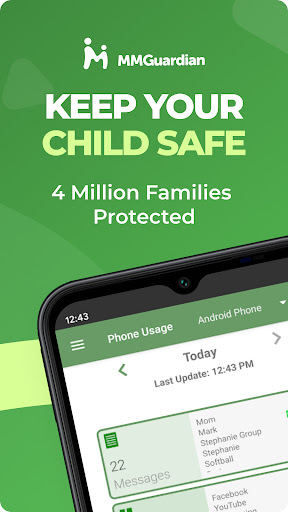

About this app
The MMGuardian Parental Control app effectively solves the problem of parents seeking to monitor and control their children's screen time and online activities, benefiting most families with young children. Compared to alternatives in the Parenting category, MMGuardian stands out with its comprehensive set of features, including GPS tracking and app blocking. However, its lack of permissions raises questions about the app's ability to effectively enforce these controls. Overall, MMGuardian is a well-received app with a strong reputation, but its limitations and potential impact on user experience should be considered.
Pros
- With over 1 million downloads and a 4.2-star rating, MMGuardian has demonstrated its effectiveness and earned the trust of many parents, providing a reliable solution for family parental control.
- The app's feature set, including screen time limits, app blocking, and GPS tracking, is comprehensive and well-suited to the needs of parents seeking to monitor and control their children's online activities.
- The developer, MMGuardian.com, has a professional website and provides a clear support email, indicating a commitment to customer support and transparency.
- The app's monetization model, with in-app purchases ranging from $1.99 to $99.99, is relatively flexible and allows parents to choose the level of control they need.
- The absence of ads in the app ensures a clean and distraction-free experience for both parents and children.
Cons
- The app's lack of permissions raises concerns about its ability to effectively enforce controls, such as blocking apps or tracking location, without the necessary access to device features.
- Some users may find the in-app purchase model to be confusing or restrictive, particularly if they need to purchase multiple licenses or subscriptions for multiple children.
- The app's compatibility with certain devices or Android versions may be limited, potentially causing issues for some users.
- The app's effectiveness may be dependent on the child's cooperation and willingness to install and use the companion app, which could be a limitation for some families.
Best for: The ideal user for MMGuardian is a tech-savvy parent or guardian of a child aged 6-16, who is seeking a comprehensive and flexible solution to monitor and control their child's screen time and online activities, and is willing to invest time and effort into setting up and configuring the app to meet their specific needs and concerns.
Developer Description
Family parental control app: limit screen time, block apps, GPS tracker.
This is the app for the parent's phone - you must also install a different app on your child's phone. Install this parent app first, and you will be guided to download the relevant Android parental control app or iPhone parental control app from Google Play or the App Store, on your child's phone.
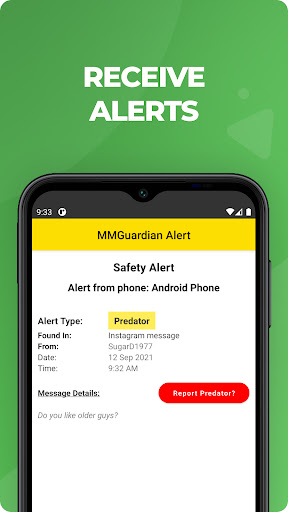
Receive alerts when your child's text messages, supported social media chat messages or web searches are indicative of drugs, sexting, cyberbullying, child grooming, violence, suicidal thoughts and more.
What does MMGuardian Do?
With the MMGuardian Child Phone App installed to your child's Android phone, you will be able to monitor and block:
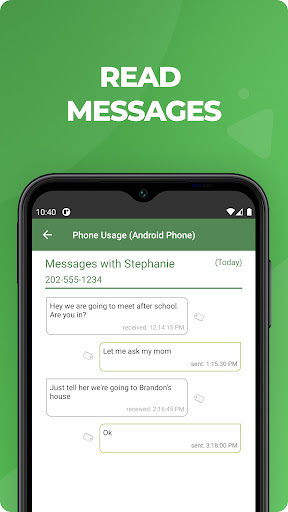
• SMS text messages
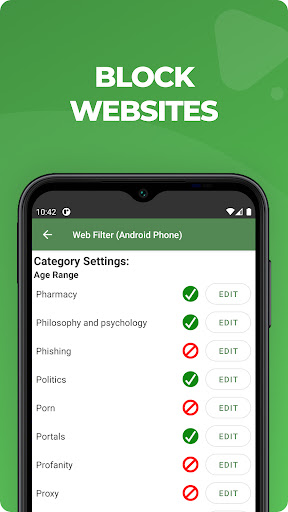
• Web browsing activity
• Application usage
• Phone calls
Social Media Chat Monitoring
In addition to normal SMS texts, chat messages from Facebook Messenger, WhatsApp, Snapchat, Instagram, Kik, TikTok and Discord are reported. Alerts will be sent to you if the content in a SMS text or chat message appears to relate to one of nine special categories including sexting, cyberbullying and suicidal thoughts.
The benefits of using MMGuardian Parental Control when your child has an Android phone include:
• Alerting you when text messages or web searches are indicative of sexting, cyberbullying, suicidal thoughts and more.
• Alerting you when pictures on your child's phone, or sent in an MMS message, are of an adult nature or indicative of sexting.
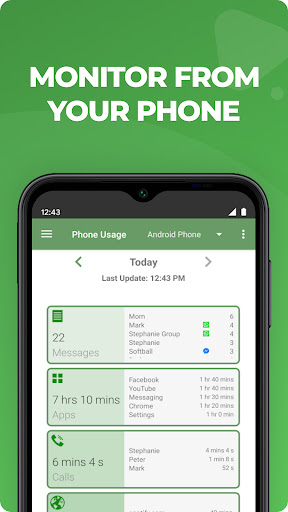
• Comprehensive reports for text messages, app usage, web browsing and voice calls.
Additional Functions
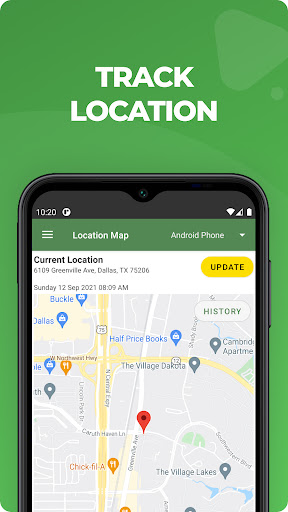
• Locate your child's phone
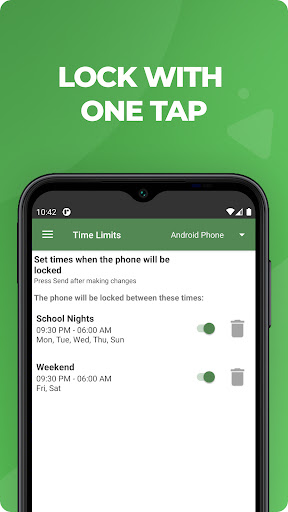
• Quickly lock or unlock your child's phone
• Set limits for screen time, app usage, web filtering
This app on your phone and the one on your child's phone must be registered using the same (parent's) email address.
Both your phone and your child's phone should have network data capability, as the app uses data to send and receive configuration commands, reports and alerts.
Free 14 day trial
You do not need to set up a subscription to get the free 14 day trial. After the free trial period of the app on the child's phone has ended, unless the child phone app is licensed by a subscription, the functions in this Parent App that relate to premium functions on the child's app will be disabled. However you can still use MMGuardian to locate your child's phone remotely.
Subscriptions
You may purchase a subscription from within this Parental Control app app to apply to the MMGuardian app installed on your child's phone. Subscriptions are $4.99/mo or $49.99/year for one child phone. Family plans for up to 5 child devices are twice these amounts.
We encourage parents to discuss the reasons to use a parental control app with their children, which include helping to protect them from potential risks of their own actions and the actions of others, such as excessive screen time, cyberbullying and sexting.
Privacy
Given the app's lack of permissions, it is likely that MMGuardian relies on other methods, such as user input or companion app installation, to enforce controls. However, this also means that the app may not collect excessive personal data, reducing the risk of privacy breaches. To ensure safe use, parents should carefully review the app's terms and conditions, as well as the companion app's permissions, to understand what data may be collected and how it will be used.
Tips
To get the most out of MMGuardian, parents should start by setting clear boundaries and expectations with their children, and then configure the app's settings to reflect these limits. Additionally, parents can optimize the app's performance by ensuring that the companion app is installed and running on the child's device, and by regularly reviewing the app's reports and alerts to stay informed about their child's online activities. Regularly checking for updates and providing feedback to the developer can also help improve the app's effectiveness and overall user experience.
What's New
v3.7.36
- Enhancement on logs
- Auto-update added
- Major update to support new iPhone features.
In-app purchases
$1.99 - $99.99 per item
Version Information
- Version
- 3.7.36
- Downloads
- 1M+
- Updated on
- Nov 28, 2025
- Released
- Sep 30, 2013
- Requires
- Android 6.0
Statistics
Google Play Rating History
Rating Distribution
Downloads Over Time
MMGuardian Parental Control has been downloaded times. Over the past 30 days, it averaged downloads per day.
Shaded area shows 30-day prediction based on historical trends
Historical data collection started recently. More data points will be available over time.
MMGuardian Parental Control - Google Play Rankings
Top Rankings
| Rank | Country | Category | List | Change |
|---|---|---|---|---|
| — |
Ranking History in
No ranking data available yet. Rankings are updated daily.
#15 in Top Grossing Parenting in United States

#37 in Top Free Parenting in United States

#32 in Top Grossing Parenting in Canada


#34 in Top Grossing Parenting in Italy


MMGuardian Parental Control users say on Google Play
 Sean Selleck
fantastic and way better than several expensive options it sends alerts Whenever there is a suspicious activity and sometimes it's a little too picky but it's still nice to know that it's working. there is a way to send feedback when this happens and it's become less of an issue so the developers seem to be tracking anything like this. I had one of my kids friends send them a beer icon and it flagged that for drugs which was nice to know. it has program restrictions as well
 Katie Moon
I like the reports, text watcher, and photo supervision. They work pretty well, my kid took a picture of his ribs after a crash and it notified me so super cool. I wish updates were push updates. If you miss one your controls may not work.
 Albert Cobacha
Payment options are very limited. data should be configurable so it can be set to Google Drive, etc.
 Danyelle Knapper
You need a better way to communicate with parents. I've been a paid subscriber for a while and the app worked great for months. As of late it has become useless. It will not 'connect' to the child's phone. I am unable to lock/unlock the phone or view in content I've received notifications on.
 Krista Culberson
I've been searching for a parent control app for weeks, I thought I found one, but when I paid for it, it still won't let me see anything, "control" anything.... all I get is alerts that I need to check my child's phone for inappropriate pictures, and they're not inappropriate. I can not use a computer to access anything, and it's telling me I have to, so I feel like this was a very difficult & disappointing waste of time and money on a very long journey of just trying to protect my daughter.
ApkTrusted Ratings & Reviews
More from MMGuardian.com
See more apps


Similar Apps

Parental Control App- FamiSafe
Free

TalkingParents: Co-Parent App
Free

OurFamilyWizard Co-Parent App
Free

Pinwheel Caregiver
Free

Co-parenting
Free

AppClose: Co-Parent Essentials
Free

ParentSider
Free

AnyTracker - track anything!
Free
Parental Control - Kidslox
Free

KidsGuard Pro-Phone Monitoring
Free

Famly
Free

Family Nest: Private Locator
Free

Stamp°D
Free

Glympse - Share GPS location
Free

Life Time Digital
Free

WaiverForever - Online Waiver
Free
Scan this QR code to download

Forwarding you to the page at Google Play market in seconds...
Open Google Play market now