
MyMixTool (for Soundcraft Ui) v1.6.6
MyUltimateTools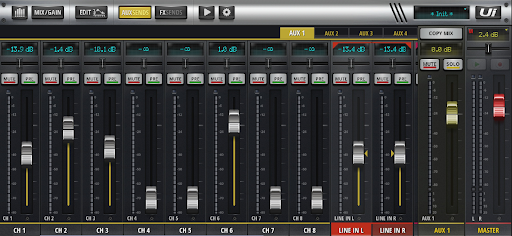


About this app
Developer Description
Control your Soundcraft Ui12, Ui16 or Ui24 mixer with your smartphone or tablet!
Features:
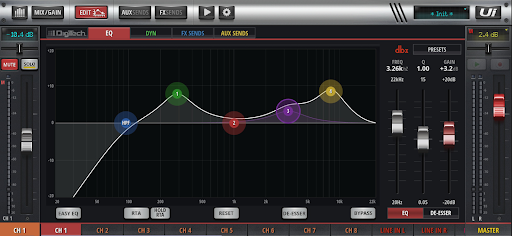
- Different views (general view, layer view, edit mode, aux sends, fx sends, player mode)
- Easy assign volumes, reverbs, delays, FX effects, balances, mute, solo
- Control built-in USB media player
- Quick and easy graphic EQ, compressor and gate
- Easily assign mute groups
- Easily assign sub groups
- Ability to protect controlling with a master password (Local aux control)
- Import/export presets and shows
- Runs on smartphones and tablets
- Email support
Warning: This app does not play any sound; you can't even edit any sounds. It is solely for remote controlling your Soundcraft digital mixer (Ui12, Ui16 and Ui24r).
Troubleshooting:
Q: I am getting an error: Not connected.
A: Please connect to your Soundcraft Ui12, Ui16 or Ui24r built-in WIFI or external router and wait few seconds, it should connect to console automatically.
Q: There is some blue screen and I can't connect to mixer.
A: We're currently working on this issue, please exit an app and restart it.
Q: All I can see is one fader and whatever I do, it shows me: »no send levels«. There is no much to do.
A: It's not a bug, it's a way how app works in portrait mode. We're currently working on better »portrait mode« support and user interface. Until finished, please use »Landscape mode«.
Compatible mixer:
- Soundcraft Ui12
- Soundcraft Ui16
- Soundcraft Ui24r
What's New
[Bug][FIXED] App crashing on low-end devices
[Improvement] Reduced memory, GPU and CPU usage for smoother performance
[Improvement] Back button behavior improved
[Improvement] Rotation behavior improved
[Improvement] Troubleshooting guide and support contact details added
Version Information
- Version
- 1.6.6
- Downloads
- 5K+
- Updated on
- May 3, 2025
- Released
- Nov 11, 2022
- Requires
- Android 6.0
Statistics
Google Play Rating History
Rating Distribution
Downloads Over Time
MyMixTool (for Soundcraft Ui) has been downloaded times. Over the past 30 days, it averaged downloads per day.
Shaded area shows 30-day prediction based on historical trends
Historical data collection started recently. More data points will be available over time.
MyMixTool (for Soundcraft Ui) - Google Play Rankings
Top Rankings
| Rank | Country | Category | List | Change |
|---|---|---|---|---|
| — |
Ranking History in
No ranking data available yet. Rankings are updated daily.
#8 in Top Paid Music And Audio in Brazil


#48 in Top Paid Music And Audio in Turkey


#48 in Top Paid Music And Audio in India
#48 in Top Paid Music And Audio in Pakistan

MyMixTool (for Soundcraft Ui) users say on Google Play
 Josip Petrović
Finally app which works really good for my Soundcraft Ui16, so I don't need to connect to website all the time. I can use it on my old Samsung tablet and also on my Samsung Z Fold. Great job developers! I definitely recommend this app.
 Carlos R. Quiñones Sulé
Hi, I'm just payed with Amex a download for the MyMixTool (for Sound U)i. The page said your application will download in a minutes, but it doesn't. How much do I have to wait for downloading begins?
 Love everyone In God
It's good I pay it it's not working even to open it's cant
ApkTrusted Ratings & Reviews
Scan this QR code to download

Forwarding you to the page at Google Play market in seconds...
Open Google Play market now