
MobileSheets v3.9.33 (Build 576)
Zubersoft





About this app
Developer Description
MobileSheets is a sheet music viewer with powerful tools for musicians.
- Multiple modes of operation including two pages side-by-side, half page turns, and vertically scrolling pages.
- Hands-free page turns using any bluetooth or usb devices (including two and four pedal models), through the automatic scrolling feature, or through face gestures such as an open mouth or smile.
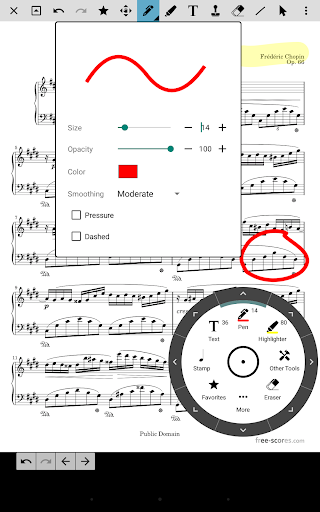
- Annotations for marking up music including support for freeform drawing, basic shapes, text and stamps
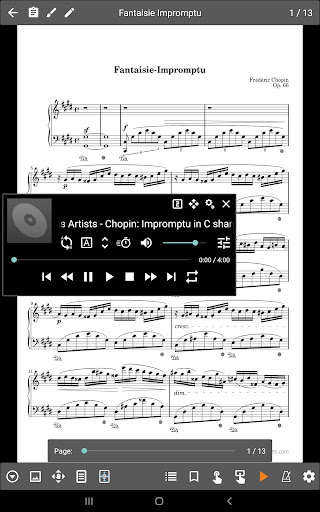
- A custom audio player for playing audio tracks with your scores. Audio player supports a-b looping and multiple sizes.
- Custom page ordering, making it easy to cut out unnecessary pages, repeat pages or change the sequence of pages without affecting the original document.
- A metronome with multiple display modes and sound effects
- Bookmarks for quick and easy access to sections in scores
- Link points for handling repeats and quickly jumping between pages
- Smart buttons that can be placed on a score to activate configurable actions when pressed
- Support for multiple file types including images, PDFs, text files and chord pro files.
- Support for importing CSV index files to break up large PDF songbooks
- Support for communicating with MIDI devices over USB to load songs or trigger actions.
- The ability to transpose chords in text and chord pro files.
- Manual and automatic cropping to completely eliminate unnecessary margins
- Support for setlists and collections to efficiently group songs for playback.
- Powerful library management features with a huge list of supported metadata fields, giving you complete control over the data in your library
- A free companion application for the PC that makes it a breeze to create and edit songs
MobileSheets acts as a file manager for your sheet music files (PDFs, images or text/chord pro files) and links directly to them on the device. It provides a way to organize and quickly access any of those files. MobileSheets can be configured to use existing files and folders on the device storage, allowing those files to be organized as desired by the user without them having to be copied or moved.
Give MobileSheets a try today and experience the freedom of having all your scores just a simple tap away.
NOTE: This application is designed and optimized for 7" and larger tablets. This application does not include any sheet music - you must provide your own. This application can not play back PDFs, images or text/chord pro files. It can only display those files and play back audio files.
For E-Ink devices, a special e-ink version is available. Contact support@zubersoft.com for more information.
The companion app is for your PC and is not included. You can download the companion app for free here: http://www.zubersoft.com/mobilesheets/companion.html
Privacy Policy: https://zubersoft.com/mobilesheets/privacy_policy_android.html
Terms of Use: https://zubersoft.com/mobilesheets/terms_and_conditions_android.html
If Google Play incorrectly states that your device is incompatible, please try the following steps:
1: Reboot your tablet
2: Go to your tablet Settings->Applications->Google Play and tap Clear Data. Do the same for Google Play Services.
3: Load Google Play and install MobileSheets
4: If the installation still does not work, reboot your tablet and try again
That fixes the problem for most users. Several reboots may be required.
What's New
- Fixed issue with OneDrive connections failing after an hour for some users due to the oauth2 token not being refreshed properly
- A semi-colon is now used to separate composers when multiple composers are listed in a formatted title
- See release notes for full list of changes
Version Information
- Version
- 3.9.33 (Build 576)
- Downloads
- 100K+
- Updated on
- Dec 11, 2025
- Released
- Apr 13, 2015
- Requires
- Android 7.0
Statistics
Google Play Rating History
Rating Distribution
Downloads Over Time
MobileSheets has been downloaded times. Over the past 30 days, it averaged downloads per day.
Shaded area shows 30-day prediction based on historical trends
Historical data collection started recently. More data points will be available over time.
MobileSheets - Google Play Rankings
Top Rankings
| Rank | Country | Category | List | Change |
|---|---|---|---|---|
| — |
Ranking History in
No ranking data available yet. Rankings are updated daily.
#3 in Top Paid Music And Audio in United States

#63 in Top Grossing Music And Audio in United States


#1 in Top Paid Music And Audio in Germany


#1 in Top Paid Music And Audio in Italy
MobileSheets users say on Google Play
 Chuck Stiver
I've been using this for practicing songs with my chorus, and it's been absolutely fantastic! There's a TON of features and you can do a lot with it. Several months in, I'm still discovering handy features. I've only had one big issue, and the developer was able to help me solve the problem right away! I've noticed syncing libraries with songs that have been edited on one device will duplicate the song...using the backup and restore instead with a cloud folder solved that problem for me!
 I Am Charlotte Turner
Excellent until now! It keeps cutting out every time I use an S pen, or finger to try and annotate... told me to clear the cache which I have done, but now it says to update after the app has fixed its bug. I have a recital this Saturday..... Please can you look at this? or is it my system that's the problem?
 Julia DuVall
I love this app. I play for my church choir and turning pages has never been easier. My practice time is half what it used to be bc I don't have to turn pages. My problem is that I am having a huge problem with multiple pages for 1 song. With every update of my tablet, it gets more difficult. No doubt it is user error but this shouldn't be so hard. I have spent HOURS today on a job that should have been 15 minutes.
 mrkip w
I've been using this for the last several years with occasional problems, but recently it decided that the thousands of files I had on it did not exist. I went back and rebuilt it by hand-- a reduced version-- and was up to about 1500 pieces when it turned white and again claimed its database was zero. I will no longer recommend this app to my friends.
 Craig D
The most recent app update has rendered this program useless to me. I spent the first 1/2 of my rehearsal trying to use the annotate features and they are all broken. My Galaxy tab 10+ Ultra won't recognize my s pen or my finger inputs. On the rare occasion it would let me choose the highlight tool, then I couldn't get back out. What did you do??!! I even uninstalled and reinstalled the app and that didn't help.
ApkTrusted Ratings & Reviews
More from Zubersoft
See more apps
Similar Apps

IMSLP
Free

Songsterr Guitar Tabs & Chords
Free

Flat: Music Score & Tab Editor
Free

Fender Play: Music Lessons
Free

Musora: The Music Lessons App
Free

MuseScore: sheet music
Free

tonestro - Music Lessons
Free

SongbookPro
Free

Fender Guitar Tuner
Free

Piano Marvel
Free

Chordify: Song Chords & Tuner
Free

Tomplay Sheet Music
Free

Set List Maker
Paid

Podcast Republic - Podcast app
Free

Chord ai - learn any song
Free

Functional Ear Trainer
Free
Scan this QR code to download

Forwarding you to the page at Google Play market in seconds...
Open Google Play market now