
Cascadeur: 3D animation v1.6.1
NEKKI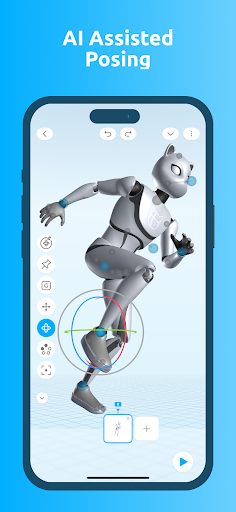



About this app
Cascadeur: 3D animation solves the problem of creating complex animations with ease, leveraging AI and physics to streamline the process. This app benefits professionals and hobbyists alike in the field of animation, particularly those looking for an alternative to traditional video players that offer more creative control. Compared to other apps in the Video Players category, Cascadeur stands out with its focus on animation creation rather than playback. However, its mixed user rating suggests some areas for improvement in terms of user experience and functionality.
Pros
- The app's use of AI and physics for animation creation is a significant advantage, offering a unique approach that can simplify the animation process for users.
- With a relatively small download size and no permission requests, Cascadeur is a lightweight and privacy-conscious option for those concerned about data security.
- The developer, NEKKI, offers in-app purchases that can enhance the user experience, providing additional features or content for those who need it, without forcing all users to pay for features they might not use.
- The absence of ads within the app ensures an uninterrupted workflow, which is crucial for creative tasks like animation.
- Given its rating of 3.2 out of 5, despite some concerns, the app indicates a level of community engagement and potential for future improvements based on user feedback.
Cons
- One of the primary concerns is the mixed user rating, which indicates that while some users find the app useful, others experience issues that prevent them from fully benefiting from its features.
- The monetization model, while flexible with in-app purchases, might be perceived as aggressive by some users, particularly if essential features are locked behind paywalls.
- The lack of information about the developer's website and direct contact methods, aside from an email, might make it difficult for users to find comprehensive support or community resources outside of the app itself.
- Some users might find the app's focus on 3D animation limiting if they are looking for a broader range of video editing or playback functionalities.
Best for: The ideal user for Cascadeur: 3D animation is likely a creative professional or hobbyist with a basic understanding of animation principles, looking for a tool that can help streamline the animation process without requiring extensive coding or technical knowledge, and who values the unique approach of using AI and physics for animation creation.
Developer Description
Animate with AI and Physics
EASY TO POSE WITH AI
AutoPosing is a smart rig powered by neural networks that helps you create poses easier and faster. Cascadeur's easy interface is ideal for touch screens. Move the control points and let the AI position the rest of the body automatically resulting in the most natural pose
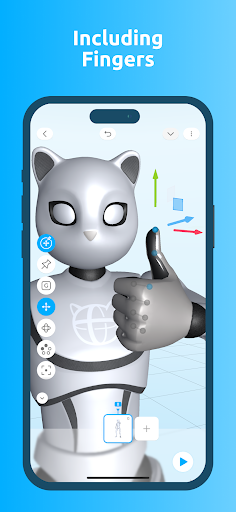
HANDY CONTROLLERS FOR FINGERS
Control fingers with intelligent AutoPosing controllers. Dramatically ease the process of animating hand behaviour and gestures
GENERATE ANIMATION WITH AI
Create animation sequences based on your keyframes with our AI inbetweening tool
EASY TO PHYSICS
AutoPhysics allows you to achieve realistic and natural motion, while altering your animation as little as possible. The suggested animation is displayed on a green double of your character
ADD LIFE WITH SECONDARY MOTION
Adjust the slider to add shakes, bounces and overlaps to make your animation come alive. Very useful for idles, action moves, etc.
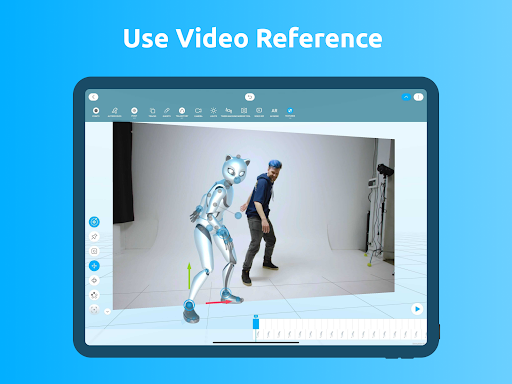
VIDEO REFERENCE
Import videos into your scenes with one click and use them as a reference for your animation
EXPERIMENT WITH AR
Use AR to position your character in the real world. Or even edit your animation right on your workdesk
ENJOY A FULL RANGE OF ANIMATION TOOLS
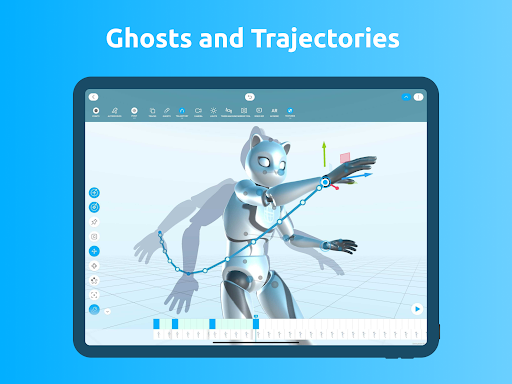
Cascadeur offers a vast variety of animation tools e.g. Trajectories, Ghosts, Copy Tool, Tween Machine, IK/FK Interpolation, Lights Customization and many more!
Privacy
Given that Cascadeur requests no permissions, it presents a low risk in terms of data privacy. However, users should be cautious about any future updates that might introduce new permissions, ensuring they understand what data is being collected and why. It's also advisable to review the terms of service and privacy policy of any in-app purchases to understand what data they might collect.
Tips
To get the most out of Cascadeur, users should start by exploring the app's AI and physics-based animation tools to understand how they can be leveraged for complex animations. Additionally, utilizing the in-app purchases wisely can enhance the creative possibilities. For optimal performance, closing unused apps and ensuring a stable internet connection can help, especially when working on large or complex animation projects.
What's New
- Fixed material settings
- Fixed input
- Fixed various bugs and crashes
In-app purchases
$7.99 - $49.99 per item
Version Information
- Version
- 1.6.1
- Downloads
- 10K+
- Updated on
- Dec 5, 2025
- Released
- Sep 29, 2025
- Requires
- Android 9
Statistics
Google Play Rating History
Rating Distribution
Downloads Over Time
Cascadeur: 3D animation has been downloaded times. Over the past 30 days, it averaged downloads per day.
Shaded area shows 30-day prediction based on historical trends
Historical data collection started recently. More data points will be available over time.
Cascadeur: 3D animation users say on Google Play
 Nemesis
it's a pretty great app when it comes to animation, I admit but can you guys work on the camera ? it feels like you didn't put that much effort into the camera, add more functionalities to it and it'll be perfect
 AbdulWadood
Very easy to animate! I was able to make two animations within the span of an hour. I only wished the export/import feature wasn't a paid feature
 Ho Hmd
it almost works fine except export button in editor doesn't work! doesn't import .casc from file manager! in editor it imports all files but we will have two character in scene and there is no way to delete meshes! video ref also doesn't work! please fix these!
 ND
ND
I know, it's new on Android, but the core feature (Autophysics) seems broken on mobile compared to PC. The Autophysics is inconsistent and breaks future frames. The Timeline doesn't show autophysics line like it does on PC, even for intervals. It crashes. This should be included in the Indie subscription... but that isn't the reason for my rating. It would've made me overlook some things, though, if it was included. Basically... I would not pay for this (Personally).
 Roman Jamison
WHY DOES IT COST MONEY TO DO ANYTHING!? I AM DELETING THIS APP AND YOU CAN DO WAY BETTER THAN THIS!
ApkTrusted Ratings & Reviews
More from NEKKI
See more apps


Similar Apps
Handy Art Reference Tool
Paid

Sora by OpenAI
Free
Thetan Creator: Create & Play
Free

Thingiverse Printables | 3Drop
Free

DreamBuild: Sketch to 3D
Paid

Magic Poser - Art Pose Tool
Free
Prisma3D - Animation, Modeling
Free

Nomad Sculpt
Free

Key Collector Comics
Free

Eklipse.gg: Instant Highlights
Free

Backbone — Next-Level Play
Free

KIRI Engine: 3D Scanner App
Free

Bambu Handy
Free

Pocket Code: Learn programming
Free

Figma: view. comment. mirror.
Free

ArtFlow: Paint Draw Sketchbook
Free
Scan this QR code to download

Forwarding you to the page at Google Play market in seconds...
Open Google Play market now