
Nine Work for Android Enterpri v4.9.6h
NextIntelligence.ai


About this app
Developer Description
Nine Work is an email app to synchronize with Exchange Server using ActiveSync.
Nine Work is compatible with MDM solutions such as AirWatch, MobileIron, Maas360, etc based on Android Enterprise.
Nine Work is an email app to synchronize with Exchange Server using ActiveSync and it is based on Android Enterprise.
How to configure App Configuration Policies
https://goo.gl/yFSU9z
As of today email communication became a critical thing as interpersonal communication skill within an organization or in your daily life. There might be nothing more important than efficient communication in the work of a company. Nine Work is a full-fledged email application for Android based on Direct Push technology to synchronize with Microsoft Exchange Server using Microsoft Exchange ActiveSync, and also designed for entrepreneurs or ordinary people who want to have efficient communication with their colleagues, friends, and family members at anytime, anywhere. You may already have good experience with other E-Mail apps for Android. Regardless of your existing experience, we will give you a superb experience more than anything else. Leveraging E-Mail, Contacts, Calendar, Tasks and Notes on your mobile devices through wireless networks enhances your user experience and dramatically reduces your time.
Key features
- Direct Push Synchronization with Exchange ActiveSync. Nine Work does not have any server to store user's Nine Work data. Nine Work app connects to user server directly. All Nine Work data is stored in user device only.
- Great user experience & beautiful GUI
- Multiple accounts
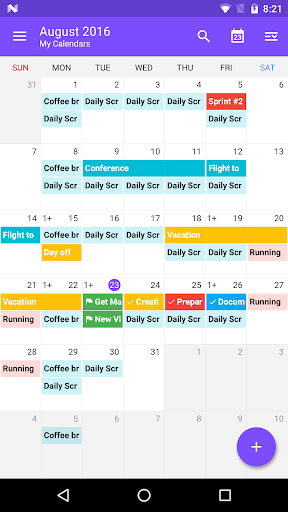
- Calendar and Contacts (Integrated into stock Calendar and Contacts application along with Nine Work account)
- Rich-Text Editor (Android KitKat and higher)
- Client Cert
- S/MIME
- IRM
- Global Address List (GAL)
- Favorite Folder (Be able to check out all of email messages including sub-folders in one special folder at a time)
- Select folders to push (Email notification per each folder)
- Automatic setup for many popular email services like Office 365, Exchange Online, Hotmail, Live.com, Outlook, MSN or Google Apps
- Full HTML (inbound, outbound)
- Secure Sockets Layer (SSL)
- Hybrid Email Search (Integrate with fast local search and online search)
- Conversation Mode
- Unread Badge (Nova Launcher, Apex Launcher, DashClock and Samsung & LG devices)
- Widgets (Unread badge, Shortcuts and Email list)
- Supports Android Wear
- Notes Sync (Exchange 2010 and higher)
- Tasks Sync (Recurrence Tasks, Reminder, Categories)
Supported Servers
- Exchange Server 2003 SP2/SP3 and above
- Office 365
- Hotmail
- Outlook.com
- Google Apps
- Other servers(IBM Notes Traveler, Groupwise, Kerio, Zimbra, Horde, IceWarp, MDaemon etc) supported Exchange ActiveSync
** Available Android
- Android 5.0 (Lollipop) and above
** Note
- Nine Work is not cloud based. It stores your accounts’ passwords only on the actual device. It connects only to the actual mail servers. It stores your messages only on the device.
** Support
- If you have a question or a special request, just send an email to support@9folders.com and we will get back to you as soon as we can.
What's New
- Fixed Office365 connection issue with Base64-Encoded Query
- Removed READ_MEDIA_IMAGES/READ_MEDIA_VIDEO permissions
- Applied to meet the "Photo Picker requirements for apps targeting Android 13+"
Version Information
- Version
- 4.9.6h
- Downloads
- 100K+
- Updated on
- Dec 18, 2025
- Released
- Jul 20, 2015
- Requires
- Android 7.0
Statistics
Google Play Rating History
Rating Distribution
Downloads Over Time
Nine Work for Android Enterpri has been downloaded times. Over the past 30 days, it averaged downloads per day.
Shaded area shows 30-day prediction based on historical trends
Historical data collection started recently. More data points will be available over time.
Nine Work for Android Enterpri users say on Google Play
 A Google user
Is good apps going to purchase. Have other functions like to share email to other external apps which i need it. As i hv multiple acc, all email function is easy to use and identify from which acc. Able to filter unread email on all email too. Flag and follow which are standard. Colour function to separate acc. Compose email option to send email from which acc although u can set default. My email acc use both either pop or imap version. Works well with gsuite and also standard hosting email setting. Can view email in full screen which is a plus as some of the email subscribed news are hard to view on other email apps like gmail. The only worries as paid member this app wont be like others eventually have to shut down due to profitability. Other then that had not encounter issue on search email or attachment which i read from other reviews and no crash issue so far.
A Google user
could be better if Spelling Checker is included
A Google user
Does not notify me anymore
 Kenneth Wright
Predictive text screws up typing, adds the word where your cursor is and leaves all other letters and brings your cursor to the end of the email. Continues to jump the cursor around when you try to correct it.
A Google user
using for several months..... not as good as Touchdown! Unable to exchange email in real time. Cannot sync more often than every 5 minutes...... way tooooooooo long! (added 10 May 2019.. I want to give ZERO STARS but the system won't allow it! REALLY DISAPPOINTED AND FRUSTRATED with the very terrible performance of this app but I am stuck with it and it negatively impacts my work. I would revert to previous app (Touch Down) if I could)
ApkTrusted Ratings & Reviews
More from NextIntelligence.ai
See more apps




Similar Apps







Scan this QR code to download

Forwarding you to the page at Google Play market in seconds...
Open Google Play market now