Door to Door Navigation v1.5.0
NISSAN MOTOR CO., LTD.


About this app
Developer Description
HAVE COMPLETE CONTROL OF YOUR ROUTE WITH DOOR TO DOOR NAVIGATION
System compatibility requirements - What you will need to use this app and service in your Nissan:
• A compatible and equipped Nissan vehicle registered and located within supported countries
The Door to Door Navigation has the following features to help you get to your final destination:
• It remembers your car’s location. You can use this feature to guide you back to your car again.
• It guides you to your final destination, after you have parked your car.
• It enables you to send a destination from your smartphone to your car’s navigation system.
Find my car
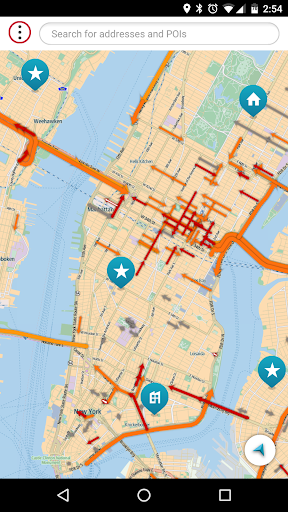
When your smartphone is connected to your car’s navigation system via Bluetooth, Door to Door Navigation receives the current location of the car.
When you leave your vehicle, the Find My Car feature starts. You receive a notification on your phone and the car location will be shown on the map.
A locate car symbol shows on the screen and a My Vehicle entry is added to your MY PLACES list.
Touch the locate car symbol when you want to return to your car. You can then:
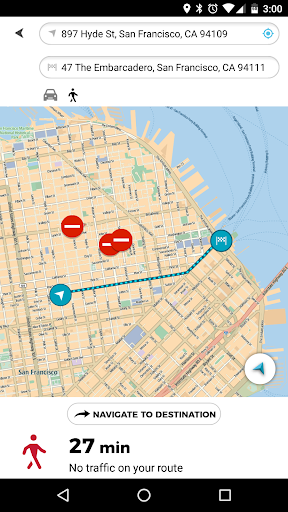
• Select NAVIGATE TO DESTINATION to share your car location with a navigation application on your phone.
• Select WALK HERE to get a walking route to your car.
The walking route will be available if you are within 5 km of the car. If you are more than 5 km away from your car, a walking route will not be automatically generated.
Final destination navigation
When your smartphone is connected to your car’s navigation system via Bluetooth, Door to Door Navigation receives the current location of the car, the address of where you have parked, and it will be shown on the map.
You will then be given the fastest walking route to your final destination.
A walking route will be available to get you to your final destination if you are within 5 km of the final destination. If you are more than 5 km away from your final destination, a walking route will not be automatically generated.
Send a destination to your vehicle
Use Door to Door Navigation to find a destination and send it to your vehicle. Once your smartphone is connected to your vehicle’s navigation system, it will sync with navigation system.
What's New
After June 15th 2025 live traffic information won't work with the old version anymore.
Version Information
- Version
- 1.5.0
- Downloads
- 100K+
- Updated on
- Jun 4, 2025
- Released
- Aug 4, 2017
- Requires
- Android 6.0
Statistics
Google Play Rating History
Rating Distribution
Downloads Over Time
Door to Door Navigation has been downloaded times. Over the past 30 days, it averaged downloads per day.
Shaded area shows 30-day prediction based on historical trends
Historical data collection started recently. More data points will be available over time.
Door to Door Navigation users say on Google Play
 John Smith (LcTVirus)
If you are having a problem linking. Once your phone connects to your car, It's going to ask you to pair the door to door on your phone. first click, connect on your phone. Then on your car desplay. It will work after that. If you click your car only it dont work. You have to ok your phone to connect
 A Google user
Good app. Good and stable connection to the car via bluetooth. But it's impossible to turn it off completely, the app continue working in background and drains the battery of the phone.
 DrAl
DrAl
Accurate traffic but it doesnt sync with car The map on android samsung galaxy S21 is sluggish and there is no way to download the local area map on device. U need a fast network to update map & traffic. It doesnt send planned routes to the car Nav 'Qashqai J12 All new2021'. Update: iPhone can update traffic on the car infotainment Nav indirectly but not androids, you still won't see any planned route not it synchronizes with Nissan Connect. Strange!
 Henry Castelo
Leased a 2021 Rogue door to door doesn't connect to navigation system. No one has called back to troubleshoot after 4 conversations with Nissan Connect Services. Dealer not much help. Anyone been able to reach someone at Nissan familiar with the app. I use Android on Samsung new phone. It is compatible with the o/s disclosed by Nissan in manuals.
A Google user
Map looks good on my phone but the instructions for connection to the car system simply don't work. App and car don't link the in the way the tutorial shows. Nothing happens even though car Bluetooth is connected to my phone. The connection is supposed to initiate automatically, but does not, and no info on troubleshooting. Very lengthy and frustrating experience. Service completely unusable as a result. Sounds similar for the majority of others. Real shame. Back to Android Auto for me!
ApkTrusted Ratings & Reviews
More from NISSAN MOTOR CO., LTD.
See more apps


Scan this QR code to download

Forwarding you to the page at Google Play market in seconds...
Open Google Play market now