NissanConnect サービス vVARY
NISSAN MOTOR CO., LTD.




About this app
Developer Description
Connected service for manufacturer option navigation
- I want to send my destination to the navigation system from the app in advance...
- I'm always wondering if I locked the doors...
Have you ever felt like this?
The "NissanConnect Services" app is here to make your car life even more comfortable.
The "NissanConnect Services" app is an official Nissan app that works in conjunction with vehicles equipped with the standard or factory-installed NissanConnect navigation system or NissanConnect infotainment system and in-vehicle communication unit.
By linking the navigation system and app, you can:
- Check your car's location and status
- Remotely control the air conditioning, door locks, and more
- Search routes and send your destination to the navigation system in advance
The app allows you to do the following:
We support you in making your car life even more comfortable and safer.
------------------
◆Eligible Vehicles
------------------
Note (Models released after December 2020)
Skyline (Models released after September 2019)
Aura (Models released after August 2021)
X-Trail (Models released after July 2022)
Fairlady Z (Models released after August 2022)
Serena (Models released after December 2022)
Roox (Models released after October 2025)
e-NV200
Nissan Leaf
Nissan Ariya
Nissan Sakura
------------------
◆Major Functions and Features
------------------
*The following are examples of features. Available services may vary depending on the vehicle model.
■Pre-trip Air Conditioning
Remotely turn on/off the air conditioner, defroster, steering wheel heater, etc.
You can schedule recurring air conditioning by specifying the day and time.
■ Door-to-Door Navigation
Search for routes in the app and send your destination to the navigation system in advance.
Even if your destination requires you to leave the car and walk, the destination will be automatically transferred to your smartphone and continue providing directions.
You can also plan your route in advance. When your departure time approaches, the route will be sent to the navigation system.
You can also set the date, time, and destination by referencing your iOS calendar schedule.
■ Power Switch On Notification
The app will notify you when your vehicle starts. Tap the notification to check your vehicle's location.
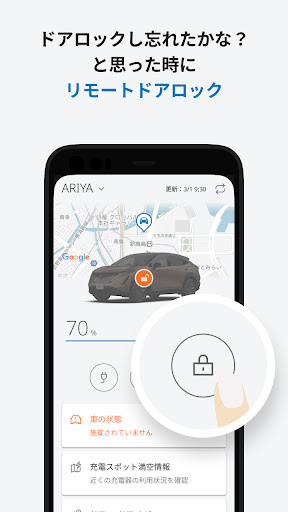
■ Remote Door Lock
If you ever wonder if you locked your car doors, you can check their status and remotely lock them if you forgot.
■ Car Finder
Check the approximate location of your car on the map in the app. This will help you avoid getting lost in large parking lots at theme parks, shopping malls, and other locations.
■ Warning Light Notification
If your car's warning light comes on, you'll receive a notification in the app.
■Remote Data Erase
In the unlikely event that your car is stolen, you can remotely delete all of your personal information (address book, home address, recent destinations, etc.) via the app, providing peace of mind.
■Garage
If you own two or more eligible NissanConnect vehicles, you can switch between them without logging in or out.
■Integration with IoT Devices
By connecting your car with IoT appliances, certain notifications from the NissanConnect Service app will be sent via voice notification from specific appliances.
Authorized users can view various information, receive notifications, and operate the vehicle within the scope of the shared permissions.
■Car Alarm Notification
The app will notify you if your door is forced open or if the battery is removed and reinstalled in the case of an EV.
■Forgotten Item Alert
Push notifications will notify you if you forget to lock the vehicle after stopping it, or if you forget to turn off the hazard lights.
■Sharing NissanConnect Services
Users with owner privileges can grant other users, such as family and friends, permission to view, receive notifications, and operate NissanConnect features.
Users who have been granted permissions can view various information, receive notifications, and operate the vehicle within the scope of the shared permissions.
-----------------
◆Features for Electric Vehicles
------------------
■Charging Spot Availability Information
Check charger availability and operating hours on the app map.
■Battery Status Check
Check the remaining time until charging is complete and the driving range based on the current battery level.
■Timer Charging
Set a timer to start charging by specifying the day and time.
■Charging Limit Setting / Charge Level Notification Setting / Remote Charging
You can set a charging limit and remotely stop charging. You can also receive notifications at specified battery levels.
■Power Supply Settings
You can set a minimum power supply limit and receive notifications via the app when charging stops when the limit is reached.
■Android Auto™ Compatible (Electric vehicles with navigation systems released after January 2019)
By connecting your smartphone to an Android Auto™-compatible navigation system, you can use the "NissanConnect Services" app on the navigation system screen.
------------------
◆NissanConnect Website
------------------
https://www3.nissan.co.jp/connect.html
Version Information
- Version
- -
- Downloads
- 100K+
- Updated on
- -
- Released
- Jan 16, 2026
- Requires
- Android Varies with device
Statistics
Google Play Rating History
Rating Distribution
Downloads Over Time
NissanConnect サービス has been downloaded times. Over the past 30 days, it averaged downloads per day.
Shaded area shows 30-day prediction based on historical trends
Historical data collection started recently. More data points will be available over time.
NissanConnect サービス - Google Play Rankings
Top Rankings
| Rank | Country | Category | List | Change |
|---|---|---|---|---|
| — |
Ranking History in
No ranking data available yet. Rankings are updated daily.
#6 in Top Free Auto And Vehicles in Japan

NissanConnect サービス users say on Google Play
 Yuri Laguta
Please add English language support :pray:
 Juan in Japan
What was the purpose of migrating to this "new" version? It looks the same and it does the same things as the previous one, except this one is in Japanese only. The old one at least had an English version. The route finder has the same web view as the previous app, including the same bugs: when you do a search, if you press the back button it closes the route finder instead of navigating back to the previous menu and you have to start all over again.
ApkTrusted Ratings & Reviews
More from NISSAN MOTOR CO., LTD.
See more apps


Scan this QR code to download

Forwarding you to the page at Google Play market in seconds...
Open Google Play market now