Dropicon Cut - Icon Pack vVARY
GomoTheGom



About this app
Developer Description
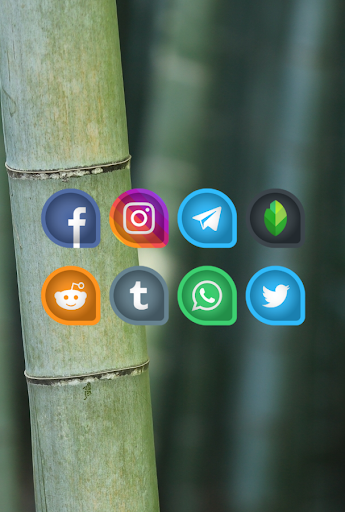
Dropicon Cut is Drop shaped icon pack wit cut-effect inside of each icons
How to apply Dropicon Cut Icon Pack/Icon Changer ?
Dropicon Cut icon pack supports numbers of popular launcher such as nova launcher, evie launcher and many more. Follow these steps to apply
1. Open Dropicon Cut Icon Pack App
2. Navigate to Apply Icon Pack Screen
3. The app shows a list of launcher that are supported such as nova launcher, evie launcher etc. Select the nova launcher installed on your phone to apply icons from this icon pack.
4. The app will automatically applies the icons from Dropicon Cut icon pack for nova launcher.
Note: If launcher doesn't show while applying from the icon pack. Please try applying from the launcher itself.
Sony Xperia Home Launcher does not appear in this application, but it can apply Dropicon Cut icon pack with different settings.
The setting for Sony Xperia :
1. Long press on the main screen
2. open the settings
3. Scroll down and open the appearance icon setting
4. choose Dropicon Cut icon pack
5. done, your Sony Xperia has applied Dropicon Cut icon.
Note: Icon pack only Support on Sony Xperia Home Launcher 10.0.A.0.8 Or Up.
Supported Launcher:
Icon Pack for Nova Launcher
Icon Pack for Apex Launcher
Icon Pack for ADW Launcher
Icon Pack for ABC Launcher
Icon Pack for Evie Launcher
Icon Pack for Next Launcher
Icon Pack for Holo Launcher
Icon Pack for Lucid Launcher
Icon Pack for M Launcher
Icon Pack for Action Launcher
Icon Pack for Sony Xperia Home Launcher
Icon Pack for Aviate Launcher
Icon Pack for Smart Launcher
Icon Pack for Go Launcher(doesn't support icon masking)
Icon Pack for Zero Launcher(doesn't support icon masking)
FEATURES
- 5000+ icons and counting
- Iconback for your unthemed icons
- 36+ HD Wallpapers
- Alternate icons
- Icon Request
- HD Icon resolution 192x192px
More Design Information On Google+, Instagram, Twitter.
https://plus.google.com/118122394503523102122
https://www.instagram.com/panoto.gomo/
https://twitter.com/panoto_gomo
special thanks to Dani Mahardika for Candybar Dashboard.
In-app purchases
$0.99 - $14.99 per item
Version Information
- Version
- -
- Downloads
- 10K+
- Updated on
- -
- Released
- Dec 29, 2019
- Requires
- Android Varies with device
Statistics
Google Play Rating History
Rating Distribution
Downloads Over Time
Dropicon Cut - Icon Pack has been downloaded times. Over the past 30 days, it averaged downloads per day.
Shaded area shows 30-day prediction based on historical trends
Historical data collection started recently. More data points will be available over time.
Dropicon Cut - Icon Pack users say on Google Play
 Cabo Jeft
Great looking Icons, only wish you had a dark one with just black and white! That would be incredible, hint hint :-)
 ALOY KAAVYAN
Excellent finish.Add some vibrant colours to the icons.
 Derp Derpington
Great icon pack, but it's missing soooooo many icons, and it's been over 3 months since an update. Maybe add premium request to maybe help with ambition?
ApkTrusted Ratings & Reviews
More from GomoTheGom
See more apps
Shield - Icon Pack
Paid

Cyandiant - icon Pack
Paid

PasteLina - Icon Pack
Paid
Olympia - Cartoon Icons Pack
Paid
Sticker UI - Icon Pack Android
Paid

Cartoon - Icon Pack
Paid
Material You Square Icon Pack
Paid

3D Shield - Icon Pack
Paid

Circle Ring Icon Pack
Free

Octacrop - Icon Pack
Paid
Hexanet - Neon Icon Pack
Free

Circa - Round Icon Pack
Paid

Gradient 3D - Icon Pack
Paid

Emerald - Icon Pack
Paid
Square 3D - Icon Pack
Paid
Pills 3D - Icon Pack
Free
Similar Apps




Scan this QR code to download

Forwarding you to the page at Google Play market in seconds...
Open Google Play market now