GPS Map Stamp Camera vVARY
Master Apps Lab








About this app
Developer Description
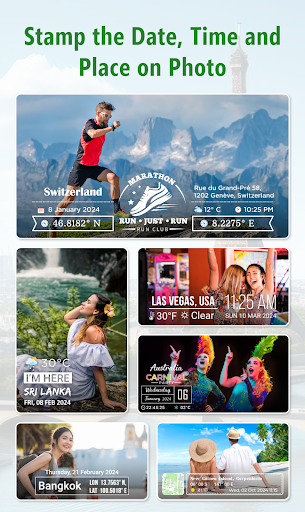
Take a photo with GPS Timestamp Camera or from photo gallery to add Geotag stamp
Now you don’t need to search for ‘How to stamp photos with GPS camera?’. As we've made it easy for you to add GPS stamp to your photos with a GPS stamp camera on pre-captured pictures!
✨ Who can make the most of this GPS stamp photography application?
➺ Adventure savvy people: Trekkers, Archaeologists, and Travelers.
➺ Onsite visitors: Civil Engineers, Architectures, etc.
➺ Event/Exhibition organizers: Fashion Shows or Destination Weddings.
The list is not over yet! There’s a lot more!
◇ Have a look at the collection of GPS Stamp templates for Geotag Photos with GPS camera:
✔ Local Temperature Units (°C or °F)
✔ Your Location Data (Detailed Address)
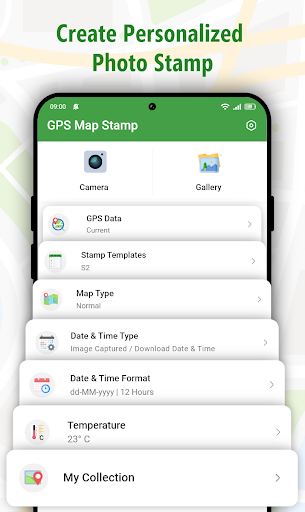
✔ GPS Maps (Normal, Satellite, Terrain, Hybrid)
✔ DateTime GPS stamp
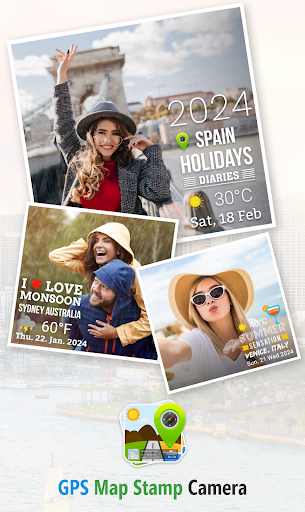
➺ Simply select the template you like, Add/Edit the details, and it will be portrayed on your images in a flash!
This GPS camera has unique features that help you relive your trips by virtually exploring the locations.
◇ Variations in Geotag include:
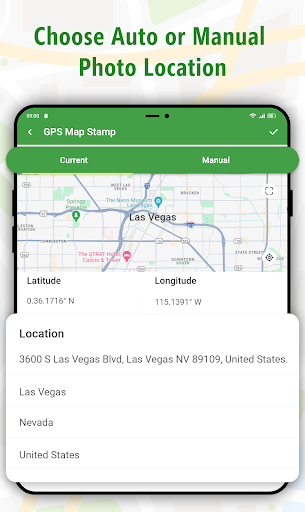
✍ AUTOMATIC TAGGING
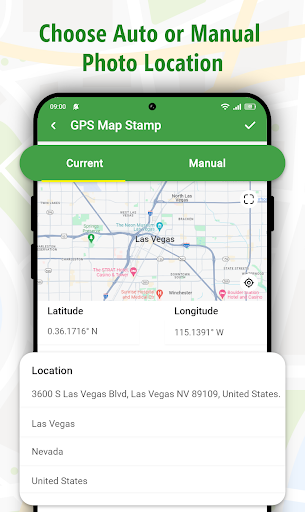
➺ Adds your current Location data to Images.
✍ MANUAL TAGGING
➺ Drag & Drop Location “PIN” on Map; it will fetch the Latitude and Longitude Details.
➺ Add your Custom Address GPS Stamp Information.
✱ How does this GPS Camera work?
> Enter proper address (City, State, Country, etc),
> Choose GPS Map you’d like to Display on the Image from Normal, Satellite, Hybrid and Terrain.
> Select the DateTime Stamp Templates,
> Select images from phone Gallery.
That’s it! In a few seconds, personalized GPS stamp will be added to your favorite Gallery photos!
🎁 WHAT’S NEW IN GPS CAMERA?
👉 Time Format
The flexibility of choosing a timestamp format in the way that you want it to stamp photos.
- 12 hours
- 24 hours
👉 Date Format
Arrange the DateTime Stamp in the format that you would like to it be shown on the image.
- dd/mm/yyyy
- mm/dd/yyyy
- yyyy/mm/dd
✩ Exciting Features crafted in GPS camera:
1. Modes for GPS camera:
→ Automatic GPS camera:
Lets your device fetch your current GPS location automatically & add to selected Gallery photos instantly!
→ Manual GPS camera:
Forgot to add the Geotag timestamp? Relax! Add it manually, as this feature allows to add custom address stamps.
2. Type of Maps:
Alternative forms of inserting GPS DateTime Stamps on images from any of the four available formats:
a) Normal; b) Satellite c) Terrain, & d) Hybrid
3. Set of Classy Templates to stamp photos:
There are ample template variations with which you can geotag pictures on the Go!
Also, you can even modify GPS Stamp templates according to picture backdrop
4. Easy and Quick to use UI:
The most important function is to look at how well and at what speed a GPS camera works, which you will surely get with “GPS Gallery Photos”.
Get the privilege to preview the appearance of custom GPS camera stamps on Photos before adding them to your collection.
✱ This GPS Map Camera app provides you with the indulgence to add geotags according to your needs for the photos captured at exotic locations.
If you haven't watermarked photos with a GPS camera, do so by making use of GPS Stamp Gallery which adds accurate geopositions with ease.
✌Download this GPS map camera NOW & start creating an attractive collection of the places you've explored with GPS stamp photos!
In-app purchases
$2.99 - $6.99 per item
Version Information
- Version
- -
- Downloads
- 100K+
- Updated on
- -
- Released
- Feb 1, 2019
- Requires
- Android Varies with device
Statistics
Google Play Rating History
Rating Distribution
Downloads Over Time
GPS Map Stamp Camera has been downloaded times. Over the past 30 days, it averaged downloads per day.
Shaded area shows 30-day prediction based on historical trends
Historical data collection started recently. More data points will be available over time.
GPS Map Stamp Camera users say on Google Play
 abigeal olabisi
Now working perfectly well, thanks for the prompt solution. You guys are the best.
 Henry Lee
[EDIT] Thank You for resolving query of giving the Year Label to the TimeStamp. Now everyone knows precisely when a photo was taken (based on time stamp). • I bought the GPS Templates & am satisfied by now. [/EDIT] • Issues: Feature of adding time stamp to existing photos are great, but local image loading time takes awhile, even after all image folders are opened; please speed it up a bit. • Request: Please Add Video Recorder as wellツ • Thank You for the reply & the hard work behind this App☋👍
 Ernesto Villalon III
The free version worked great for my pictures. To be thankful, I just paid the full amount for the app, but now can NO longer use the app. app says I also have to buy the H1 template and bought it, I still CANNOT use the app. I wanted to send this message thru email but you have none.
 Lawal omolola Krystal
at first the app was good but then if I take pictures it doesn't save on my phone so imagine taking lots of pictures and it ends up not saving which makes the app super annoying and frustrating
 Maria Johnson
The app has stopped working for me
ApkTrusted Ratings & Reviews
More from Master Apps Lab
See more apps
Simple Calculator with History
Free
Watermark Stamp: Text on Photo
Free

Shot On Stamp Photo Camera
Free

Auto Logo Watermark on Photo
Free

Signature Stamp On Camera Pics
Free

Reverse Play : Sing Challenge
Free

Geotag Photos with GPS Stamps
Free

Export Contacts: Contact Mover
Free

Skip Ads: Auto Skip Video Ads
Free
Auto Numbering Sequence Stamp
Free
Finance Calculator Plus
Free

Shot On Video Stamp Camera
Free

Hydro-Fit: Workout & Hydration
Free

Digital Compass: GPS Direction
Free

BG Remover & Changer of Photo
Free

Date and Time Stamp: Timesnap
Free
Similar Apps








Scan this QR code to download

Forwarding you to the page at Google Play market in seconds...
Open Google Play market now