
Collage Maker - Grid & Frames v1.77
Outdoing Apps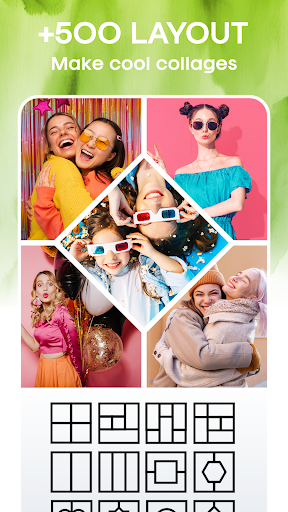




About this app
The Collage Maker - Grid & Frames app solves the problem of creating visually appealing photo collages with ease, benefiting amateur photographers and social media enthusiasts the most. Compared to alternatives in the Photography category, this app stands out with its high user rating of 4.7/5 and over 10 million downloads, indicating a well-designed and user-friendly interface. However, its lack of permissions requests is both a blessing and a curse, as it may limit the app's functionality in certain areas. Overall, the app's success can be attributed to its simplicity and effectiveness in creating stunning photo collages.
Pros
- With over 10 million downloads and a 4.7/5 user rating, the Collage Maker - Grid & Frames app has demonstrated its ability to meet the needs of a large user base, providing a high level of social proof and credibility.
- The app's free version with in-app purchases offers a flexible monetization model, allowing users to try out the basic features before deciding to upgrade to premium content, which is a significant advantage over paid apps.
- The developer's reputation, as evident from their website and email support, suggests a commitment to maintaining and updating the app, which is essential for ensuring compatibility with the latest Android versions and fixing any bugs that may arise.
- The app's offline capability and lack of permissions requests make it an attractive option for users who value their privacy and want to minimize data usage.
- The app's performance is optimized for devices running Android 7.0 and above, ensuring a smooth user experience and fast rendering of photo collages.
Cons
- The app's monetization model, which includes ads and in-app purchases, may be perceived as aggressive by some users, potentially disrupting the user experience and encouraging unintended purchases.
- The limited functionality of the free version may not be sufficient for advanced users, who may need to purchase additional features or upgrade to a premium app to meet their needs.
- The app's compatibility with devices running older Android versions is not explicitly stated, which may be a concern for users with older devices who want to ensure that the app will work seamlessly on their hardware.
- Some users may find the app's interface and feature set to be too basic, particularly when compared to more advanced photo editing apps that offer a wider range of tools and effects.
Best for: The ideal user for the Collage Maker - Grid & Frames app is a social media enthusiast or amateur photographer who wants to create visually appealing photo collages without requiring extensive photo editing expertise, and is willing to tolerate ads and potential in-app purchases to access premium features and content.
Developer Description
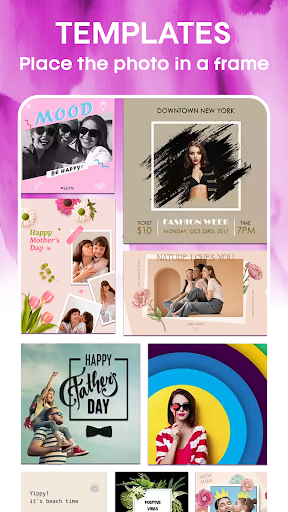
Get side by side photos, Create photo collage in photo editor & picture collage
Photo Collage Maker Features:
⭐You can combine upto 9 photos to create pic collage with Free photo collage maker & picture editor!
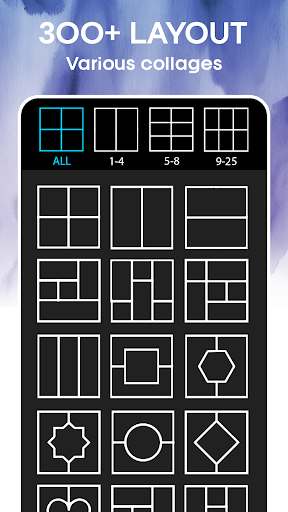
⭐Supports plenty of photo collage free layouts, photo by grids & photo collages!
⭐Adjustable border size and colour for pic frame collage & picture editor!
⭐Amazing and cool effects and filters to pictures what you choose in photo collage
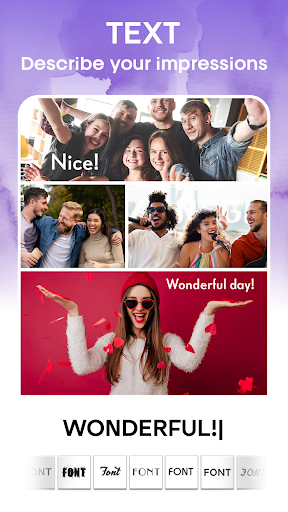
⭐You can edit collage with text and stickers!
⭐Save photo to sdcard in photo editor collage!
⭐Share your work on social platforms like Facebook, Instagram and more!
Photo With Grid & Photo Collage Maker App:
Supports a wide variety of collage layouts and photo with grids, side by side photo for picture editor & pic collage making. The adjustable border feature enables us to set the width of the border in picture editor & photo by grid. The color and pattern of the border can be changed in free collage apps & photo by grid. Try out different patterns and colors, for the border, to make beautiful pic frame in photo by grid & photo collage free. This photo grid app is very easy to use.
Photo Editor & Free Collage Apps
This all-in-one photo editor collage & picture editor supports wide variety of photo editing options in side by side photo & free collage apps, you can apply filters and effects to pictures, you can edit collage with stickers and text in side by side photo & free collage apps.
Photo Collage Ratio - Make Photo Collage
You can change collage aspect ratio as per your choice in the photo layout & picture editor. You can select suitable photo layout ratios for social platforms like Instagram, Facebook and more using this grid photo.
Photo Collage - Collage Maker & Photo Editor Apps:
Collage maker free is the finest free photo collage maker and photo editor collage app. Download it now for free to create beautiful photo layout with pic collage free with free photo collage maker.
Privacy
Given the app's lack of permissions requests, users can be assured that their personal data and device information are not being collected or shared without their knowledge. However, as with any app that displays ads, users should be cautious when clicking on advertisements and ensure that they are not inadvertently downloading malware or providing sensitive information. To minimize potential risks, users should review the app's terms of service and privacy policy before installing.
Tips
To get the most out of the Collage Maker - Grid & Frames app, users should start by exploring the various grid and frame options to find the ones that best suit their needs. Additionally, users can optimize the app's performance by closing other resource-intensive apps and ensuring that their device has sufficient storage space. By doing so, users can create stunning photo collages quickly and efficiently, without experiencing any significant lag or slowdowns.
What's New
In-app purchases
$2.99 - $29.99 per item
Version Information
- Version
- 1.77
- Downloads
- 10M+
- Updated on
- Nov 6, 2025
- Released
- Dec 22, 2012
- Requires
- Android 7.0
Statistics
Google Play Rating History
Rating Distribution
Downloads Over Time
Collage Maker - Grid & Frames has been downloaded times. Over the past 30 days, it averaged downloads per day.
Shaded area shows 30-day prediction based on historical trends
Historical data collection started recently. More data points will be available over time.
Collage Maker - Grid & Frames users say on Google Play
 Meiriani Rusli
awesome and user-friendly. We can choose from so many designs.
 A Google user
great, if it can be offered free
 Samuel Izuchukwu
excellent
 CARYL McCARLEY
The grid sections are too small
 Brahmananda S
after finishing no exit, in the exite pace or googale adds are disturbing at back place in setting no details,why it is keeping in googale store..😭😭😭..it is for bluddy adds..
ApkTrusted Ratings & Reviews
More from Outdoing Apps
See more apps
Jewellery Photo Editor
Free

Side by side picture : Collage
Free

Photo Collage : Photo Editor
Free

PicStudio Photo Editor Collage
Free

Pic Frame - Grid Collage Maker
Free

Photo Editor Collage Maker
Free

Photo Greeting Card
Free
Pimple Remover & Makeup Cam
Free
Collage video maker & photo
Free

Collage Maker Photo Collage
Free

Wedding Dress Photo Editor
Free
Background Changer of Photo
Free

Cartoon Photo Editor –Toon Pic
Free

Girls Jewellery Photo Editor
Free
Color Splash Photo Editor
Free

Pic Frame Effect
Free
Similar Apps

Collage Maker Photo Editor PIP
Free

Collage Maker - Selfie Camera
Free

Collage Maker & Photo Editor
Free

Photo Collage Maker,Pic Editor
Free

Blend Photos - Photo Blender
Free

Photo Video Maker - InSlide
Free
PhotoPad Photo Editor
Free

Photo Collage Maker & Editor
Free

Photo Video Maker: Slideshows
Free

Photo Editor - Collage Maker
Free

Collage Maker | Photo Editor
Free

PhotoGrid: Video Collage Maker
Free

Square Blur-Pic Editor Effect
Free
Music Video Maker - Slide Show
Free

Photo Editor Pro - Square Pic
Free

InstaSquare Photo Editor
Free
Scan this QR code to download

Forwarding you to the page at Google Play market in seconds...
Open Google Play market now