PS Remote Play v8.5.1
PlayStation Mobile Inc.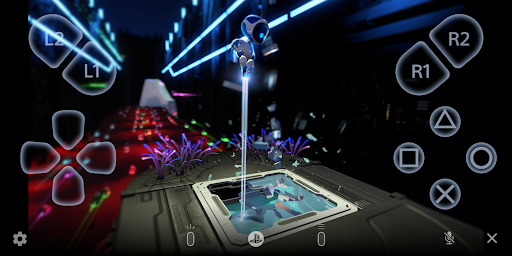
About this app
The PS Remote Play app solves the problem of limited access to PlayStation consoles by allowing users to stream and control their PS5 or PS4 from their Android devices, benefiting most gamers who want to play their console games on-the-go. Compared to other entertainment apps, PS Remote Play stands out with its seamless integration with PlayStation consoles, but falls short with its below-average user rating, indicating significant issues that need to be addressed. Despite this, the app's high download numbers and lack of ads or in-app purchases make it a compelling option for gamers. However, the app's performance and compatibility issues may hinder the user experience.
Pros
- With over 10 million downloads, the PS Remote Play app has significant social proof, indicating a large and active user base that can provide support and feedback to improve the app's performance and functionality.
- The app's lack of ads and in-app purchases provides a clean and uninterrupted gaming experience, allowing users to focus on their games without distractions.
- The app's seamless integration with PlayStation consoles allows for easy setup and use, making it a great option for gamers who want to play their console games on their Android devices.
- The developer, PlayStation Mobile Inc., has a reputation for providing high-quality gaming experiences, which adds to the app's credibility and trustworthiness.
- The app's regular updates, such as the latest version 8.5.1, demonstrate the developer's commitment to improving the app's performance and addressing user concerns.
Cons
- The app's below-average user rating of 2.8/5 indicates significant issues with the app's performance, compatibility, and user experience, which may deter some users from downloading and using the app.
- The app requires Android 10 or higher, which may limit its compatibility with older devices and exclude some users from using the app.
- Some users have reported issues with the app's connectivity and streaming quality, which can affect the overall gaming experience and make it frustrating to use.
- The app's lack of transparency about the data it collects and how it is used may raise concerns about user privacy and security.
Best for: The ideal user for the PS Remote Play app is a tech-savvy gamer who owns a PS5 or PS4 console and an Android device, has a stable and high-speed internet connection, and is looking for a way to play their console games on-the-go, with a moderate to high level of technical skill and a strong interest in gaming and entertainment.
Developer Description
Access your PS5 or PS4 wherever you go.
With PS Remote Play, you can:
• Display the PlayStation®5 or PlayStation®4 screen on your mobile device.
• Use the on-screen controller on your mobile device to control your PS5 or PS4.
• Use the DUALSHOCK®4 wireless controller.
• Use the DualSense™ wireless controller on mobile devices with Android 12 or later installed.
• Use the DualSense Edge™ wireless controller on mobile devices with Android 14 or later installed.
• Use the Backbone One PlayStation® Edition on USB Type-C Android smartphones.
• Join voice chats using the mic on your mobile device.
• Enter text on your PS5 or PS4 using the keyboard on your mobile device.
To use this app, you need the following:
• A mobile device with Android 10 or later installed
• A PS5 or PS4 console with the latest system software version
• An account for PlayStation Network
• A fast and stable internet connection
When using mobile data:
• Depending on your carrier and network conditions, you may not be able to use Remote Play.
• Remote Play uses a lot more data than most video streaming services. Data charges may apply.
Verified devices:
• Google Pixel 9 series
• Google Pixel 8 series
• Google Pixel 7 series
Using your Controller:
• You can use the DUALSHOCK 4 wireless controller. (On devices with Android 10 and 11 installed, use the on-screen controller to use the touch pad function.)
• You can use the DualSense wireless controller on mobile devices with Android 12 or later installed.
• You can use the DualSense Edge wireless controller on mobile devices with Android 14 or later installed.
• You can use the Backbone One PlayStation® Edition on USB Type-C Android smartphones.
Note:
• This app may not work properly on unverified devices.
• This app may not be compatible with some games.
• Your controller may vibrate differently than when playing on your PS5 or PS4 console.
• Depending on your mobile device's performance, you might experience input lag when using your wireless controller.
App subject to end-user license agreement:
www.playstation.com/legal/sie-inc-mobile-application-license-agreement/
Privacy
Since the PS Remote Play app requests no permissions, it is likely that the app uses alternative methods to collect data, such as device information and gaming activity, which may be used for analytics and advertising purposes. To protect your privacy, make sure to review the app's terms of service and privacy policy, and consider using a VPN or other security measures to encrypt your data. Additionally, be cautious when connecting to public Wi-Fi networks, as they may not be secure.
Tips
To get the most out of the PS Remote Play app, make sure to set up your PS5 or PS4 console and Android device on the same Wi-Fi network, and use a high-quality internet connection to ensure smooth streaming and low latency. Additionally, consider using a controller or other gaming accessory to enhance your gaming experience, and explore the app's settings to customize your experience and optimize performance. Regularly updating the app and your console's firmware can also help resolve any issues and improve overall performance.
What's New
Version Information
- Version
- 8.5.1
- Downloads
- 10M+
- Updated on
- Oct 27, 2025
- Released
- Oct 27, 2014
- Requires
- Android 10
Statistics
Google Play Rating History
Rating Distribution
Downloads Over Time
PS Remote Play has been downloaded times. Over the past 30 days, it averaged downloads per day.
Shaded area shows 30-day prediction based on historical trends
Historical data collection started recently. More data points will be available over time.
PS Remote Play - Google Play Rankings
Top Rankings
| Rank | Country | Category | List | Change |
|---|---|---|---|---|
| — |
Ranking History in
No ranking data available yet. Rankings are updated daily.
#94 in Top Free Entertainment in United States


#68 in Top Free Entertainment in United Kingdom

#70 in Top Free Entertainment in Poland


#81 in Top Free Entertainment in France

PS Remote Play users say on Google Play
 Alex Yarnell
Ok, now this is cool... lol I'm a 40 year old dude who's kids all have PS5 and I just got myself a 4. Low and behold this app works and works WELL! It doesn't use your phones hardware for rendering. I have a cheap moto g and it runs all my games flawlessly and the controller was easy to set up. Yeah it's not the same as my 86" TV but when the wife wants to watch her show, I still have an option. Thanks from an old gamer getting back in the hobby!
 Neva Paluszynski
It really helps
 Kiran Kaur
its good till you have best internet access and a better phone then it is compatable for gaming . But not for long sessions cause during gameplay there will be 90 percent chances that your connection lost during play Fortnite or etc. That's why I give it 3 stars but conclusion is it worked not well but not least.
 Danielle Gault
Truthfully not even worth it anymore. On lunch break I used to hook to my system and game. now it says its trying to establish a connection via internet and then states one cant be found so cant even game at work anymore. lame as hell. aside from that if youre at home and want to play it'll work depending on the device but dont hold your breath for it to work when youre away from the Playstation. I have a ps4 and ps5 never had issues till this year with the app.
 Aryan Bowen
I swear this app was so good at first until today now it doesn't wanna connect and I have perfectly fine internet and because my controller won't connect to my ps4 this is the only way I can use my Playstation, and the one day I have money to buy something it doesn't connect it either says someone else is using remote play when nobody else is because I'm alone all the time. or it says something about the internet but my internet works perfectly fine for EVERY other app
ApkTrusted Ratings & Reviews
More from PlayStation Mobile Inc.
See more apps





Similar Apps

One Emulator for Game Consoles
Free

Backbone — Next-Level Play
Free

Nintendo Switch App
Free

Medal - Gaming Clips
Free
Nintendo Today!
Free
Xbox beta
Free
GeForce NOW Cloud Gaming
Free
Eneba – Marketplace for Gamers
Free
Stash - Track Video Games
Free

The Roku App (Official)
Free

DLive · Your Stream Your Rules
Free
Loudplay — PC games on Android
Free
Bikii Cloud Game
Free

LootBoy: Packs. Drops. Games.
Free

LG ThinQ
Free
Battle.net
Free
Scan this QR code to download

Forwarding you to the page at Google Play market in seconds...
Open Google Play market now