
WEBP Converter - Image to WEBP vVARY
Double Ape



About this app
Developer Description
Convert Photos to WEBP. Batch Conversion. Private and Offline
Why Choose WebP?
WebP is a cutting-edge image format developed by Google that offers superior compression without sacrificing quality. Whether you're running a website, developing an app, or simply sharing images online, converting your images to WebP can dramatically speed up loading times and save storage space.
Key Features:
* High-Quality Conversion: Preserve the integrity of your images while significantly reducing file size.
* Customizable File Size: Choose your preferred compression level to balance between quality and file size.
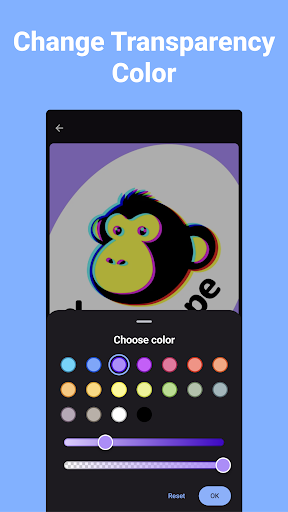
* Transparency Support: Maintain or adjust transparency settings from the original image during conversion.
* Batch Conversion: Save time by converting multiple images to WebP format at once.
* Fast and Easy: With a streamlined user interface, converting images has never been quicker or more straightforward.
* Instant Save & Share: Save your converted images directly to your gallery or share them instantly across apps and platforms.
Who Can Benefit?
* Web Developers: Improve site speed and performance by reducing image file sizes.
* Graphic Designers: Optimize your artwork for digital use without losing quality.
* Content Creators: Ensure your visuals load faster and look great on any device.
* Social Media Enthusiasts: Share high-quality images with smaller file sizes, perfect for posting online.
How It Works:
1. Select Your Images: Choose one or multiple images from your gallery.
2. Set Your Preferences: Adjust the file size and transparency settings as needed.
3. Convert: Tap convert, and your images will be processed in seconds.
4. Save or Share: Instantly save to your gallery or share directly from the app.
In-app purchases
$31.99 per item
Version Information
- Version
- -
- Downloads
- 10K+
- Updated on
- -
- Released
- Dec 31, 2022
- Requires
- Android Varies with device
Statistics
Google Play Rating History
Rating Distribution
Downloads Over Time
WEBP Converter - Image to WEBP has been downloaded times. Over the past 30 days, it averaged downloads per day.
Shaded area shows 30-day prediction based on historical trends
Historical data collection started recently. More data points will be available over time.
WEBP Converter - Image to WEBP users say on Google Play
 Roger Bedard
Wish I had discovered this app a long time ago .. it's that good!
 David Burkhart
Simple and easy to use. I like the simple compression slider to trade-off quality for a smaller file size; and, I love being able to see the file size before committing! I can't give it five stars because of the obtrusive ads. But, I'm happy with it.
 Jordan Francis
It seems like an update changed the ability to convert files in order of selection. Kindly advise and address this issue if possible.
 n158 J.K.
Animated gifs becomes static, although they shold be animation.
ApkTrusted Ratings & Reviews
More from Double Ape
See more apps
Video to Audio - Video to MP3
Free

Convert Video to GIF
Free
Flip Video - Mirror Video
Free

Change Video Speed - SlowMo
Free
Convert Images to PNG
Free

Reverse Audio - Reverse Sing
Free
Flip Image - Mirror Photos
Free

Convert Images to JPG JPEG
Free
Compress Image - MB to KB
Free

Games for Cats - Cat Toy
Free
Compress Video - Resize Video
Free
Image to PDF Converter
Free
Image Converter JPG PNG PDF
Free

Trim Video - Cut Video
Free

Blur Face - Censor Image
Free
Keep Screen On - Phone Call
Free
Similar Apps

PixaGen: Ai image generator
Paid

Banano Pro İmage Generator
Free

Text & Image to Video AI Gen
Paid

3D Photo: Imager
Paid

Apowersoft Background Eraser
Free

KiWi Vault: Hide Photos, Video
Free

Video Downloader & HLS Player
Free

Smallpdf: Scanner & PDF Editor
Free

Photo Scan App by Photomyne
Free

AI Photo Eraser - Inpaint Lab
Free

Boosted Ad Maker by Lightricks
Free

DreamBuild: Sketch to 3D
Paid

Video Downloader & HD Player
Paid

Google Automotive Keyboard
Free
Scan this QR code to download

Forwarding you to the page at Google Play market in seconds...
Open Google Play market now