Keep Screen On - Phone Call vVARY
Double Ape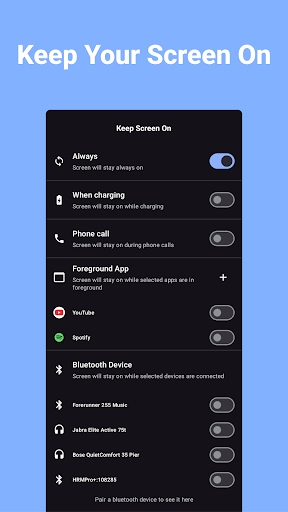


About this app
Developer Description
Prevent your phone from locking, by keeping the screen always awake (alive)
Key Features:
⚙️ Multiple Customization Options:
- 🕒 Always-On Screen: Keep your screen on indefinitely.
- 🔌 Screen On While Charging: Prevent screen timeout while charging your phone.
- 📞 Screen On During Phone Calls: Keep your screen awake during calls for easy access to your dialer or notes.
- 📱 Screen On When a Specific App is in Foreground: Select which apps should keep your screen awake when open.
- 🔊 Screen On When Connected to Bluetooth Devices: Stay focused while driving or listening to music with your screen on when paired with your car’s Bluetooth or other connected devices.
🧩 Widgets & Quick Settings Tile:
- Quickly toggle Keep Screen On directly from your home screen with customizable widgets.
- Use the Quick Settings Tile for fast, easy access from your notification shade.
♻️ Automatic Restart After Reboot:
No need to set it up again after restarting your phone. The app automatically restarts, so your preferences are always active.
Why Choose Keep Screen On?
- 📚 Stay Productive: Whether you're using your phone as a GPS, reading long articles, or referencing notes, your screen stays on when you need it.
- 🚗 Focus While Driving: Use Bluetooth-triggered screen-on mode to keep maps or playlists accessible.
- 🎮 Stay Engaged While Gaming: No more interruptions when playing your favorite mobile games.
- 💼 Perfect for Work Calls: Take notes or reference materials during calls with the screen-on-during-calls feature.
How It Works
Simply choose when and how you want your screen to stay on. The intuitive design allows you to select specific conditions, such as connected Bluetooth devices, active foreground apps, and more. With PRO features, you can get even more control with app-specific and call-specific screen-on settings.
🚀 Get More With PRO
Unlock advanced features like Screen On During Calls, Screen On When Specific Apps are in the Foreground, Screen On When Connected to Bluetooth Devices, Widgets and Quick Settings Tiles. Get full control over when and how your screen stays on.
In-app purchases
$0.99 - $31.99 per item
Version Information
- Version
- -
- Downloads
- 100K+
- Updated on
- -
- Released
- Jun 15, 2022
- Requires
- Android Varies with device
Statistics
Google Play Rating History
Rating Distribution
Downloads Over Time
Keep Screen On - Phone Call has been downloaded times. Over the past 30 days, it averaged downloads per day.
Shaded area shows 30-day prediction based on historical trends
Historical data collection started recently. More data points will be available over time.
Keep Screen On - Phone Call users say on Google Play
 Timur
Timur
Works well as promised/designed. 4 stars as after the phone restart/reboot, I have to manually start the app. Please add an option to autostart the app when OS starts. Thank you. Update. Autostart has been added. Now 5*. Many thanks! Could you please add a control service/demon which will check if aplication is kept running and if not to start it automatically. All that tricks seam do not work on Samsung phones. Please check/consult maybe with Adguard. They managed to find 100% working solution.
 Joseph Paice
a good app but sometimes it disables itself in the background and I have to re-enable it again. this is despite unrestricting battery usage in the background including data too.
 Clifton J Hunt Sr
I really cannot give a rating on this app yet. I think it is ABSOLUTELY RIDICULOUS for y'all to expect a new user to give a review right after downloading and opening the app for the first time. Because of this, I will give 3 stars only because I have not been able to use and abuse this new app.
 Mohsen Soua
if you intend to purchase this app with the aim of resolving the problem of dimming screen during phone calls don't do it! This was my sole reason for spending the 30 euros it costs. I thought in my candor that it wouldn't have been so highly priced if it did not really do what it claimed. I was wrong! It definitely doesn't prevent the screen dimming during calls. At least not on my Pixel 9. The developer affirms the contrary. This said I could get a refund and I am thankful for that.
 Xtenity
the only part that it advertised cost money. :response to editors' response: in order to "keep screen on" during "phone calls" is ONLY available with your paid for upgrade. as is said.. "the only part that is advertised, costs money"
ApkTrusted Ratings & Reviews
More from Double Ape
See more apps
Video to Audio - Video to MP3
Free

Convert Video to GIF
Free
Flip Video - Mirror Video
Free

Change Video Speed - SlowMo
Free

Convert Images to PNG
Free

Reverse Audio - Reverse Sing
Free
Flip Image - Mirror Photos
Free

Convert Images to JPG JPEG
Free
Compress Image - MB to KB
Free

Games for Cats - Cat Toy
Free
Compress Video - Resize Video
Free

Image to PDF Converter
Free
Image Converter JPG PNG PDF
Free

WEBP Converter - Image to WEBP
Free

Trim Video - Cut Video
Free

Blur Face - Censor Image
Free
Similar Apps

Macrorify - Image Auto Clicker
Free

ZenAlarm: Smart Wake Up
Paid

Retro Mode - Icon Pack (Light)
Paid

Quikshort: Shortcut Creator
Free

App Blocker & Pomodoro Timer
Free
ChargeNow
Free

TAP Kiln Control Mobile
Free

ASTRO File Manager & Cleaner
Free

Touch Screen Test
Free

Nothing Pomodoro Timer
Free

dynamicSpot - Dynamic Island
Free

ScreenMaster:Screenshot Markup
Free

Simple Gallery Pro
Paid

Automate
Free

Screen Recorder Unlimited
Free

World Festival Guide
Paid
Scan this QR code to download

Forwarding you to the page at Google Play market in seconds...
Open Google Play market now