
Quikshort: Shortcut Creator v1.9.8
AtolphaDev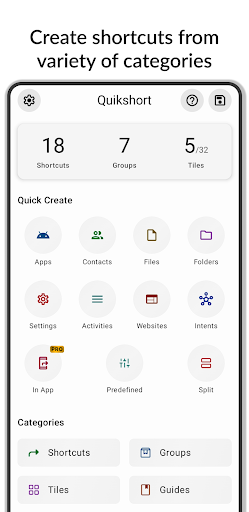





About this app
Developer Description
An app that lets you create Shortcuts and Tiles from variety of categories
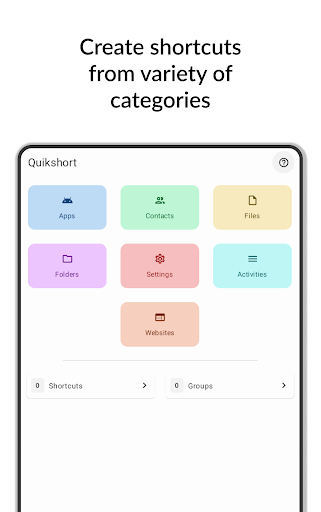
Create shortcuts and tiles from variety of categories such as
- Apps
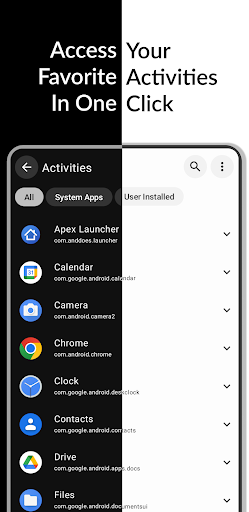
- Activities
- Contacts
- Files
- Folders
- Websites
- Settings
- System Intents
- Custom Intents
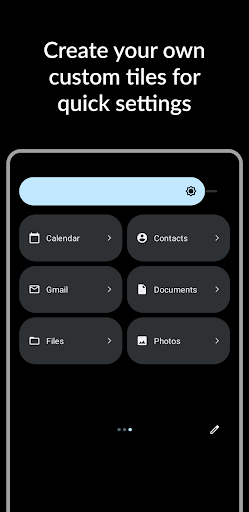
You can create unlimited shortcuts and groups on your home screen and up to 15 tiles in your quick settings using Quikshort.
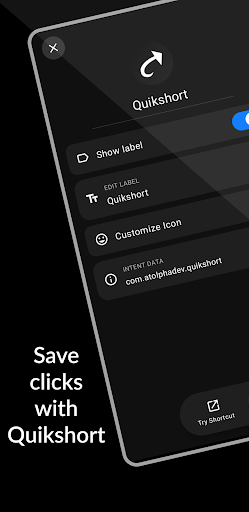
Customize your shortcut with variety of customization features like select icon from icon packs, add a background, change background to solid or gradient colors, adjust icon size and shape and many more.
Quikshort allows you to try out your shortcut before you put them on your homescreen.
It saves your shortcuts and provides you the ability to modify and update them in future.
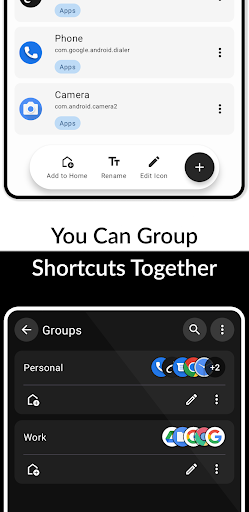
Quikshort provides group feature to group your shortcuts together and access all at a time with single shortcut.
Quikshort also allows you to create action shortcuts to quickly access and control system functions such as adjusting brightness, volume, and sound modes, as well as performing actions like taking a screenshot, locking the device, or opening the power menu.
==== Accessibility Service Usage ====
Quikshort uses the Accessibility Service API strictly to enable specific action shortcuts such as Power Menu, Lock Device, and Screenshot. This permission is not required for general use of the app and is only requested when a user creates any of the specific mentioned action shortcuts. Quikshort does not collect, store, or share any personal or sensitive data through the Accessibility Service. The service is used solely for the purpose of executing the mentioned action shortcuts and for no other function.
Create a shortcuts with Quikshort and save few clicks in your day.
What's New
- You can now create custom shapes using PNG and SVG images
- A new password generation action has been added along with auto brightness toggle
- Added more customization options for group widget label and shortcut label
- Optimized icon pack loading
- Minor UI improvements
- Fix some bugs and crashes
In-app purchases
$0.49 - $94.99 per item
Version Information
- Version
- 1.9.8
- Downloads
- 100K+
- Updated on
- Jan 1, 2026
- Released
- Sep 13, 2023
- Requires
- Android 8.1
Statistics
Google Play Rating History
Rating Distribution
Downloads Over Time
Quikshort: Shortcut Creator has been downloaded times. Over the past 30 days, it averaged downloads per day.
Shaded area shows 30-day prediction based on historical trends
Historical data collection started recently. More data points will be available over time.
Quikshort: Shortcut Creator users say on Google Play
 Jim T
Jim T
It has the potential to be great, if I didn't have to keep redoing the widget I created. Every few days the widget says "click to select", and I have to refresh it or something. But now it's not working at all. Update: I'm using Smart Launcher. But I think the problem may be that I also had the widget assigned on two other launchers. So I disabled the other launchers and now it's working fine.
 Cynthia Y
Switched over to this app since the old shortcut maker I've been using didn't work with Android 8. This app has been working well for me since the OS update! Only thing is I can't seem to figure out how to put the shortcut widget in the bottom tray..
 Max Binder
Useful app, but sometimes tiles don't launch, and also sometimes restarting a phone erases web shortcuts
 Ugleno Pacawo
Icons are bigger than default and it only allows me to shrink icon within the predefined margins..
 helen katz
great app as it is, but i do have a question for the designer.
ApkTrusted Ratings & Reviews
Similar Apps
Shortcut Maker
Free
Good Lock: Premium Lock Screen
Free

Taskbar
Free

Touch Screen Test
Free

dynamicSpot - Dynamic Island
Free

Automate
Free

Retro Mode - Icon Pack (Light)
Paid

AppDash: App Manager & Backup
Free

G-CPU:Monitor CPU, RAM, Widget
Free

BOLT Icon Pack
Paid
CPU Monitor - temperature
Free

MacroDroid - Device Automation
Free

AIO Launcher
Free

Swift Backup
Free
Icon Pack Studio
Free

Ares Dark Icon Pack
Paid
Scan this QR code to download

Forwarding you to the page at Google Play market in seconds...
Open Google Play market now