
Swift Backup v5.0.6
SwiftApps.org
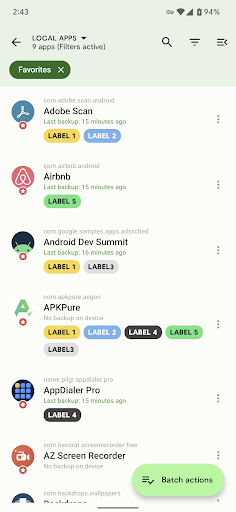
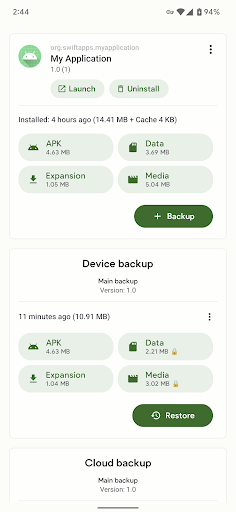
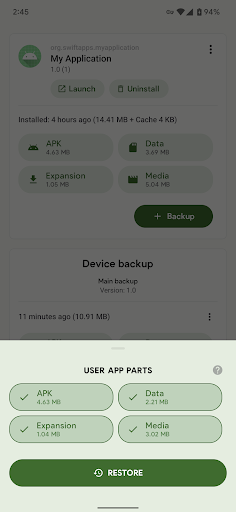
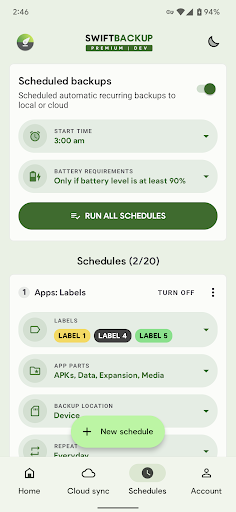
About this app
Developer Description
A simple, fast and smart backup solution for Android smartphones
Disclaimer: Google Sign-in is required for cloud backups and premium features in the app (www.swiftapps.org/faq#whygoogle). Browser based sign-in is supported on devices without Google Play services.
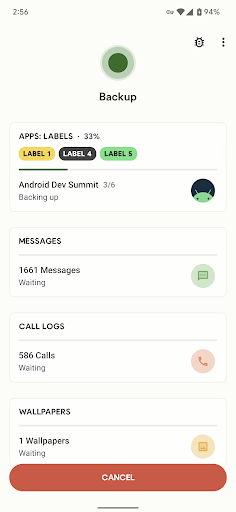
Swift Backup is a one-stop destination to backup your
• Apps (APKs)
• Messages
• Call Logs
• Applied Wallpapers
On Rooted devices Swift Backup can also backup & restore
• App data: Restore most apps in the same condition as when they were backed up
• Special app data like granted permissions, battery optimization setting*, Magisk Hide state of the app, app SSAIDs, etc.
• WiFi network configurations
Note: Batch restoring apps is only supported if you are rooted or have Shizuku service running.
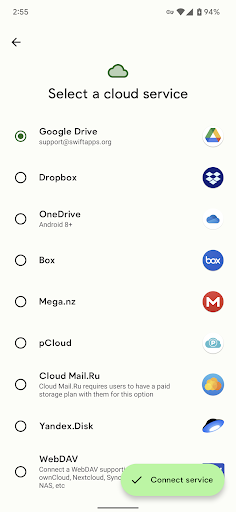
Cloud services supported
• Google Drive
• Dropbox
• OneDrive
• Box
• Mega.nz
• pCloud
• CloudMail.Ru (Needs paid premium plan in CloudMail.Ru)
• Yandex
• WebDAV servers: Nextcloud, ownCloud, Synology NAS, etc
• S3 (Amazon S3 or any other S3 compatible storage)
• SMB (Samba)
• SFTP
• FTP/S/ES
Premium options (Unlocked via in-app purchase plan)
• Cloud backups for apps
• App Labels
• Custom backup/restore configuration for apps
• Scheduled backups
Refund policy
We have a 14 days no-questions-asked refund policy. If you are not happy with the app, please email us the order number of purchase or the email address of the purchasing account within 14 days to support@swiftapps.org.
Please report any observed bugs with steps to reproduce via:
• Email: support@swiftapps.org
• Support group on Telegram: https://t.me/swiftbackupsupport
Helpful links:
• FAQs: www.swiftapps.org/faq
• Common issues: www.swiftapps.org/issues
What's New
- Cloud: Fixed download issues with FTP servers
- Other minor fixes
In-app purchases
$0.99 - $11.99 per item
Version Information
- Version
- 5.0.6
- Downloads
- 500K+
- Updated on
- Dec 15, 2024
- Released
- Aug 18, 2017
- Requires
- Android 6.0
Statistics
Google Play Rating History
Rating Distribution
Downloads Over Time
Swift Backup has been downloaded times. Over the past 30 days, it averaged downloads per day.
Shaded area shows 30-day prediction based on historical trends
Historical data collection started recently. More data points will be available over time.
Swift Backup users say on Google Play
 Brandon Smithson
The new KING for android backups with/without root. RIP Titanium Backups. Long live Swift Backup. With root you can backup all your apps, WiFi, SMS, and setup schedules with ignore lists. very happy with it. Wish they had a pro version for degoogled users that you could just buy as an app instead of an in app purchase.
 nic tse
1.unable recognize system app in Android 16 QPR1. 2. unable backup apps in private space. 3.Add an option to del certain backup app.
 Jimmy San
I tried to restore my data on my rooted phone on android 15, while the backup was quick and easy, the restoring quickly turned into nightmare when a lot of apps keep crashing with the data restored. Had to manually delete the data and log back in to each app which defeats the purpose what this app is intended for. Notifications won't work with the restored data.
 Matt H
Does not let you restore older app versions without uninstalling even, if you have root. 🤷♂️ Meaning if the app version is updated since the backup and you press Restore, it does nothing. What's the point.
 John Walker
MUST sign into Google to use some features of the app.
ApkTrusted Ratings & Reviews
Similar Apps

fooView - FV Float Viewer
Free

Storage Analyzer & Disk Usage
Free

GSMArena
Free

AppDash: App Manager & Backup
Free

Super File Manager Explorer
Free

Explorer
Free
GlassWire Data Usage Monitor
Free

Total Commander - file manager
Free

Nextcloud
Free

pCloud: Cloud Storage
Free

MobiDrive Cloud Storage & Sync
Free

RealVNC Viewer: Remote Desktop
Free

One Hand Operation +
Free
UltData: Photo & Data Recovery
Free

My Data Manager: Data Usage
Free

One Key: password manager
Free
Scan this QR code to download

Forwarding you to the page at Google Play market in seconds...
Open Google Play market now