
Explorer v3.12.8
Speed Software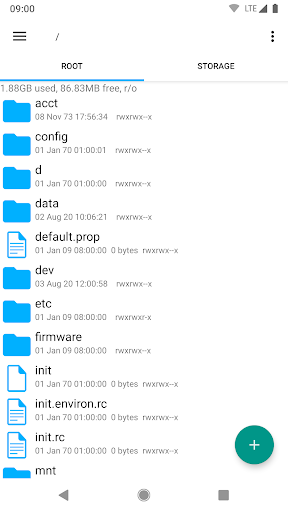
About this app
The Explorer app solves the problem of efficiently managing files on Android devices, benefiting users who frequently access and organize their files. With over 10 million downloads and a 4.0/5 rating, it stands out in the Productivity category for its simplicity and speed, although it may lack advanced features compared to alternatives. Its lightweight nature and absence of ads make it an attractive option for those seeking a hassle-free experience. However, its limited feature set might not appeal to power users seeking more comprehensive file management solutions.
Pros
- The app's high download numbers and good user rating indicate a well-received and reliable file management solution, suggesting that it effectively meets the needs of its target audience.
- The absence of ads and in-app purchases ensures an uninterrupted user experience, allowing users to focus on managing their files without distractions.
- With no permissions required, the app poses minimal risk to user privacy and security, making it a trustworthy choice for those concerned about data protection.
- The developer's reputation, as evidenced by the app's overall quality and update frequency, suggests a commitment to maintaining and improving the app over time.
- The app's compatibility with Android 4.3 and later ensures a wide range of devices can utilize the app, making it accessible to a broad user base.
Cons
- The app's limited feature set might not cater to advanced users who require more sophisticated file management capabilities, such as cloud storage integration or advanced search functions.
- The lack of a developer website and detailed contact information might make it difficult for users to find support or report issues, potentially leading to frustration.
- The app's simplicity, while beneficial for ease of use, might also limit its appeal to users seeking more customizable or feature-rich file management solutions.
- Without a clear update history or changelog, users may be uncertain about the app's maintenance and whether issues are being actively addressed.
Best for: The ideal user for the Explorer app is likely an individual seeking a straightforward, easy-to-use file management solution, possibly with limited technical expertise, who values simplicity and speed over advanced features, and is looking for a reliable, ad-free experience to manage their files efficiently on their Android device.
Developer Description
Fast, lightweight and easy to use file manager.
Features include:
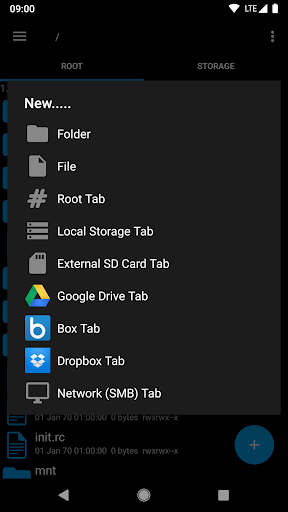
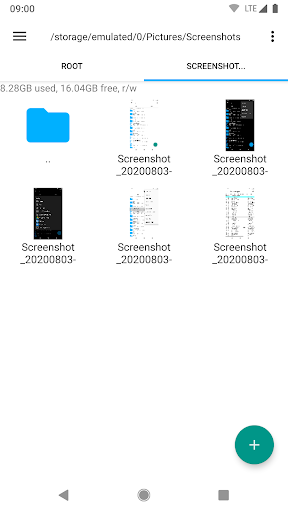
• Multiple tabs - Easily navigate between different locations by swiping or clicking on a tab
• Google Drive, Box, Dropbox and Network (SMB) support
• Multiple themes (Light, dark and home wallpaper)
• Built in Text Editor
• Create and extract zip or tar files
• Extract rar archives
• Perform long running operations (e.g. copy, move) in the background
• Stream video and audio files from network and cloud to media player applications
• Create home screen shortcuts to files and folders
• Customisable icon sets
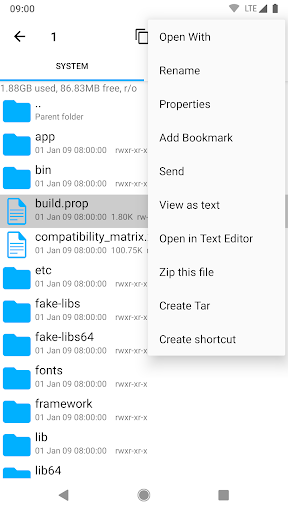
• Send files (via email, bluetooth etc)
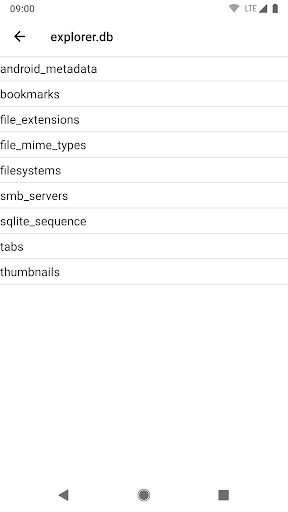
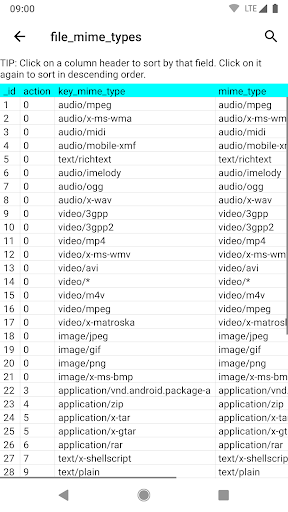
• Built in SQLite database viewer
• Bookmark frequently used files and folders
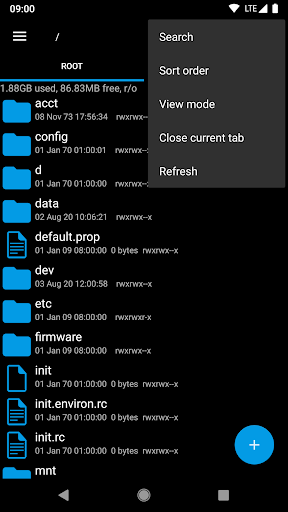
• Search function
• "Open With" facility allowing files to be opened as a generic type or by using specific apps
• View file and folder properties including size, date, MD5 checksum
For fast, friendly support simply email us: support@speedsoftware.co.uk
Explorer supports 11 languages including: English, French, Spanish, Italian, German, Japanese, Korean, Hebrew, Danish, Russian and Portuguese.
Permissions:
• Full network access - Required for network and cloud access. No information is passed to us over the internet.
• Add or remove accounts - Used by the Google Drive SDK to add a new account if desired. No changes are made to existing accounts and no details accessed apart from the account name.
• Find accounts on the device - Used to list available accounts for logging into Google Drive.
• Prevent from sleeping - Used to stop the device sleeping during long operations so they are not interrupted.
Privacy
Given the app requires no permissions, the risk of data collection or privacy breaches is significantly minimized. However, users should still be cautious when managing sensitive files and consider using additional security measures such as encryption for highly confidential data. Regularly reviewing the app's permissions and updates can also help ensure continued safe use.
Tips
For first-time users, setting up the app involves simply installing and launching it, after which they can immediately begin managing their files. To optimize performance, users should regularly clean up unnecessary files and folders, and consider organizing their files into clear categories for easier access. Additionally, exploring the app's settings can reveal options for customizing the user interface and behavior to better suit individual preferences.
What's New
Version Information
- Version
- 3.12.8
- Downloads
- 10M+
- Updated on
- Oct 27, 2025
- Released
- Feb 4, 2026
- Requires
- Android 4.3
Statistics
Google Play Rating History
Rating Distribution
Downloads Over Time
Explorer has been downloaded times. Over the past 30 days, it averaged downloads per day.
Shaded area shows 30-day prediction based on historical trends
Historical data collection started recently. More data points will be available over time.
Explorer users say on Google Play
 Rick Arding
Been using Explorer eight years now and it's still the best for me. No useless bloat and it's fast. Transferring files between cloud storages and my device is very fast using the persistent tabs. Background operations save me a lot of time. Freaking good app
 Kent Solgule
Background copy doesn't work, not for large files anyway. It's pointless to use since device becomes unresponsive. It's better to watch the progress bar and have the opportunity to cancel the copy than to have a temporary brick. I copied between SD and internal mem, 0.5 to 3.5 GB files, android 10, 4GB RAM. Haven't noticed this problem before, but maybe used mostly for many small files before.
 MKP
MKP
Can't access data and obb files again on galaxy s24 ultra. Hope you manage to find a workaround because I don't really want to mess with root any more
 nageshwar rao adhikarala
Not much impressed.
 Nick Stapp
This app has received a bad update that removes the ability to open the Android/data folder. It's stupid and unnecessary for an update to remove a feature. I installed an older version, opened Android/data, then updated, and I could navigate the folder just fine. I exited the folder and then couldn't reopen it. Please undo the stupid update and do not remove features in updates. The ability to open Android/data should still be included in the app for devices that support this feature.
ApkTrusted Ratings & Reviews
More from Speed Software
See more apps

Similar Apps

Super File Manager Explorer
Free

Total Commander - file manager
Free
Material Files
Free
Cx File Explorer
Free

ASTRO File Manager & Cleaner
Free

File Manager
Free

EX File Manager
Free

Swift Backup
Free

Storage Analyzer & Disk Usage
Free

MediaFire
Free

File Manager
Free
RAR
Free
RS File Manager File Explorer
Free
File Manager
Free

fooView - FV Float Viewer
Free

PRIVARY Secure Photo Vault
Free
Scan this QR code to download

Forwarding you to the page at Google Play market in seconds...
Open Google Play market now