
File Manager vV1-210601
Xiaomi Inc.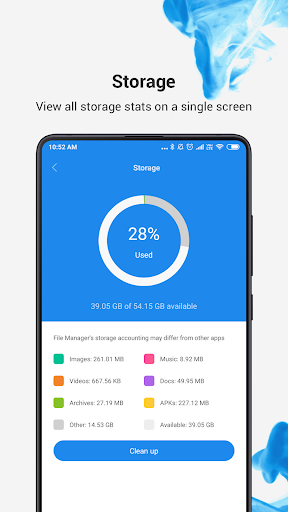

About this app
The File Manager app by Xiaomi Inc. solves the problem of cluttered and disorganized device storage by providing an easy-to-use and efficient file management tool. This app benefits users who need to frequently manage and transfer files, such as professionals and power users. Compared to alternatives in the Tools category, Mi File Manager stands out with its high user rating and large download numbers, indicating a high level of user satisfaction. However, its lack of unique features and reliance on ads for monetization might make it less appealing to some users.
Pros
- With over 1 billion downloads and a 4.6-star rating, Mi File Manager has demonstrated its effectiveness and user satisfaction, making it a reliable choice for file management needs.
- The app's developers, Xiaomi Inc., are a well-established and reputable company, which adds to the app's credibility and trustworthiness.
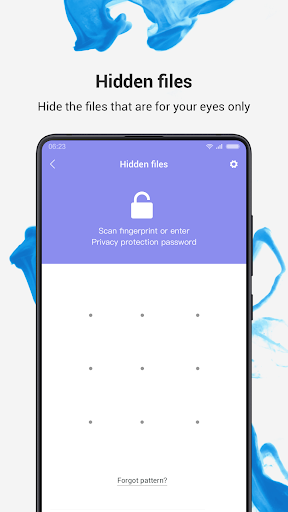
- Mi File Manager requires no permissions, which is a significant advantage in terms of user privacy and security, as it minimizes the risk of data breaches or unauthorized access.
- The app's offline capability and efficient performance make it a great option for users who need to manage files on-the-go or in areas with limited internet connectivity.
- The developers' active support and frequent updates ensure that the app stays up-to-date with the latest Android versions and security patches.
Cons
- The app's monetization model, which relies on ads, might be intrusive or annoying to some users, potentially compromising the overall user experience.
- Some users might find the app's feature set to be limited compared to other file management tools, which could be a drawback for power users or those with specific needs.
- The lack of in-app purchases or premium features might limit the app's revenue potential, which could impact the developers' ability to invest in future updates and improvements.
- The app's compatibility with certain devices or Android versions might be limited, which could result in performance issues or crashes for some users.
Best for: The ideal user for Mi File Manager is a tech-savvy individual, likely between the ages of 25 and 45, who frequently manages and transfers files, such as professionals, students, or power users, and values a reliable, efficient, and easy-to-use file management tool that can help them stay organized and productive on-the-go.
Developer Description
Mi File Manager is a free, secure tool for easy and efficient file management.
Key features
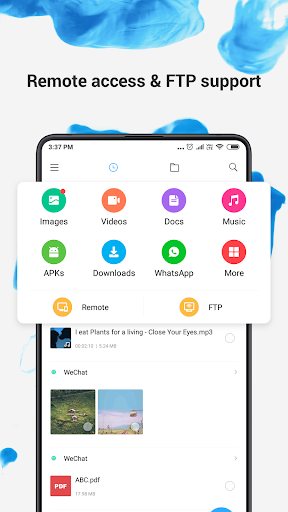
Recent: View the files you worked with recently without looking for them.
Categories: Files are organized into categories by their formats. From there, you can access to frequently used apps quickly.
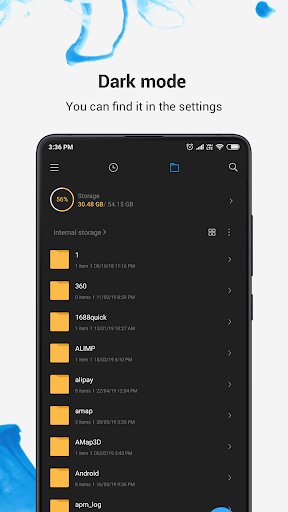
Storage: View your storage stats and manage all folders on your device.
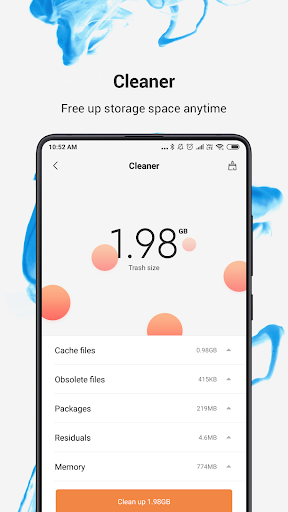
Cleaner: Free up storage space on your device by deleting cache and junk files.
Mi Drop: Share files with friends who are nearby without connecting to the Internet.
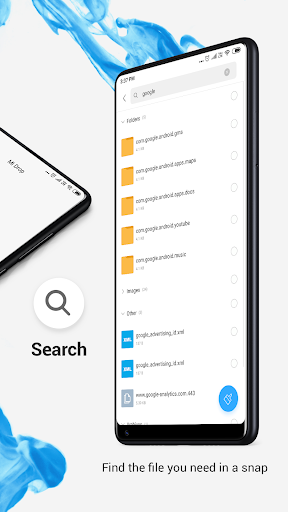
Global search: Enter keywords to find files.
Multiple file formats support: Open videos, music, documents, APKs, and compressed files with one tap.
File compression: Compress and decompress ZIP/RAR archives.
Manage multiple files: Select multiple files for the same operation.
Multiple languages supported: Bahasa Indonesia, Bengali, Chinese, English, Español, Português, ру́сский язы́к, українська мова, Tiếng Việt
Privacy
Since Mi File Manager requires no permissions, the risk of data breaches or unauthorized access is minimized. However, users should still be cautious when downloading and installing apps from unknown sources, and ensure that they are downloading the official version from a trusted store. Additionally, users should regularly review and update their app permissions to ensure that they are aware of any changes to the app's access requests.
Tips
To get the most out of Mi File Manager, users should first set up the app by granting it the necessary storage access permissions, and then explore the app's various features, such as file sorting and searching. Additionally, users can optimize the app's performance by regularly cleaning up temporary files and cache, and by using the app's built-in file compression feature to reduce storage usage. Furthermore, users can integrate Mi File Manager with other apps, such as cloud storage services, to enhance their file management capabilities.
What's New
1. Fixed some known bugs.
2. Boosted overall performance.
Version Information
- Version
- V1-210601
- Downloads
- 1.0B+
- Updated on
- May 13, 2024
- Released
- Oct 25, 2017
- Requires
- Android 5.0
Statistics
Google Play Rating History
Rating Distribution
Downloads Over Time
File Manager has been downloaded times. Over the past 30 days, it averaged downloads per day.
Shaded area shows 30-day prediction based on historical trends
Historical data collection started recently. More data points will be available over time.
File Manager users say on Google Play
 Litrisia Vosloo
very happy
 Tiffany Sesuca
It's a great app and I love it. It deserves 5 stars!
 Jianna Embri
good 👍 you
 Varinder Dobhal
File folder not deleted so very bad application
 DP Gupta
photo not working properly
ApkTrusted Ratings & Reviews
More from Xiaomi Inc.
See more apps













Similar Apps

File Manager
Free
Material Files
Free
File Manager
Free

Samsung My Files
Free

File Manager
Free

Cx File Explorer
Free
ZX File Manager
Free

Total Commander - file manager
Free

Super File Manager Explorer
Free

EX File Manager
Free

Explorer
Free
RS File Manager File Explorer
Free

Storage Analyzer & Disk Usage
Free

File Sharing - InShare
Free

ASTRO File Manager & Cleaner
Free

RAR
Free
Scan this QR code to download

Forwarding you to the page at Google Play market in seconds...
Open Google Play market now