
Samsung My Files v15.2.04.2
Samsung Electronics Co., Ltd.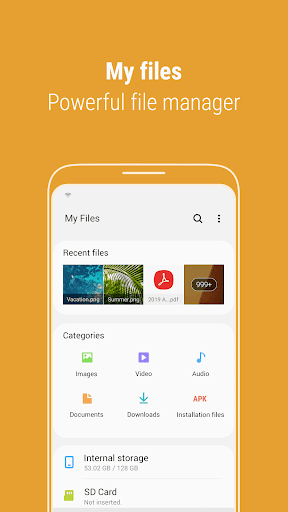
About this app
Samsung My Files is a file manager app that solves the problem of accessing and managing files on Samsung devices, benefiting users who need to organize their files and folders efficiently. Compared to alternatives in the Tools category, Samsung My Files stands out with its simplicity and seamless integration with Samsung devices. However, it may fall short in terms of advanced features offered by other file manager apps. With over 5 billion downloads and a 4.0-star rating, it's clear that Samsung My Files is a trusted and reliable choice for many users.
Pros
- The app's simplicity and ease of use make it accessible to users of all skill levels, allowing them to quickly and easily manage their files and folders.
- As a Samsung-developed app, it integrates perfectly with Samsung devices, providing a seamless and intuitive user experience.
- With no ads or in-app purchases, users can enjoy a distraction-free experience without any additional costs or interruptions.
- The app's offline capability allows users to access and manage their files even without an internet connection, making it a reliable choice for users who need to work with files on-the-go.
- Samsung's reputation for delivering high-quality apps ensures that Samsung My Files is a trustworthy and reliable choice for users who need a file manager app.
Cons
- One concern is that the app may not offer as many advanced features as other file manager apps, which could be a drawback for power users who need more complex file management capabilities.
- Some users may find the app's design and user interface to be somewhat outdated, which could make it less appealing to users who are accustomed to more modern and sleek app designs.
- As a Samsung-exclusive app, users with non-Samsung devices may not be able to take full advantage of the app's features and integration, which could limit its appeal to a wider audience.
- The lack of transparency about the app's data collection and usage policies could be a concern for users who are sensitive about their privacy and data security.
Best for: The ideal user for Samsung My Files is a Samsung device owner who needs a simple, reliable, and easy-to-use file manager app to organize and manage their files and folders, and is likely a casual user who values ease of use and simplicity over advanced features and complex functionality.
Developer Description
File manager to access files or folders in your device
"My Files" manages all the files on your smartphone, just like a file explorer on your computer.
You can also manage files stored on SD cards, USB drives and files in the cloud storage connected with your smartphone at the same time.
Download and experience "My Files" now.
[New features in My Files]
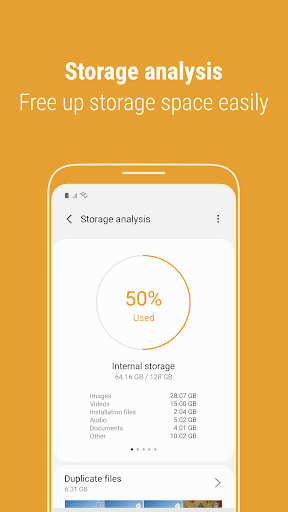
1. Free up storage space easily by tapping the "Storage Analysis" button on the main screen.
2. You can hide any unused storage space from the main screen via the "Edit My Files home".
3. You can view long file names without ellipses using the "Listview" button.
[Key features]
- Browse and manage files stored on your smartphone, SD card, or USB drive conveniently.
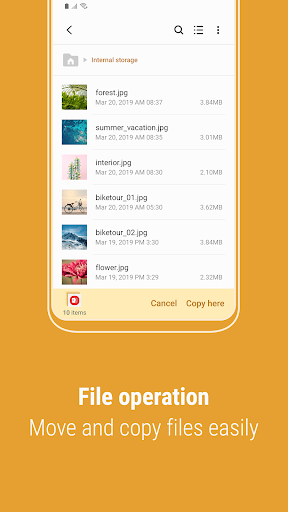
.Users can create folders; move, copy, share, compress, and decompress files; and view file details.
- Try our user-friendly features.
.The Recent Files list: Files the user has downloaded, run, and/or opened
.The Categories list: Types of files, including downloaded, document, image, audio, video, and installation files (.APK)
.Folder and file shortcuts: Show on the device home screen and the My Files main screen
.Provides a function used to analyze and free up storage space.
- Enjoy our convenient Cloud services.
.Google Drive
.OneDrive
※ Supported features may be different depending on models.
The following permissions are required for the app service.
[Required permissions]
-Storage: Used to open, delete, edit, search files and folders on internal / external memory
- Notifications : Used to show the progress of ongoing actions such as moving or copying files and folders
Privacy
Since Samsung My Files requires no permissions, users can rest assured that their data and device are safe from potential security risks. However, users should still be cautious when managing sensitive files and folders, and ensure that they are using the app in a way that protects their privacy and security. It's also a good idea to regularly review and update the app to ensure that any potential security vulnerabilities are patched.
Tips
To get the most out of Samsung My Files, users should start by familiarizing themselves with the app's simple and intuitive interface, and exploring the various features and options available. Users can also optimize their file management experience by creating folders and categories to organize their files, and using the app's search function to quickly locate specific files. Additionally, users can take advantage of the app's offline capability by accessing and managing their files even without an internet connection.
Version Information
- Version
- 15.2.04.2
- Downloads
- 5.0B+
- Updated on
- Jan 8, 2026
- Released
- Apr 8, 2018
- Requires
- Android Varies with device
Statistics
Google Play Rating History
Rating Distribution
Downloads Over Time
Samsung My Files has been downloaded times. Over the past 30 days, it averaged downloads per day.
Shaded area shows 30-day prediction based on historical trends
Historical data collection started recently. More data points will be available over time.
Samsung My Files users say on Google Play
 janice parker
Great for my basic use.
 No Name
This is the worst manager on the market.
 Remi Purl
why is there an update that files isn't updated to run it's run. by the same company and it's making my phone hard to use pls update thankyou
 Brian Patterson
File Manger will not update, not matter the steps I take to resolve. I am too scared to uninstall then reinstall in the fear I loose all of the files within File Manager.
 Jaguar MBSD
Deceitful- theft of data
ApkTrusted Ratings & Reviews
More from Samsung Electronics Co., Ltd.
See more apps
Smart Tutor for SAMSUNG Mobile
Free

One Hand Operation +
Free

POWERbot-S
Free

Samsung WE VoIP
Free

Galaxy Buds Core Manager
Free
Samsung Accessory Service
Free

Galaxy Buds FE Manager
Free
Galaxy Buds FE Manager
Free

Galaxy Buds Pro Manager
Free

Galaxy Buds3 Manager
Free

Galaxy Buds2 Manager
Free

Galaxy Buds Manager
Free

Samsung Plus 2
Free

Galaxy Buds3 FE Manager
Free

POWERbot-E
Free

Galaxy Buds3 Pro Manager
Free
Similar Apps

File Manager
Free

File Manager
Free

Swift Backup
Free
File Manager
Free

ASTRO File Manager & Cleaner
Free

Storage Analyzer & Disk Usage
Free

Super File Manager Explorer
Free

Explorer
Free
Material Files
Free

Xiaomi Community
Free

Gallery - photo gallery, album
Free

File Manager
Free

Dropbox: Secure Cloud Storage
Free

EX File Manager
Free

Total Commander - file manager
Free
Cx File Explorer
Free
Scan this QR code to download

Forwarding you to the page at Google Play market in seconds...
Open Google Play market now