
MacroDroid - Device Automation vVARY
ArloSoft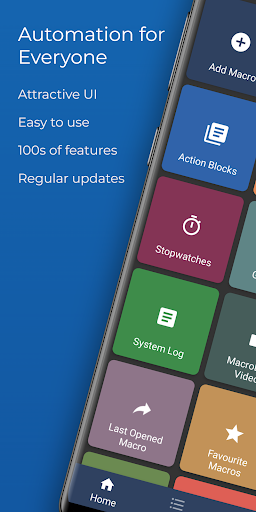
About this app
Developer Description
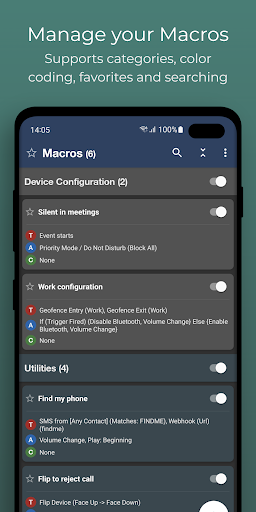
Number one automation app for Android - Over 20 million Downloads.
A few examples of how MacroDroid can help you to get automated:
# Manage files on your device, for example automating file copying, moving and deleting to keep your file system clean.
# Auto reject incoming calls when in a meeting (as set in your calendar).
# Increase safety while commuting by reading your incoming notifications and messages (via Text to Speech) and send automated responses via email or SMS.
# Optimize your daily workflow on your phone; switch on bluetooth and start playing music when you enter your car. Or switch on WiFi when near your house.
# Reduce battery drain (e.g. dim screen and switch Wifi off)
# Make custom sound and notification profiles.
# Remind you to do certain tasks using timers and stopwatches.
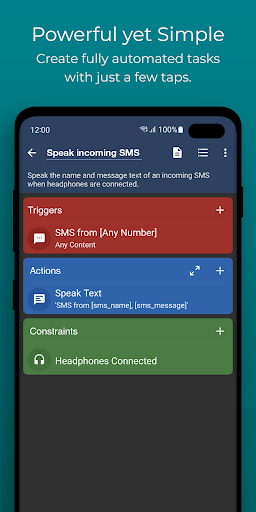
These are just a few examples out of limitless scenarios where MacroDroid can make your Android life a little easier. With only 3 simple steps this is how it works:
1. Select a Trigger.
The trigger is the cue for the macro to start. MacroDroid offers over 80 triggers to start your macro, i.e. location based triggers (like GPS, cell towers, etc), device status triggers (like battery level, app starting/closing), sensor triggers (like shaking, light levels, etc) and connectivity triggers (like Bluetooth, Wifi and Notifications).
You can also create a shortcut on the homescreen of your device or run using the unique and customizable Macrodroid sidebar.
2. Select the Actions you like to automate.
MacroDroid can perform over 100 different actions, that you typically would do by hand. Connect to your Bluetooth or Wifi device, select volume levels, speak text (like your incoming notifications or current time), start a timer, dim your screen, run Tasker plugin and many more.
3. Optionally: Configure Constraints.
Constraints help you to let the macro fire only when you want it to.
Living near your work, but only want to connect to your company's Wifi during work days? With a constraint you can select specific times or days that the macro can be invoked. MacroDroid offers over 50 constraint types.
MacroDroid is compatible with Tasker and Locale plugins to expand the range of possibilities even further.
= For beginners =
MacroDroid's unique interface offers a Wizard that guides step by step through the configuration of your first macros.
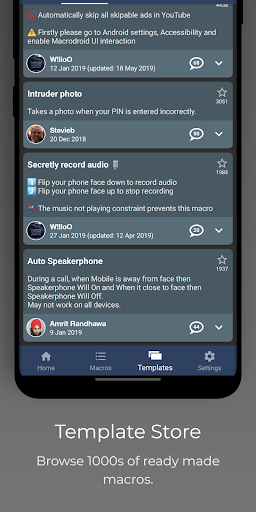
It is also possible to use an existing template from the template section and customize it to your needs.
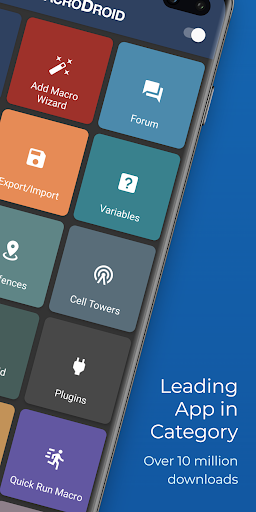
The built-in forum allows you to get help from other users, allowing you to easy learn the ins and outs of MacroDroid.
= For more experienced users =
MacroDroid offers more comprehensive solutions like the use of Tasker and Locale plugins, system/user defined variables, scripts, intents, advance logic like IF, THEN, ELSE clauses, use of AND/OR
The free version of MacroDroid is ad-supported and allows up to 5 macros. The Pro version (a small one time fee) removes all adverts and allows an unlimited amount of macros.
= Support =
Please use the in-app forum for all usage questions and feature requests, or access via www.macrodroidforum.com.
To report bugs please use the built in 'Report a bug' option available via the troubleshooting section.
= Accessibility Services =
MacroDroid makes use of accessibility services for certain features like automating UI Interactions. use of accessibility services is entirely at the users discretion. No user data is ever obtained or logged from any accessibility service.
= Wear OS =
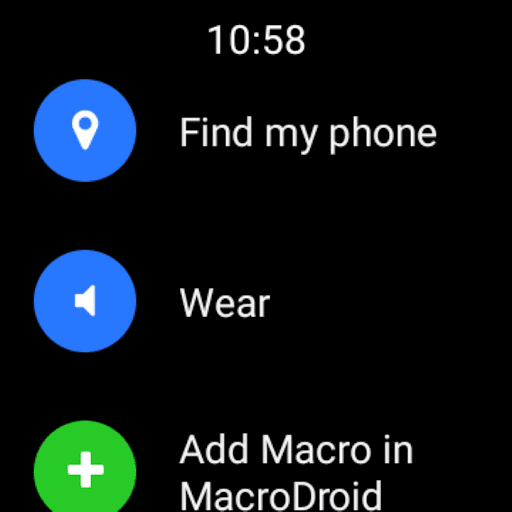
This app contains a Wear OS companion app for interaction with MacroDroid. This is not a standalone app and requires the phone application installed. The Wear OS app supports complications populated by MacroDroid to use along with your watch face of choice.
What's New
Fixed issue where animation overlay action would not invoke [this macro] when clicked.
Fixed issue where floating text could appear at slightly different y location when dragged and redisplayed later.
Fixed issue where file operation (all file access) did not work correctly with delete option.
Fixed issue with calendar end event not working correctly when using check in advance.
In-app purchases
$2.49 - $10.00 per item
Version Information
- Version
- -
- Downloads
- 10M+
- Updated on
- Jan 14, 2026
- Released
- May 18, 2012
- Requires
- Android Varies with device
Statistics
Google Play Rating History
Rating Distribution
Downloads Over Time
MacroDroid - Device Automation has been downloaded times. Over the past 30 days, it averaged downloads per day.
Shaded area shows 30-day prediction based on historical trends
Historical data collection started recently. More data points will be available over time.
MacroDroid - Device Automation - Google Play Rankings
Top Rankings
| Rank | Country | Category | List | Change |
|---|---|---|---|---|
| — |
Ranking History in
No ranking data available yet. Rankings are updated daily.
#8 in Top Free Tools in India


#29 in Top Grossing Tools in Japan
 Cast for Chromecast & TV Cast
MacroDroid - Device Automation
Cast for Chromecast & TV Cast
MacroDroid - Device Automation
 All Recovery - Photos, Videos
#39 in Top Free Tools in Pakistan


#43 in Top Grossing Tools in Brazil


MacroDroid - Device Automation users say on Google Play
 dar thlaan
Great device automation, and improving all the time!
 Sofía Barquero
Works amazing but it does have limitations on things (actions and triggers) i wish it did. But for what it does work (which is still plenty) it's amazing and does make my life easier. Also quite fun if you like programming without actually having to code.
 Chris Schneider
Works great. The issue is that logs fill up and it becomes unresponsive. Took me a while to figure it out. I created a macro to clear the logs, but this shouldn't be an issue. I don't know why I can't just turn off logs altogether. I don't find them useful. Even turning off logging for a script, system logs are still recorded for the script. My usage is scripts that touch every few seconds or less, and the app just breaks after a while.
 Heran Bago
Mostly does not work on various official firmwares for Samsung's Android. Most desired functions aren't going to happen. App tries its best though and looks okay doing it. Assuming it works on certain other devices. Persistent Notification won't go away despite best efforts. Zero support. D+ would not buy again.
 Sinner
There's a very annoying bug, if you enable silent mode, it also enables DnD for some stupid reason. I reported it everywhere I could, but I found no solution so far. And the developer doesn't respond to support emails.
ApkTrusted Ratings & Reviews
Similar Apps

Spatial Touch™
Free

Automate
Free

G-CPU:Monitor CPU, RAM, Widget
Free

Starlink
Free

Taskbar
Free

Auto Clicker - Automatic tap
Free

Macrorify - Image Auto Clicker
Free

DevCheck Device & System Info
Free

Touch Screen Test
Free

Xiaomi Community
Free
AccuBattery
Free
GlassWire Data Usage Monitor
Free
Automatic Scroll
Free
CPU Monitor - temperature
Free

Quikshort: Shortcut Creator
Free
RAR
Free
Scan this QR code to download

Forwarding you to the page at Google Play market in seconds...
Open Google Play market now