
DevCheck Device & System Info vVARY
flar2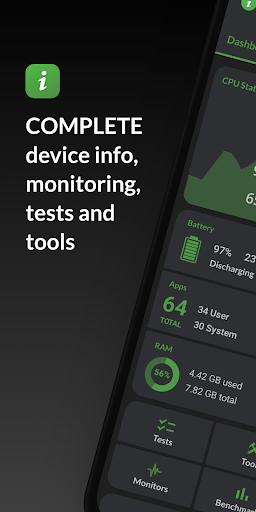



About this app
Developer Description
Testing, tools and complete information about your hardware and operating system
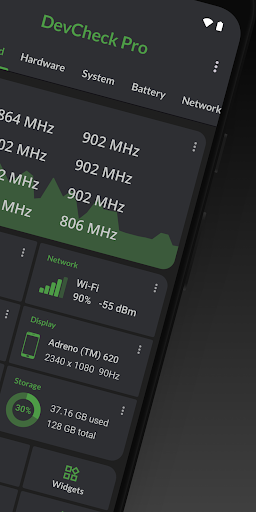
DevCheck provides some of the most detailed CPU and System-on-a-Chip (SoC) information available on Android. View specifications for Bluetooth, GPU, RAM, storage, and other hardware in your phone or tablet. See detailed Wi-Fi and mobile network information, including dual-SIM support. Monitor sensors in real time and learn about your device’s operating system and architecture. Rooted devices and Shizuku are supported for accessing additional system information on compatible devices.
Dashboard:
A comprehensive overview of critical device and hardware information, including real-time monitoring of CPU frequencies, memory usage, battery statistics, deep sleep, and uptime, with summaries and shortcuts to system settings.
Hardware:
Detailed specifications for your SoC, CPU, GPU, memory, storage, Bluetooth, and other hardware, including chip names and manufacturers, architecture, processor cores and configuration, manufacturing process, frequencies, governors, storage capacity, input devices, and display specifications.
System:
Complete system and software information, including device codename, brand, manufacturer, bootloader, radio, Android version, security patch level, and kernel. DevCheck can also check root, BusyBox, KNOX status, and other operating system details.
Battery:
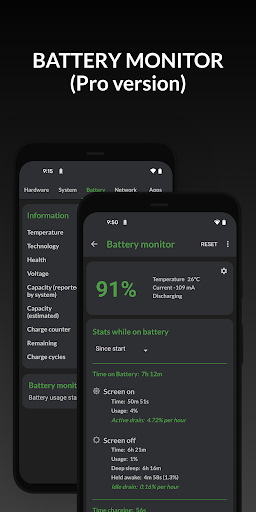
Real-time battery information including status, temperature, level, technology, health, voltage, current, power, and capacity. The Pro version adds detailed battery usage tracking with screen-on and screen-off statistics using the Battery Monitor service.
Network:
Detailed information about Wi-Fi and mobile/cellular connections, including IPv4 and IPv6 addresses, connection details, operator, phone and network type, public IP address, and one of the most complete dual-SIM implementations available.
Apps:
Detailed information and management for all installed apps.
Camera:
Advanced camera specifications including aperture, focal length, ISO range, RAW capability, 35mm equivalents, resolution (megapixels), crop factor, field of view, focus modes, flash modes, JPEG quality and image formats, and available face detection modes.
Sensors:
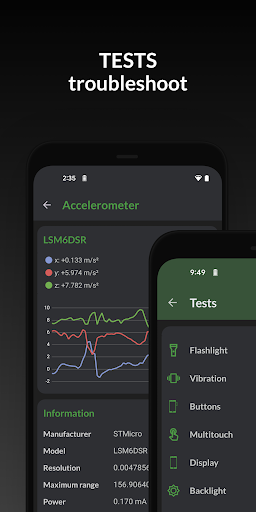
A complete list of all sensors on the device, including type, manufacturer, power usage, and resolution, with real-time graphical data for accelerometer, step detector, gyroscope, proximity, light, and more.
Tests:
Flashlight, vibrator, buttons, multitouch, display, backlight, charging, speakers, headset, earpiece, microphone, and biometric scanners (the last six tests require the Pro version).
Tools:
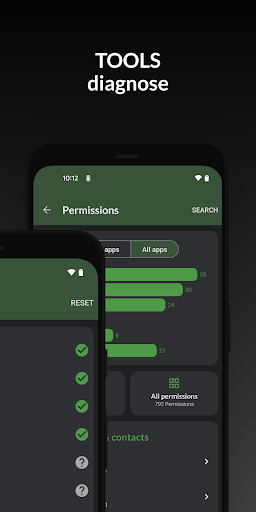
Root Check, Bluetooth Scan, CPU Analysis, Integrity Check (Pro), Permissions Summary (Pro), Wi-Fi Scan (Pro), Network Mapper (Pro), Usage Stats (Pro), GPS tools (Pro), and USB Check (Pro).
Widgets (Pro):
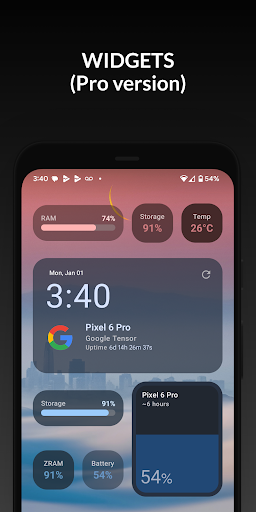
Modern, customizable widgets for your home screen. Monitor battery, RAM, storage, and other stats at a glance.
Floating Monitors (Pro):
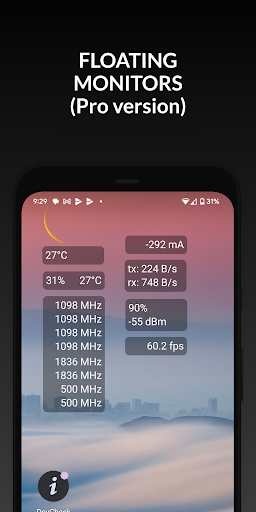
Customizable, movable, always-on-top transparent overlays that display real-time information such as CPU frequencies and temperatures, battery status, network activity, and more while using other apps.
Pro Version
Available via in-app purchase.
The Pro version unlocks all tests and tools, benchmarking, Battery Monitor, home screen widgets, floating monitors, and custom color schemes.
Permissions & Privacy
DevCheck requires various permissions to display detailed device information.
No personal data is ever collected or shared.
Your privacy is always respected.
DevCheck is completely ad-free.
What's New
-Screen Time (PRO)
-bug fixes
6.19/6.24:
-improve battery, network, and other hardware info
-updated and improved some UI elements
-new temperature screen
-Network Mapper (PRO)
-bug fixes and optimizations
6.17:
-improve hardware detection
-support new hardware and devices
-Shizuku support (temperatures, battery info, CPU load, app memory usage list)
-task manager (requires Shizuku and PRO)
-improve temperature, battery, GPU, vulkan and OpenGL info
-modernize old stuff
In-app purchases
$1.49 - $24.99 per item
Version Information
- Version
- -
- Downloads
- 5M+
- Updated on
- Dec 14, 2025
- Released
- Aug 1, 2015
- Requires
- Android Varies with device
Statistics
Google Play Rating History
Rating Distribution
Downloads Over Time
DevCheck Device & System Info has been downloaded times. Over the past 30 days, it averaged downloads per day.
Shaded area shows 30-day prediction based on historical trends
Historical data collection started recently. More data points will be available over time.
DevCheck Device & System Info - Google Play Rankings
Top Rankings
| Rank | Country | Category | List | Change |
|---|---|---|---|---|
| — |
Ranking History in
No ranking data available yet. Rankings are updated daily.
#51 in Top Free Tools in Indonesia
 Speaker Cleaner - Remove Water
DevCheck Device & System Info
Speaker Cleaner - Remove Water
DevCheck Device & System Info
 Video Downloader: Video Player
DevCheck Device & System Info users say on Google Play
 Brett Richards
Great app. It has as much, if not more info about the handset than other apps, and info that required additional permissions you can click to allow when required. (I.e. You don't need to provide app a bunch of permissions upon install, only when they are required) It has 1 click links to settings menu locations to review/change settings that are otherwise difficult to locate. The only thing this and all other handset info apps is missing, is a list of mobile network bands the handset can use.
 Samuel Cate
This is a really good app to tell you everything you want to know about your device but I wish the pro version was a bit cheaper and I don't understand why the toggle for dark mode is locked behind the pro version.
 Projwal Bk
the app is good but I want to report the bug where battery saver still say its disabled even after I turn battery saver the app doesn't recognise it as it is active other than that it is good app (phone name redmi 8a dual)
 Dan
Dan
Still broken in the newest version. Google has started to inject ‘libpairipcore.so’ into your app (and you can disable it, as far as I know). It's part of Google's anti-competitive Play Integrity suite. It breaches a real opt-in security protection I have in my hardened phone (not found in other phones of the same model), causing the protection to kill your app on launch. I'd appreciate if you'd disable this Google garbage. Previous versions of your app didn't use/contain ‘libpairipcore.so’.
ApkTrusted Ratings & Reviews
More from flar2
See more apps





Similar Apps

3DMark — The Gamer's Benchmark
Free

G-CPU:Monitor CPU, RAM, Widget
Free
AccuBattery
Free
Charge Meter
Free
GlassWire Data Usage Monitor
Free

MacroDroid - Device Automation
Free

CPU Monitor - temperature
Free

Touch Screen Test
Free

NetSpeed Indicator
Free

Xiaomi Community
Free

GSMArena
Free

Swift Backup
Free

Taskbar
Free

1Tap Cleaner (clear cache)
Free

dynamicSpot - Dynamic Island
Free

F-Secure Mobile Security
Free
Scan this QR code to download

Forwarding you to the page at Google Play market in seconds...
Open Google Play market now