
High Brightness Mode v6.02
flar2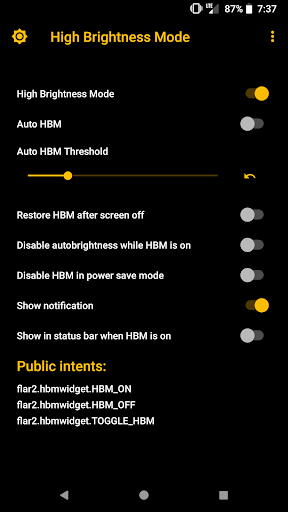


About this app
Developer Description
See your screen in bright sunshine. High brightness mode for your phone
This app triggers an extra high brightness mode that is built in to many phones with AMOLED screens, including most Samsung, Motorola and OnePlus phones. See below for a list of devices with high brightness mode (HBM) capability.
Even if your phone does not have the special HBM hardware setting, this app will force maximum screen brightness, which is really handy when you are outside in the sun.
HBM does not require root on Samsung devices, but the screen can will be brighter if your device is rooted. With root, this app can force maximum brightness beyond what is available in system settings.
HBM now requires root on OnePlus devices!
HBM requires root on the Nexus 6/6P, Pixel, Pixel XL, Pixel 2 and Motorola phones. Root is required because HBM is a special hardware setting, it does NOT simply increase your brightness slider to max. This is significantly brighter than max brightness on compatible devices.
Four ways to activate high brightness mode:
-Auto mode, which turns high brightness mode on or off depending on ambient lighting
-Widget for your homescreen
-Quick Settings tile (Android Nougat or later)
-Manually in the app
Compatible devices:
-Most Samsung phones, including Galaxy S6/S7/S8 and Note 6/7/8. Works without root on Samsung phones, but will get brighter on rooted devices
-Most Motorola phones with AMOLED screens. Requires root.
-Nexus 6. Requires root for HBM hardware setting
-Nexus 6P, Pixel, Pixel XL, Pixel 2, Pixel 2XL, Pixel 3, Pixel 3XL, Pixel 3a, Pixel 3a XL: Requires a custom kernel such as ElementalX or Kirisakura and root.
-OnePlus 3/3T/5/5T/6/6T/7: requires root
On phones with the HBM hardware setting, this app can make your screen up to 20% brighter than the highest brightness setting. High Brightness Mode Widget uses a hidden hardware setting to unleash the full potential of your AMOLED screen.
Auto mode will automatically turn high brightness mode on or off depending on the brightness (ambient light) of your surroundings. You can adjust the threshold for triggering high brightness mode and set auto mode using either the app, widget or quick settings tile.
This app can maintain high brightness mode even if you turn your screen off and on (and even across reboots!)
For Samsung and OnePlus phones, it is recommended to select the "Disable autobrightness when HBM is on" option if you use the system's auto brightness. This setting will prevent the system from turning off HBM if you enable it, but still allow you to use auto brightness the rest of the time.
Tasker integration with these intents:
flar2.hbmwidget.TOGGLE_HBM (this toggles high brightness mode)
flar2.hbmwidget.HBM_ON (turns on high brightness mode)
flar2.hbmwidget.HBM_OFF (turns off high brightness mode)
What's New
-Supports OnePlus 5, 6, 7 and 8 series (and maybe later) (requires root)
-Supports most (not all) Samsung devices without root
-Other devices do not have High Brightness Mode! This app will only set the display to max brightness, no extra brightness. Still useful if you want to force maximum brightness
Version 6.02:
-update for new devices
-bug fixes and improvements
Version Information
- Version
- 6.02
- Downloads
- 10K+
- Updated on
- Aug 13, 2024
- Released
- Jul 21, 2015
- Requires
- Android 5.0
Statistics
Google Play Rating History
Rating Distribution
Downloads Over Time
High Brightness Mode has been downloaded times. Over the past 30 days, it averaged downloads per day.
Shaded area shows 30-day prediction based on historical trends
Historical data collection started recently. More data points will be available over time.
High Brightness Mode - Google Play Rankings
Top Rankings
| Rank | Country | Category | List | Change |
|---|---|---|---|---|
| — |
Ranking History in
No ranking data available yet. Rankings are updated daily.
#31 in Top Paid Tools in Indonesia


#63 in Top Paid Tools in India


#98 in Top Paid Apps in Indonesia

![Navigation [Huawei watches]](https://play-lh.googleusercontent.com/LIpu_9yID-4tv05JF2k160_JYGtZjliiTWi80eBgi82DVUSt2IleiGKYFeoV8GX3Hg)
High Brightness Mode users say on Google Play
 William Davis
Since going from a Galaxy J337V with outdoor mode to an A03s with adaptive brightener, I could not see my camera screen when trying to take photos outside. This app made a world of difference. Still not quite as good as my old phone in outdoor mode, but a thousand times better with this app. Good job, it makes my life easier.
 Sridhar palivela
good
 DreamFyre The Dragon
Device: S22 Ultra Not Rooted App did not do much. It maximized brightness and disabled adaptive brightness. However true high brightness mode was not enabled. High brightness mode is a toggleable option by default on this device and when enabled, gets exceptionally brighter than this app does. Might yield better results if device was rooted, but that is outside of my field of interest at this time.
 C
C
I gotta say it's a no go and I've looked hard to notice a difference in the screen brightness but I don't see it turning the brightness to the max. Many Samsung phones have to be in auto to do this and be in direct sunlight. You can tell when it enters this mode by the brightness adjuster in the notification bar turning red and the screen gets extremely bright. This app does put the phone into standard extra bright but there's already a button for that in brightness adjuster on pull down menu.
 Zack D'Mello
Absolutely rip off. It does absolutely nothing. It just increases brightness to the max. Save your money and don't buy this app. They specifically said in the description: OnePlus phones don't require root. Edit: Looks like my review made them change the description. Description now says that OnePlus phones now need root lol. Unfortunate as I purchased based on the old description.
ApkTrusted Ratings & Reviews
More from flar2
See more apps





Similar Apps

Castro Premium - system info
Paid

TAP Kiln Control Mobile
Free

Lib of Dev (Open Source)
Free

myPhonak
Free

ATMOS : Online dive logbook
Free

PDK Access by ProdataKey
Free

NETGEAR Orbi – WiFi System App
Free

Quikshort: Shortcut Creator
Free

Philips Hue
Free

Lorex Classic
Free
ChargeNow
Free

Cync (the new name of C by GE)
Free

Nedis SmartLife
Free

Cloaked: Protect your privacy
Free

Ajax PRO: Tool For Engineers
Free

Oticon Companion
Free
Scan this QR code to download

Forwarding you to the page at Google Play market in seconds...
Open Google Play market now