
EX Kernel Manager v6.04
flar2


About this app
Developer Description
Tweak kernel settings on your rooted device
** Your device must be ROOTED to fully use this app
** This app works with ALL devices and kernels. ElementalX is not required.
** Some advanced features such as wake gestures, color and sound control require a compatible custom kernel
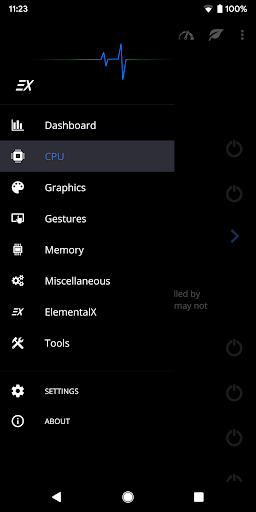
Dashboard: your homepage within the app, Dashboard summarizes your current settings and shows real-time CPU and GPU frequencies, temperatures, memory usage, uptime, deep sleep, battery level and temperature, governors, and i/o settings.
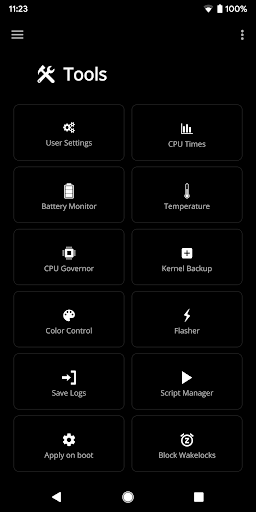
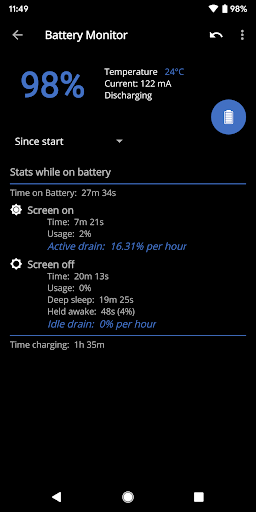
Battery Monitor: the most accurate way to measure battery life. EXKM's Battery Monitor is designed to show battery statistics that you can use to optimize battery life scientifically. EXKM Battery Monitor measures % battery use per hour and gives separate statistics for screen off (idle drain) and screen on (active drain). It automatically measures only when the battery is discharging so you never have to remember to reset the stats or create markers.
Script Manager: easily create, share , edit, execute and test shell scripts (requires SuperSU or Magisk)
Flash and Backup: save and restore kernel and recovery backups, flash any boot.img, recovery zip, Magisk module or AnyKernel zip. Import custom kernel JSON configs
CPU Settings: easily create, share and load CPU governor profiles for maximum battery life. Adjust max frequency, min frequency, CPU governor, CPU boost, hotplugging, thermals and voltage (if supported by kernel/hardware)
Graphics Settings: Max frequency, min frequency, GPU governor and more.
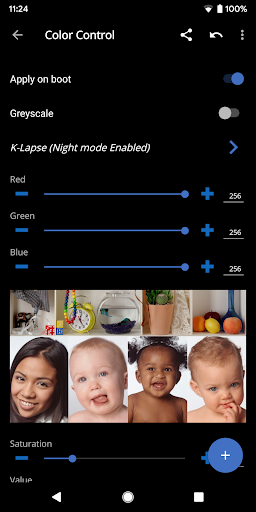
Advanced Color Control: RGB controls, saturation, value, contrast, hue and K-Lapse. Save, load and share custom profiles. (requires kernel support)
Wake Gestures: sweep2wake, doubletap2wake, sweep2sleep, haptic feedback, camera gesture, wake timeout and more (requires kernel support).
Custom User Settings: This feature allows you to add any kernel setting you want. Kernel settings are located in the /proc and /sys directories. Navigate to the desired path and quickly and easily add the setting to the app where it can be changed on the fly or applied at boot. Plus you can easily import/export your custom settings and share with other users.
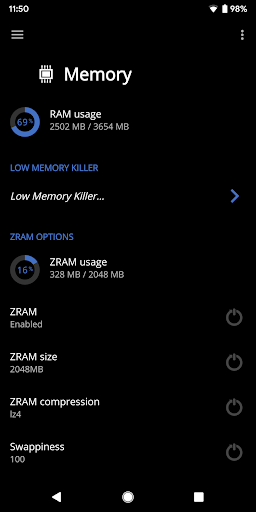
Memory Settings: adjust zRAM, KSM, lowmemorykiller, and virtual memory settings
Sound Control: adjust speaker, headphone and mic gain. Supports elementalx, fauxsound, franco sound control, and others (requires kernel support).
CPU Times: Show CPU frequency usage and deep sleep, and optionally sort by most used frequencies.
Update or Install ElementalX: Get notified and quickly download and install the ElementalX Kernel on supported devices.
Many other settings: i/o scheduler, readahead kb, fsync, zRAM, KSM, USB fastcharge, TCP congestion algorithm, last kernel log, magnetic cover control, memory settings, entropy settings, Vox Populi and much more!
ElementalX custom kernel is available for the Samsung Galaxy S9/9+, Google Pixel 4a, Pixel 4/4XL, Pixel 3/3 XL, Pixel 3a/3a XL,Pixel 2/2 XL, Pixel/Pixel XL, Nexus 5, Nexus 6, Nexus 5X, Nexus 6P, Nexus 7 (2013), Nexus 9, OnePlus Nord, OnePlus 8 Pro, OnePlus 7 Pro, OnePlus 6/6T, OnePlus 5/5T, OnePlus 3/3T, Essential PH-1, HTC One m7/m8/m9, HTC 10, HTC U11, Moto G4/G4 Plus, Moto G5 Plus, Moto Z, and Xiaomi Redmi Note 3.
What's New
-support new hardware
-init_boot backup
-more s2s options
-update translations
6.03:
-update for Android 14
-minor bug fixes and improvements
-update translations
5.98:
-support themed icon
5.90:
-update for Android 13
5.86:
-new Flash Center, import and create custom kernel JSON configs
-new Storage screen
-improve Temperature sensors
-bug fixes and optimizations
5.83:
-improve vendor_dlkm backup/restore
-fix block wakelocks on newer devices
5.81:
-backup and restore vendor_dlkm
Version Information
- Version
- 6.04
- Downloads
- 100K+
- Updated on
- Aug 25, 2024
- Released
- May 13, 2015
- Requires
- Android 4.2
Statistics
Google Play Rating History
Rating Distribution
Downloads Over Time
EX Kernel Manager has been downloaded times. Over the past 30 days, it averaged downloads per day.
Shaded area shows 30-day prediction based on historical trends
Historical data collection started recently. More data points will be available over time.
EX Kernel Manager - Google Play Rankings
Top Rankings
| Rank | Country | Category | List | Change |
|---|---|---|---|---|
| — |
Ranking History in
No ranking data available yet. Rankings are updated daily.
#44 in Top Paid Tools in Turkey


EX Kernel Manager users say on Google Play
 Chris Spearman
I had an issue choosing my backup dir. My most recent Android update disabled my Files app and replaced it with Files by Google. My issues with file picking we're fixed after reverting this. I still feel there should be a default backups dir in the event someone cancels the dialog and chooses nothing. Google has been pulling some weird stuff with file access recently, and things like that would help user pain points. Dev response was excellent, I'll drop a 5 star for that alone.
 Doğan
Doğan
Ran this a couple days now, the kernel itself is great, but the app is not. Settings randomly change when opening the app after a while and on some items the "apply on boot" button even gets turned off. Please fix these inconsistencies by ensuring the app persists the settings forever after a user sets them. E.g. when i set speaker gain to 2, it should still be 2 when i open kernel manager after a week, but currently it just resets to 0. Happens to all settings, please fix.
 Envinite
Works but kinda buggy at times. For example, after recharge, auto Powersave mode did turned off, but some config set for Powersafe still persist (ex: lower CPU/GPU max, governor). Sometimes setting that were set to apply on boot also reset/changed by itself, not the one that the app said may not persist like core & freq setting, but other stuff like default Governor, msm thermal, etc. So it makes the kernel customizable, at least until the next time it will mess up AGAIN.
 Ghocha Baladewa
This awesome, but i find bug when set frequency kernel, if i try change in maximum freq option, the frequency change to small freq (450 Mhz), when i set to 3120 mhz, the option always set to 450 Mhz, after i restart phone, he back to normal 3120 Mhz, but if i change to 2660 mhz, he always change to 450 mhz, please help, my phone is mi a1, using Cakeby Kernel 3.0 OC, this happen only in this app EXKM but if i try other kernel manager is normal..., If this issue fixed, i will give you 5 star, 🙏
 Harshit Jangir
It just doesn't work on my rooted OP5, I see black screen after flashing and rebooting it. I tried to format data after flashing, tried to flash via twrp, tried both express and custom versions, but it just doesn't work. I also sent them an e-mail but got no reply. So I just wasted my money to see a black screen on my phone and make it unusable.
ApkTrusted Ratings & Reviews
More from flar2
See more apps





Similar Apps

Lib of Dev
Free

ASTRO File Manager & Cleaner
Free

Total Commander - file manager
Free

Explorer
Free

xHP Flashtool
Free

Swift Backup
Free

CSV File Viewer - Smart CSV
Free

Ajax PRO: Tool For Engineers
Free

Storage Analyzer & Disk Usage
Free

Building Tools
Free

Castro Premium - system info
Paid

ISO Today
Free

Dig Local
Free

G-CPU:Monitor CPU, RAM, Widget
Free

CircuitMess Playground
Free

TAP Kiln Control Mobile
Free
Scan this QR code to download

Forwarding you to the page at Google Play market in seconds...
Open Google Play market now