
Button Mapper: Remap your keys v3.35
flar2


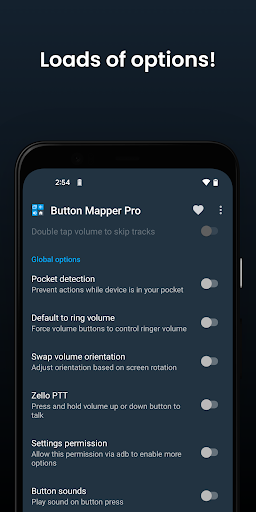


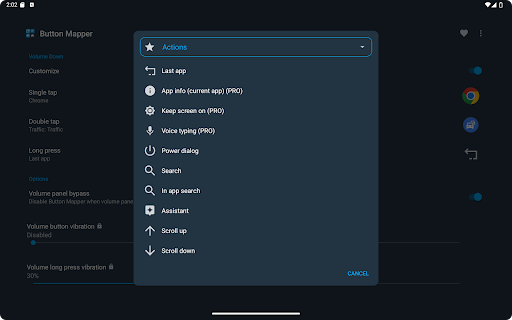


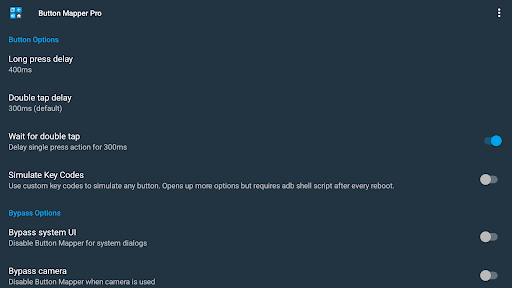


About this app
Developer Description
Remap hardware buttons to launch any app, shortcut or action
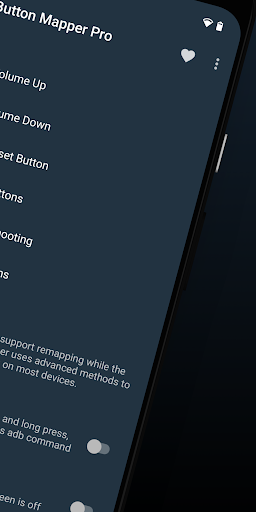
Button Mapper can remap most physical or capacitive keys and buttons, such as volume buttons, some assist buttons, and capacitive home, back and recent apps keys. Button Mapper can also remap buttons on many gamepads, remotes and other peripheral devices.
Root is not required for most actions, however some require an adb command from a connected PC if not rooted. Button Mapper does not work when the screen is off unless your device is rooted or you run an adb command.
A few examples of remapping you can do with Button Mapper:
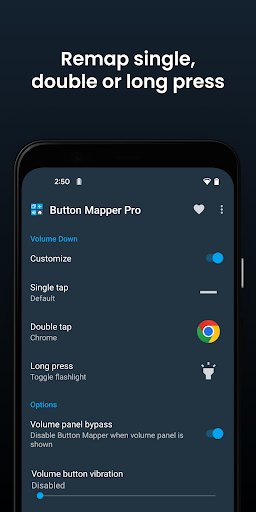
-long press to toggle your flashlight
-remap your TV remote control
-press to broadcast custom intents, scripts or commands
-long press to open camera and take a photo
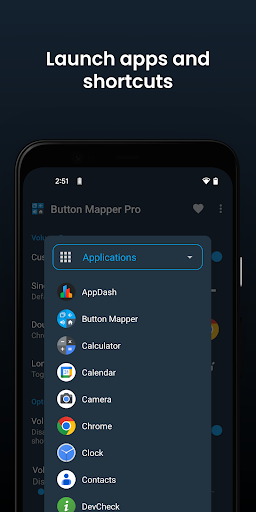
-double tap to launch your favorite app or shortcut
-double tap to open your notifications
-swap your back and recent apps keys (capacitive buttons only!)
-use your volume buttons to adjust screen brightness
-long press to toggle "do not disturb" mode
-and much more
Additional features unlocked in the pro version:
-Simulate keycodes (requires adb command or root)
-Swap volume keys on orientation change
-Default to ring volume on Pie or later
-Pocket detection
-Themes
-Change back and recents buttons
-Customization of haptic feedback (vibration) on button press and long press
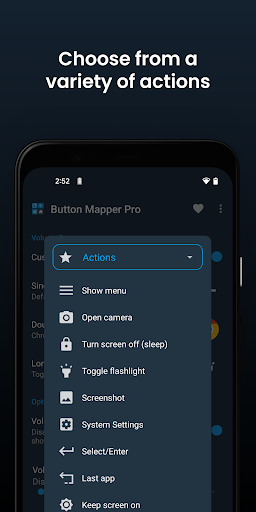
Actions that can be mapped to buttons or keys:
-Launch any app or shortcut
-Disable the button
-Broadcast intents (PRO)
-Run scripts (PRO)
-Camera shutter
-Turn screen off
-Toggle flashlight
-Quick settings
-Show notifications
-Power dialog
-Take screenshot
-Music: previous/next track and play/pause
-Adjust volume or mute
-Last app switch
-Toggle do not disturb
-Adjust brightness
-Now on tap (root)
-Menu button (root)
-Choose custom keycode (root and PRO)
-Root command (root and PRO)
-Toggle WiFi
-Toggle Bluetooth
-Toggle rotation
-Clear notifications
-Split screen
-Scroll up/down (root)
-And many more...
Buttons supported:
-Physical home, back and recent apps/menu buttons
-Volume up
-Volume down
-Most camera buttons
-Many headset buttons
-Custom buttons: add other buttons (active, mute, etc) on your phone, headphones, gamepads, TV remote and other peripheral devices
Additional options:
-change the long press or double tap duration
-delay initial button press for better double tap operation
-disable Button Mapper while using specific apps
-plus many more customizations
Troubleshooting:
-Make sure Button Mapper accessibility service is enabled and allowed to run in the background
-Button Mapper does not work with onscreen buttons (such as soft keys or the navigation bar) or the power button.
-The options shown in the app depend on the buttons available on your phone. Not all phones have home, back and recents buttons!
This app uses Accessibility services. Accessibility is used to detect when the physical or capacitive buttons are pressed on your device so they can be remapped to custom actions to accommodate your needs. It is not used to see what you type. Button Mapper does not collect or share any of your personal information, it is safe and your privacy is respected.
This app uses the Device Administrator permission. (BIND_DEVICE_ADMIN)
This permission is used to lock the screen if the "Turn screen off" action is chosen. If you want to remove this permission, open Button Mapper, click on the menu (three dots in the upper right corner) and select "Uninstall"
What's New
-add alternate screenshot option (try if screenshot doesn't work)
-bug fixes
-update translations
3.34:
-app info action (PRO)
3.27/3.29/3.30:
-fix action dialogs repopulated with wrong settings
-option to use scan codes (allows remapping more buttons on certain remotes)
3.22:
-add Shizuku support
-add brighter flashlight option (PRO)
-add D-pad actions (if supported) (PRO)
-show all apps action (PRO)
-improve volume handling on TVs
In-app purchases
$0.99 - $24.99 per item
Version Information
- Version
- 3.35
- Downloads
- 5M+
- Updated on
- Oct 1, 2024
- Released
- Oct 22, 2016
- Requires
- Android 4.3
Statistics
Google Play Rating History
Rating Distribution
Downloads Over Time
Button Mapper: Remap your keys has been downloaded times. Over the past 30 days, it averaged downloads per day.
Shaded area shows 30-day prediction based on historical trends
Historical data collection started recently. More data points will be available over time.
Button Mapper: Remap your keys - Google Play Rankings
Top Rankings
| Rank | Country | Category | List | Change |
|---|---|---|---|---|
| — |
Ranking History in
No ranking data available yet. Rankings are updated daily.
#52 in Top Grossing Personalization in United States

#18 in Top Grossing Personalization in Netherlands
 Letter Fonts - Stylish Text
Button Mapper: Remap your keys
Letter Fonts - Stylish Text
Button Mapper: Remap your keys
 Pujie Watch Faces - Wear OS 6
#29 in Top Grossing Personalization in Poland


#30 in Top Grossing Personalization in Germany
 GRUBL™ 4D Live Wallpapers + AI
Button Mapper: Remap your keys
GRUBL™ 4D Live Wallpapers + AI
Button Mapper: Remap your keys
 Music ringtones for android
Button Mapper: Remap your keys users say on Google Play
 Lucía M. Polis
Screenshot action mapped to different button; rating updated! 🩷
 Abhay Kumar
nice app .my phone has an extra button please try to make useful that button my phone is moto g60
 Admiral LionHeart
[NEW UPDATE, 061225] This app is amazing.. it is out of date.. I would like to see a new update that includes the following: (1) A more advanced activity menu that can replace updated shortcut create apps. (2) A more detailed menu for groups of "Intent Executing Shortcuts" so you can bypass shortcut creator apps. (3) A feature that delays single tap longer than 150ms. (4) A more advanced "backup/export feature". (5) Popup Keybad shortcut feature to execute predefined shortcuts via text/pin code.
 Glenn Auve
stopped working on my TCL TV remote. was great when it was working, but I think the TV updated the other day and now it doesn't work
 Dave
Dave
I installed Button Mapper specifically to remap the Netflix button on my Android TV remote, only to find out that this basic function is locked behind a paywall. Remapping a button should be a core feature, not a premium one—especially when it's as simple as redirecting one app shortcut to another. Monetization of such a basic feature leaves a bad impression.
ApkTrusted Ratings & Reviews
More from flar2
See more apps





Similar Apps

spacedesk - USB Display for PC
Free
TeamViewer QuickSupport
Free

Hue Essentials
Free

AnyDesk Remote Desktop
Free

Twilight: Blue light filter
Free

GSMArena
Free

ScreenStream
Free

LocalSend: Transfer Files
Free

Computer Launcher Pro
Free

Home Assistant
Free

SmartThings
Free

Tooly All Tools In One Toolbox
Free

Windows App
Free

Volume Styles - Custom control
Free
Screen Mirroring: Cast to TV
Free

DNA Launcher
Free
Scan this QR code to download

Forwarding you to the page at Google Play market in seconds...
Open Google Play market now