
Computer Launcher Pro v13.8
Pro Themes and Launchers


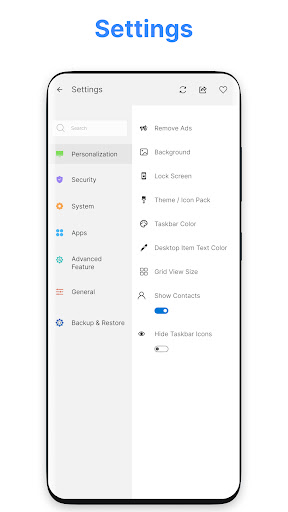


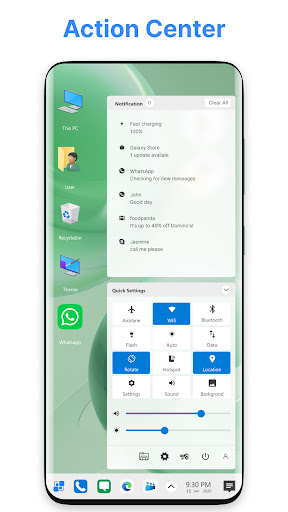


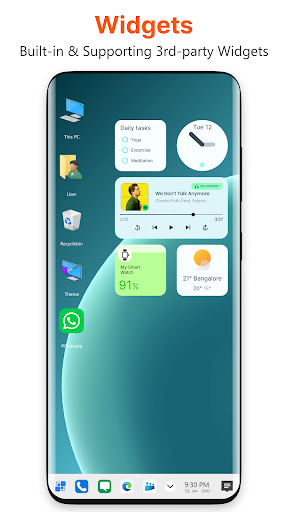

About this app
Computer Launcher Pro solves the problem of monotony in mobile home screens by offering a personal computer-like look, which benefits users who crave a unique and nostalgic experience. This app stands out in the Personalization category due to its high user rating and extensive downloads, indicating a well-received and stable product. However, it falls short in terms of innovation, as the concept of a computer-themed launcher is not new. Compared to alternatives, Computer Launcher Pro's simplicity and ease of use are notable advantages.
Pros
- Computer Launcher Pro has an excellent user rating of 4.5/5, indicating a high level of user satisfaction and a well-designed interface.
- The app's download numbers exceed 1 million, providing social proof of its popularity and reliability.
- The developer, Pro Themes and Launchers, has a reputation for creating themed launchers, suggesting expertise in this area.
- The app requires no permissions, which is a significant advantage in terms of privacy and security.
- The app's small size and offline capability make it accessible to a wide range of devices and users.
Cons
- The app contains ads, which may be intrusive or annoying to some users, and the in-app purchases may lead to additional costs.
- The app's functionality may not be suitable for all users, particularly those who prefer a more traditional Android experience.
- Some users may find the computer-themed design to be gimmicky or lacking in customization options.
- The developer's email support may not be as responsive or comprehensive as some users would like.
Best for: The ideal user for Computer Launcher Pro is likely a tech-savvy individual between the ages of 18 and 40 who is looking for a unique and nostalgic mobile experience, has a basic understanding of Android customization, and is willing to explore and personalize their home screen to create a computer-like interface.
Developer Description
Change your mobile home screen with personal computer look
Features
- File managers (All internal and external SD card and USB supported)
- Photo viewer
- Desktop Folder with applications as contacts support
- Desktop Widgets
- App lock features
- Launcher lock screen
- Built-in wallpapers
- 100+ Themes
Privacy
Since Computer Launcher Pro requires no permissions, the risk of data collection or privacy breaches is minimal. However, users should still be cautious when installing apps from unknown sources, and it's recommended to monitor the app's behavior and performance to ensure it doesn't consume excessive resources. Additionally, users should review the developer's privacy policy to understand their data handling practices.
Tips
To get the most out of Computer Launcher Pro, users should experiment with the various customization options to create a personalized look and feel. Additionally, users can optimize performance by closing unnecessary apps and clearing cache regularly. It's also recommended to check the app's settings for any hidden features or tweaks that can enhance the user experience.
What's New
- Drag and drop added for both system and launcher widgets
- Music widget now support folder section for music
- Drag & drop other page animation improved
- Bug fixes
- Ads removed in folder and calendar sections
In-app purchases
$1.49 - $1.99 per item
Version Information
- Version
- 13.8
- Downloads
- 1M+
- Updated on
- Jan 8, 2026
- Released
- Oct 26, 2022
- Requires
- Android 8.0
Statistics
Google Play Rating History
Rating Distribution
Downloads Over Time
Computer Launcher Pro has been downloaded times. Over the past 30 days, it averaged downloads per day.
Shaded area shows 30-day prediction based on historical trends
Historical data collection started recently. More data points will be available over time.
Computer Launcher Pro users say on Google Play
 babak lotfi
nice and beautiful . i use this from 14 month ago . i 💕 it.but have some problems 1 cant resize desktop icons 2 not have notification dot or numbers on apps . 3 example can not put widgets from apps like folders from es manager 4 dont support apps like change wallpaper or auto change 5 put some animated things and some clock widgets 6 dont support many of system widget exam xiaomi phones like game launcher widget ( important ) 7 if make it multi windows support - when minimized gt taskbar.
 Izinegbe Eghianruwa
Since the update some time ago, the launcher no longer displays wallpapers from other sources. It makes the app look unexciting.
 Kasheera Gamith
ads led me to remove this app without using it for a single day. otherwise the interface was nice.
 OJWANG MUTULI
STUPID AND SILLY UPDATE AGREEMENT. I write this message, very disappointed and dissatisfied with the current update. The nonsense agreement aired and silly premiere subscription. I have been loyal since 2022, but this time I rather use another launcher. I DON'T RECOMMEND ANYONE TO USE THIS LAUNCHER FROM NOW HENCE FORTH! For those who I earlier recommended I urge you to forgive me and uninstall the launcher as soon as possible.
ApkTrusted Ratings & Reviews
Similar Apps

DNA Launcher
Free
Super S9 Launcher for Galaxy S
Free

Simple App Launcher
Free
A Launcher : Galaxy A Launcher
Free

Cool Mi Launcher - CC Launcher
Free

Alpha Hybrid Launcher 4D theme
Free

Newer Launcher 2025 launcher
Free
Computer File Explorer
Free

Smart Launcher 6 ‧ Home Screen
Free

P Launcher
Free

Niagara Launcher ‧ Home Screen
Free

Floating Apps (multitasking)
Free

OxygenOS 16 Icon pack
Free
Newlook Launcher - Galaxy Star
Free

Windows App
Free

Action Launcher: Pixel Edition
Free
Scan this QR code to download

Forwarding you to the page at Google Play market in seconds...
Open Google Play market now