Niagara Launcher ‧ Home Screen v1.15.6
Peter Huber





About this app
Niagara Launcher Home Screen solves the problem of cluttered home screens by offering a minimalist and one-hand-friendly interface, making it ideal for users seeking simplicity and productivity. It stands out in the Personalization category with its zero-ad policy and high user rating, benefiting most those who value clean design and ease of use. Compared to alternatives, Niagara Launcher's focus on minimalism and usability sets it apart, though some may find its feature set limited. Its high rating and large user base attest to its effectiveness in meeting the needs of its target audience.
Pros
- With over 10 million downloads and a 4.8/5 rating, Niagara Launcher has demonstrated its ability to meet user needs and preferences, indicating a high level of social proof and user satisfaction.
- The app's zero-ad policy enhances the user experience, providing an uninterrupted and distraction-free environment that aligns with its minimalist philosophy.
- Niagara Launcher's developer, Peter Huber, offers in-app purchases without aggressive monetization tactics, allowing users to support the app's development without feeling pressured into buying unnecessary features.
- The lack of required permissions is a significant advantage, as it ensures user data privacy and security, aligning with the app's minimalist and user-centric approach.
- The developer's active engagement, as indicated by the app's version updates and responsive support email, suggests a commitment to maintaining and improving the app over time.
Cons
- Some users might find the minimalist approach too simplistic, potentially lacking in features compared to more comprehensive launchers, which could limit its appeal to users seeking more customization options.
- The in-app purchases, while not aggressive, may still deter some users who prefer a one-time payment model or are wary of additional costs, potentially affecting the app's accessibility to a broader audience.
- The app's compatibility with certain devices or Android versions might be limited, as with any launcher, which could lead to compatibility issues for some users.
- Users expecting a high degree of customization may find Niagara Launcher's focus on minimalism restrictive, as it prioritizes simplicity over extensive personalization options.
Best for: The ideal user for Niagara Launcher Home Screen is likely a tech-savvy individual or anyone seeking a clutter-free, easy-to-use interface, who values simplicity, productivity, and data privacy, and is willing to pay for additional features to support the app's development, thereby benefiting from a highly rated and regularly updated launcher.
Developer Description
A minimalist productivity launcher. One-hand-friendly. Zero ads.
🏆 "The best Android app I've used in years" · Joe Maring, Screen Rant
🏆 "It changed the way I look at the full device—big time" · Lewis Hilsenteger, Unbox Therapy
🏆 Among the best launchers of 2022, according to Android Police, Tom's Guide, 9to5Google, Android Central, Android Authority, and Lifewire
▌ Top reasons to use Niagara Launcher:
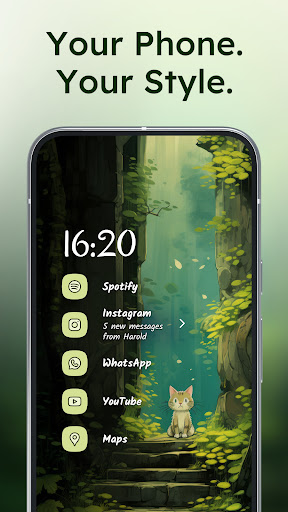
✋ Ergonomic efficiency · Access everything with one hand - no matter how big your phone is.
🌊 Adaptive list · In contrast to a rigid grid layout used by other Android launchers, Niagara Launcher's list can adapt to your needs. The media player, incoming messages, or calendar events: everything pops in when it needs to.
🏄♀ Wave alphabet · Efficiently reach every app without even having to open an app drawer. The launcher's wave animation does not only feel satisfying but also helps you navigate your phone with just one hand.
💬 Embedded notifications · Not just notification dots: Read and respond to notifications right from your home screen.
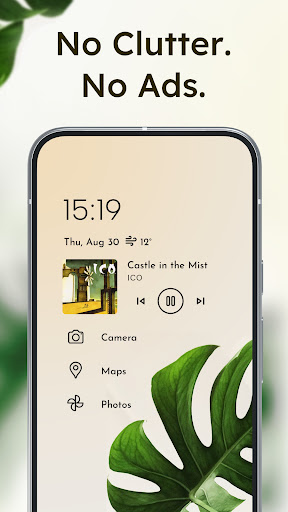
🎯 Stay focused · The streamlined and minimalist design declutters your home screen, reduces distractions, and is super easy to use.
⛔ Ad-free · Having to endure advertisements on a minimalist launcher designed to keep you focused does not make sense. Even the free version is also completely ad-free.
⚡ Lightweight & lightning fast · Being minimalist and fluid are two of the most important aspects of Niagara Launcher. The home screen app runs smoothly on all phones. With just a few megabytes in size, no space is wasted.
✨ Material You Theming · Niagara Launcher adopted Material You, Android's new expressive design system, to make your home screen truly yours. Set an awesome wallpaper, and Niagara Launcher instantly themes around it. We went one step further by bringing Material You to everyone by backporting it to all Android versions.
🦄 Personalize your home screen · Impress your friends with Niagara Launcher's clean look and customize it to your needs. Personalize it with our integrated icon pack, fonts, and wallpapers, or use your own.
🏃 Active development & great community · Niagara Launcher is in active development and has a very supportive community. If you ever have a problem or want to voice your opinions about the launcher, please join us:
🔹 Twitter: https://twitter.com/niagaralauncher
🔹 Discord: https://niagaralauncher.app/discord
🔹 Telegram: https://t.me/niagara_launcher
🔹 Reddit: https://www.reddit.com/r/NiagaraLauncher
🔹 Press kit: http://niagaralauncher.app/press-kit
---
📴 Why we offer an accessibility service · Our accessibility service has the sole purpose of letting you quickly turn off your phone's screen with a gesture. The service is optional, disabled by default, and neither collects nor shares any data.
Privacy
Given that Niagara Launcher requires zero permissions, it poses minimal risk to user data privacy and security, making it a safe choice for those concerned about data collection. However, users should still be cautious when making in-app purchases and ensure they understand what each purchase entails. Regularly reviewing the app's privacy policy and terms of service is also advisable to stay informed about any changes.
Tips
To get the most out of Niagara Launcher, users should explore its settings to customize the launcher according to their preferences, such as setting up favorite apps and tweaking the interface for optimal one-hand use. Additionally, utilizing the launcher's gestures can enhance productivity and navigation efficiency. Regularly checking for updates can also ensure users have access to the latest features and improvements.
What's New
Turn your phone into a showpiece with new clock styles, 10 stunning new themes, artist-made wallpapers, and the new Stellar Anycon icon pack.
Our latest update also improves the overall stability and performance.
In-app purchases
$0.99 - $42.99 per item
Version Information
- Version
- 1.15.6
- Downloads
- 10M+
- Updated on
- Dec 24, 2025
- Released
- Jan 30, 2021
- Requires
- Android 5.0
Statistics
Google Play Rating History
Rating Distribution
Downloads Over Time
Niagara Launcher ‧ Home Screen has been downloaded times. Over the past 30 days, it averaged downloads per day.
Shaded area shows 30-day prediction based on historical trends
Historical data collection started recently. More data points will be available over time.
Niagara Launcher ‧ Home Screen - Google Play Rankings
Top Rankings
| Rank | Country | Category | List | Change |
|---|---|---|---|---|
| — |
Ranking History in
No ranking data available yet. Rankings are updated daily.
#6 in Top Grossing Personalization in United States

#26 in Top Free Personalization in United States

#1 in Top Grossing Personalization in Germany
Niagara Launcher ‧ Home Screen
 Character.Me: AI Roleplay Chat
#3
Character.Me: AI Roleplay Chat
#3
 Zedge™ Wallpapers & Ringtones
#1 in Top Grossing Personalization in Brazil

Niagara Launcher ‧ Home Screen users say on Google Play
 Huthaifa Rawi
Edit: I keel getting back to Niagara over and over. This is the best launcher for me, ever. Old: Took me some time to settle in, but I really enjoyed the experience so far. I never thought I could go with a minimal launcher, since I crave functionality more than anything else, yet Niagara presents a functionality driven minimalism. Quite lovely.
 Jim Kunert
Still getting started, but one big problem so far. Editing folders is a pain. You try to scroll the folder, the entire app catalog scrolls, taking you away from your folder contents. Disable background scroll while working in folders, please.
 Shaun Johnson
I like the look and feel of this launcher. It's different then most launders but I have to say that this isn't really doing enough to push the envelope. It's good but it could be much better.
 Daniel G.
I hate the widget stack, I want to use multiple widgets at once. Can't rate higher when such a important feature is missing
 Ezekiel Serrano
every customization feature is paid
ApkTrusted Ratings & Reviews
Similar Apps

Smart Launcher 6 ‧ Home Screen
Free

Nova Launcher
Free
Muviz Edge: AOD & Edge Lights
Free

StandBy Mode Pro Smart Display
Free

DNA Launcher
Free

Action Launcher: Pixel Edition
Free

Ratio: Productivity Homescreen
Free

Backdrops - Wallpapers
Free
Widget Lab:Wallpapers & Themes
Free
OneUI Widgets
Paid

Alpha Hybrid Launcher 4D theme
Free

Computer Launcher Pro
Free

CMM Launcher 2.0
Free

OxygenOS 16 Icon pack
Free

AIO Launcher
Free

One4Wall: 4K Wallpapers & Live
Free
Scan this QR code to download

Forwarding you to the page at Google Play market in seconds...
Open Google Play market now