
StandBy Mode Pro Smart Display v1.8.7.472
Zetabit Tecnologia



About this app
Developer Description
Turn your Android into a powerful Desk or Bedside Clock that helps you Focus!
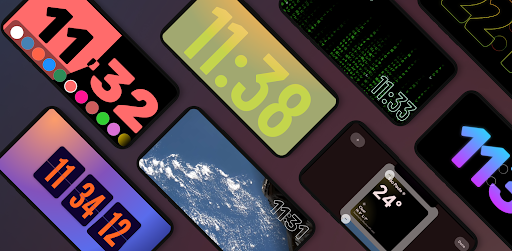
The app is organized into intuitive categories: Duo, Photos, Tools, Player, Weather, and Relax. You can navigate sideways to select from dozens of different widgets. Customize them to your liking, and the app will open automatically when you charge your phone.
Built natively with Material 3 for smooth performance, StandBy Mode Pro is frequently updated based on user feedback. We take your privacy seriously—everything runs locally on your device.
https://zetabitapps.com/privacy-policy
Have feedback or a feature request? Reach out to us: support@zetabitapps.com
✨ KEY FEATURES:
🕰️ Beautiful & Customizable Clocks
Choose from a wide range of fullscreen digital and analog clocks:
• Flip Clock (Retro style)
• Neon, Solar & Matrix Watch
• Big Crop Clock (Pixel-style)
• Radial Inverter (Burn-in safe)
• Day Clock (Big Text/Senior Friendly), Segmented Clock, Analog + Digital combo
Detailed customization gives you hundreds of unique layout possibilities.
📅 Duo Mode & Widgets
Productivity at a glance. Add two widgets side by side: clocks, calendars, music players, or any third-party widget. Resize, rearrange, and personalize.
📷 Photo Slide & Frame Mode
Turn your device into a digital photo frame. The AI auto-detects faces to ensure your memories are perfectly cropped and centered.
🛠️ Tools That Matter
• Fullscreen Timer & Stopwatch
• Schedule with Calendar integration
• Notification display (Experimental)
🌤️ Smart Weather Clocks
Real-time weather integrated into elegant clock displays. Supports fullscreen, edge-to-edge, or minimalist bottom layouts.
🛏️ Night Mode (AOD Style)
Sleep soundly. The app automatically dims screen brightness and tints widgets red to minimize eye strain in low light.
🔋 Quick Launch & Charging Logic
Set the app to auto-launch when you plug in your charger—or restrict it to landscape mode only.
🕹️ Vibes Radio
Built-in Lo-fi, ambient, and study-friendly radios with aesthetic visuals. Premium users can link any YouTube video to create their own background vibe.
🎵 Universal Player Control
Control playback from Spotify, YouTube Music, Apple Music, and more, directly from the StandBy screen.
🧩 Aesthetic Widgets
Create a fully personalized setup using modern Material Design styles.
🧲 Screen Saver Mode (Beta)
A new aesthetic upgrade that activates while your device is idle—perfect for long-use desk setups.
🔥 Burn-in Protection
Advanced chessboard pixel shifting keeps your OLED display safe during long sessions.
Unlock your Android's full potential.
Whether at your desk, on your nightstand, or docked at work, StandBy Mode Pro makes your screen useful and beautiful.
What's New
NEW
• New Christmas and New Year's Eve vibes and GIFs
FIXES & IMPROVEMENTS
• Duo: Enhanced scrolling - interact with widgets using slow scroll, navigate pages with fast scroll
• Fix Sleep Timer waking device when Turn Off Screen option is enabled
• Fix missing colors in Pomodoro theme
In-app purchases
$0.99 - $54.99 per item
Version Information
- Version
- 1.8.7.472
- Downloads
- 1M+
- Updated on
- Dec 28, 2025
- Released
- Jun 6, 2023
- Requires
- Android 7.0
Statistics
Google Play Rating History
Rating Distribution
Downloads Over Time
StandBy Mode Pro Smart Display has been downloaded times. Over the past 30 days, it averaged downloads per day.
Shaded area shows 30-day prediction based on historical trends
Historical data collection started recently. More data points will be available over time.
StandBy Mode Pro Smart Display - Google Play Rankings
Top Rankings
| Rank | Country | Category | List | Change |
|---|---|---|---|---|
| — |
Ranking History in
No ranking data available yet. Rankings are updated daily.
#21 in Top Grossing Personalization in United States

#9 in Top Grossing Personalization in Mexico


#11 in Top Grossing Personalization in Japan


#11 in Top Grossing Personalization in Germany
StandBy Mode Pro Smart Display users say on Google Play
 Payam Namdar
Awesome....
 Stuart Ewen
Has been a great app so far, but have had some issues with a Duo widget not reading my calendar correctly (it updated once when I added it the first time, and has not updated since then. Would love the ability to apply a fixed background or slideshow to the Duo view
 Danny Underwood-Jones
Good but not as good as the native iPhone app it's mimicking despite having more customization options. Costs $12+, which is a bit pricey for an app. Does not always auto-launch when I put it on my charger. Also, my phone dropped from 100% to 31% in 6 hours of general use yesterday and when I looked under battery settings this app was the top offender draining power. Finally, my phone overheats on a magnetic charger to the point where it sometimes shuts off and I think this app is to blame.
 Atharv Doiphode
very expensive
 chris s (cstow)
I previously bought the lifetime premium but upon reinstall none of the premium features are working. it wants me to re buy and the purchase restoration button says nothing to restore. app is neat when it worked though. in the fixes it said that this was supposed to be fixed but it's not
ApkTrusted Ratings & Reviews
More from Zetabit Tecnologia
See more apps


Similar Apps

OneUI Widgets
Paid

Smart Launcher 6 ‧ Home Screen
Free

Niagara Launcher ‧ Home Screen
Free

Ratio: Productivity Homescreen
Free

Flip Clock: World Clock
Free
Muviz Edge: AOD & Edge Lights
Free

Widget Lab:Wallpapers & Themes
Free

Backdrops - Wallpapers
Free

Everything Widgets
Paid

dynamicSpot - Dynamic Island
Free

OxygenOS 16 Icon pack
Free

AIO Launcher
Free

KWGT Kustom Widget Maker
Free

Clock Widget: Photo & Music
Free
4K Wallpapers - PhoneWalls
Free
Square Home
Free
Scan this QR code to download

Forwarding you to the page at Google Play market in seconds...
Open Google Play market now