
Ratio: Productivity Homescreen v7.1.3
Prometheus Interactive LLC










About this app
The Ratio: Productivity Homescreen app aims to solve the problem of fragmented productivity tools by integrating a homescreen, texting app, and widgets into one platform, potentially benefiting individuals who value simplicity and consolidation. However, with a mixed user rating of 3.2/5, it falls short in meeting the expectations of some users, possibly due to its monetization strategy or feature limitations. Compared to other productivity apps, Ratio's unique all-in-one approach stands out, but its effectiveness depends on the user's specific needs and preferences. The app's ability to strike a balance between functionality and simplicity will be crucial to its success.
Pros
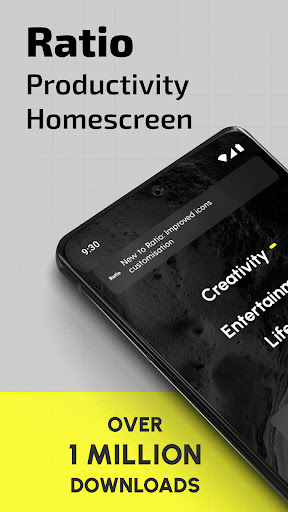
- With over 1 million downloads, the app has demonstrated a level of social proof, indicating that many users find value in its features and functionality.
- The developer, Prometheus Interactive LLC, provides a clear website and email for support, which is a positive indicator of their commitment to user satisfaction and transparency.
- The app's minimal permission requirements, with a total of 0 permissions, suggest a focus on user privacy and data security, which is a significant advantage in the productivity category.
- The availability of in-app purchases offers users the flexibility to customize their experience and access additional features, which can enhance the app's overall value proposition.
- The app's integration of multiple tools into one platform can simplify the user experience and reduce the need to switch between apps, potentially increasing productivity.
Cons
- The mixed user rating of 3.2/5 raises concerns about the app's ability to meet the diverse needs and expectations of its users, potentially indicating areas for improvement in terms of feature development or user support.
- The presence of ads may detract from the user experience, particularly if they are intrusive or frequent, which could negatively impact the app's overall usability and effectiveness.
- The wide range of in-app purchase prices, from $0.99 to $99.99, may be perceived as aggressive or unclear, potentially leading to user frustration or mistrust.
- The lack of information about the app's data collection and usage policies, despite its minimal permission requirements, may still raise privacy concerns among users who value transparency and control over their data.
Best for: The ideal user for the Ratio: Productivity Homescreen app is likely a tech-savvy individual, possibly a professional or student, who values simplicity, consolidation, and customization in their productivity tools, and is willing to invest time in setting up and optimizing the app to meet their specific needs and workflow.
Developer Description
Improve productivity and focus. Homescreen, texting app, and widgets all in one.
Ratio Launcher: Productivity Homescreen – Personalize Your Phone and Customize Home Screen!
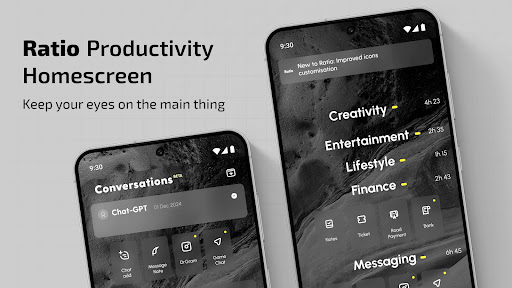
Your phone organizer is a tool, and with Ratio Launcher: Productivity Homescreen, you have the option to use it efficiently. This customizer & minimalist launcher aims at reducing distractions so that you can achieve your goals with ease. Your phone will transform into a highly productive phone organizer. Ratio Launcher: Productivity Homescreen gives you the power to stay in control at all times.Your phone customizer will no longer be a distraction, but a productivity tool!
📄Key Features of Ratio Launcher: Productivity Homescreen:📄
📱 Smart phone organizer – Get instant access to grouped apps.
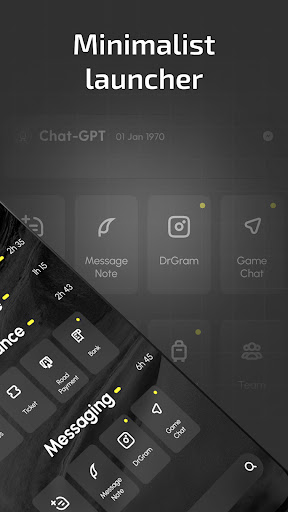
📱 Minimalist design – Clean and distraction free customize home screen app.
📱 Universal search – Search for apps, contacts, and other information all in one place.
📱 Time tracker – Increase productivity by controlling app usage.
📱 App Lock & App Hider – Hide your apps and keep them private.
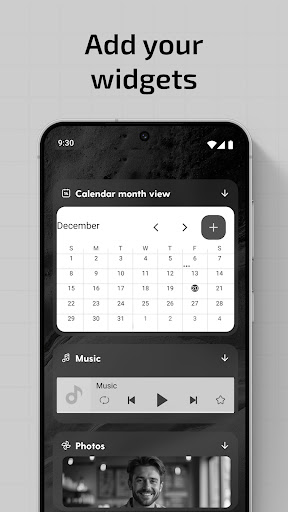
📱 Custom widgets – Weather, notes, media player, integrated calendar, and many more.
📱 Dark mode, Light mode & Focus mode – Customize the interface according to your needs.
A smartphone productivity tool as an easy home screen customizer & minimalist launcher!
Easy Home Screen Customizer & Minimalist Launcher is not simply a home screen customizer & minimalist launcher but a powerful productivity tool.Effortless Organization with Smart Drawers:📂
With Phone Customizer, your apps can be stored in drawers which are set in pace with your lifestyle. Either allow the System to auto- sort apps into Creativity, Finance, and so on, or manually adjust them to your liking in this phone organizer. Put your most-used apps on the screen while cutting down clutter.
Privacy and Control with App Lock & App Hider:🔒
Ratio Launcher: Productivity Homescreen is all about making sure your privacy comes first. Lock off some sensitive apps to hide unnecessary ones and enjoy a distraction-free and easy home screen customizer. You can clean up your source of distraction, which will allow you to stay at work and, at the same time, take control of your device security with this phone organizer.
Custom Widgets for Productivity:📆
Ratio Launcher: Productivity Homescreen combines essential widgets Calendar, Weather, Notes, and Media Player for streamlined daily tasks to be done with utmost productivity. Customize home screen and receive instant updates without shifting between different applications.
Customize Home Screen Experience:🎨
Customization is crucial for Phone Customizer users. Pick from Dark Mode, Light Mode, Focus Mode, and Sun Mode. Whether you’re in need of a high-contrast display or a sleek minimal interface, this easy home screen customizer & minimalist launcher has a setting tailored for you.
Upgrade Your Phone Customizer Experience Today!
Ratio Launcher: Productivity Homescreen empowers you to transform your device and take command of your digital life. This phone customizer enables effortless switches between devices. Customization is crucial for Ratio Launcher: Productivity Homescreen users with features you need to reduce distractions. Maximizing productivity and improving focus has never looked so beautiful with this easy home screen customizer & minimalist launcher.Use of Accessibility Service:
This app uses the AccessibilityService API to provide the best possible experience.
- We do not collect any personal information through accessibility services.
- We will not read your screen's sensitive data or any content.
- For this app to function properly, we need the Accessibility Permission. Accessibility services are required to receive a response from the system when the top of the screen is touched to trigger the shade and to retrieve window content: Required for automatic clicking of some settings after the user chooses they want to toggle them in the app-provided interface.
Privacy
Given the app's minimal permission requirements, users can be relatively confident in its respect for their privacy, but it is still essential to review the developer's data collection and usage policies to understand what data may be collected and how it is used. Users should also be cautious when making in-app purchases and ensure they understand the terms and conditions. To further protect their privacy, users can consider using the app in conjunction with other privacy-focused tools or features.
Tips
To get the most out of the Ratio: Productivity Homescreen app, users should start by customizing the homescreen to fit their specific needs and workflow, taking advantage of the integrated widgets and features. Additionally, users can explore the app's settings to optimize its performance and battery usage, ensuring a seamless experience. By regularly reviewing and adjusting their in-app purchases and settings, users can also ensure they are maximizing the app's value and minimizing any potential drawbacks.
What's New
• You can now select individual icons from various packs for specific apps for much more customisation than before.
• The icon pack selector received a visual update and grayscaling colored icon packs is now optional. It has also moved to the General Setting area.
• When switching icon packs, you can maintain individually selected icons, letting you try different options without losing your previous selections.
• Ratio is now available in Japanese!
In-app purchases
$0.99 - $99.99 per item
Version Information
- Version
- 7.1.3
- Downloads
- 1M+
- Updated on
- Dec 22, 2025
- Released
- Sep 14, 2020
- Requires
- Android 8.1
Statistics
Google Play Rating History
Rating Distribution
Downloads Over Time
Ratio: Productivity Homescreen has been downloaded times. Over the past 30 days, it averaged downloads per day.
Shaded area shows 30-day prediction based on historical trends
Historical data collection started recently. More data points will be available over time.
Ratio: Productivity Homescreen users say on Google Play
 Bauer Mongali
so good
 NZIE Emmanuel (kenth)
this is an great app, suitable minimal feature to avoid phone addiction
 خالد جماحنة
nice app, but still has some problems like cant edit widget size in root section
 R S
R S
-- Feb 2025 This app helps in reducing distraction, but the new version doesn't respect previous lifetime purchases. If you don't subscribe, the new version shows color ads on your home screen...which runs counter to using greyscale to boost focus. The subscription is also much more expensive now. easily the cost of high-end phone after two years. Less distraction is worthwhile but keep the price in mind. -- Nov 2025 Now on v7.1.3...All issues from February remain.
 Edward Smith (Agitated_Hamster)
Where is the lifetime pro option?
ApkTrusted Ratings & Reviews
More from Prometheus Interactive LLC
See more apps
Graffiti Logo Maker App
Free
Compass: Accurate Compass
Free

Baby Story Photo Editor App
Free

Camy — Live Video CCTV
Free

Cute Calendar & Daily Planner
Free

Niki: Cute Notes App
Free

Flashlight - LED Flash App
Free
GPS Speedometer: Speed Tracker
Free
Calculator
Free

Gaming Logo Maker with Name
Free

Recover Contacts + Backup
Free
Barometer and Altimeter App
Free

Paint for Android
Free

Custom Color Keyboard Themes
Free

Neon Icon Designer App
Free

Photo Blender Editor
Free
Similar Apps

StandBy Mode Pro Smart Display
Free

Smart Launcher 6 ‧ Home Screen
Free
Niagara Launcher ‧ Home Screen
Free
OneUI Widgets
Paid

Flip Clock: World Clock
Free
Muviz Edge: AOD & Edge Lights
Free

Widget Lab:Wallpapers & Themes
Free

Nova Launcher
Free

DNA Launcher
Free

Clock Widget: Photo & Music
Free

Action Launcher: Pixel Edition
Free

KWGT Kustom Widget Maker
Free

AIO Launcher
Free

OxygenOS 16 Icon pack
Free

Color Launcher, cool themes
Free

Alpha Hybrid Launcher 4D theme
Free
Scan this QR code to download

Forwarding you to the page at Google Play market in seconds...
Open Google Play market now