
ScreenStream v4.3.0
Dmytro Kryvoruchko








About this app
Developer Description
Secure one‑tap screen & audio share via WebRTC/MJPEG/RTSP to browsers/players.
Modes:
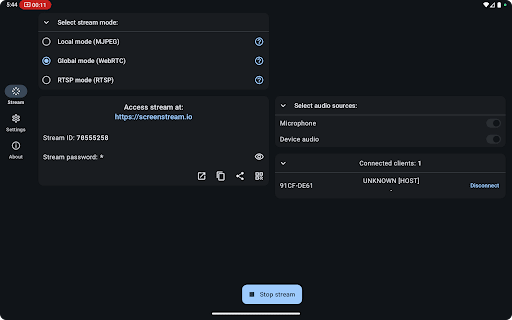
• Global (WebRTC) - worldwide, end-to-end encrypted WebRTC with password (video + audio).
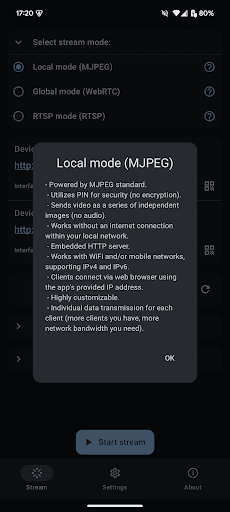
• Local (MJPEG) - zero setup HTTP stream on your Wi-Fi/hotspot; PIN locked; works offline or online.
• RTSP - Server or client mode with H.265/H.264/AV1 video + OPUS/AAC/G.711 audio.
Global (WebRTC)
• End-to-end encrypted, password-protected peer-to-peer stream
• Shares screen, microphone, and device audio
• Viewers join with Stream ID + password in any WebRTC-enabled browser
• Requires Internet; signaling handled by public open source server
• Audio/video flows directly between devices - Bandwidth grows per viewer
Local (MJPEG)
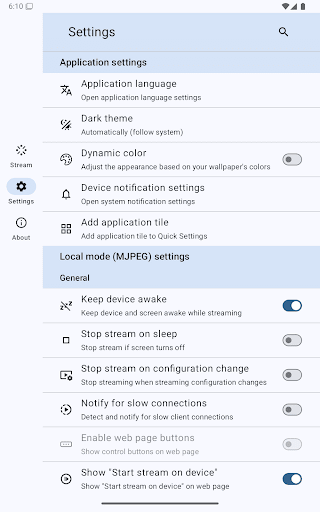
• Embedded HTTP server; works offline or online over Wi-Fi, hotspot, or USB‑tether
• Sends screen as independent JPEG images (video only)
• Optional 4‑digit PIN; no encryption
• IPv4 / IPv6 support; crop, resize, rotate, & more
• Each viewer gets a separate image stream - more viewers require more bandwidth
RTSP
• Streams H.265/H.264/AV1 video + OPUS/AAC/G.711 audio with embedded or external RTSP server
• Server mode has protocol, interface/address filters, IPv4/IPv6, and port settings
• Works over Wi-Fi or cellular, IPv4 & IPv6
• Compatible with VLC, FFmpeg, mpv, GStreamer, OBS, MediaMTX, and others
• Requires an RTSP client or player for viewing
Popular use cases
• Remote support & troubleshooting
• Live presentations or demos
• Distance learning & tutoring
• Casual game sharing
Good to know
• Requires Android 6.0+ (uses the standard MediaProjection API)
• High data usage on mobile - prefer Wi‑Fi
• 100 % open source under the MIT License
What's New
MJPEG: Keep image on reconnect
MJPEG: Flip image option
Urdu translation. Thanks to NAVEED NOOR KHAN @ Cloudbox
Bug fixes
Version Information
- Version
- 4.3.0
- Downloads
- 5M+
- Updated on
- Jan 4, 2026
- Released
- Jul 17, 2016
- Requires
- Android 6.0
Statistics
Google Play Rating History
Rating Distribution
Downloads Over Time
ScreenStream has been downloaded times. Over the past 30 days, it averaged downloads per day.
Shaded area shows 30-day prediction based on historical trends
Historical data collection started recently. More data points will be available over time.
ScreenStream users say on Google Play
 আজব গল্পঃ
this app is very simple and effective, just to the point. but please add touch input and start stream control from browser. because I use it on my secondary phone which has broken display. so I set the app from PC by usb debugging and then use by this app. if the touch control and auto start possible, it would be very helpful
 Bcl Toy
when i use WebRTC on landscape the view on the web is cropped. It's just showing the left bottom of the screen.
 Chris Chiang
can't seem to stream the sound? otherwise it's. 5 star
 Mikhail Hudon (ZerithFarron)
Been hunting for a new phone streaming app after Screen Stream Mirroring Pro shut down. I see a lot of ratings calling it free and not having adds but they're all over the app. Not only that you can't stream audio. Been trying to get this to connect to OBS or VLC and neither are connecting. Not worth it. I guess you never know how good you had it until it's gone....
 Neo Mkansi
because I can't share screen with my TV the only reason I search this app I only wanted to share my screen with the TV
ApkTrusted Ratings & Reviews
Similar Apps

RealVNC Viewer: Remote Desktop
Free

TeamViewer Remote Control
Free

AirDroid: File & Remote Access
Free

spacedesk - USB Display for PC
Free

Linksys
Free

Smart Connect
Free

AnyDesk Remote Desktop
Free
Screen Mirroring: Cast to TV
Free

CrookCatcher • Anti-Theft
Free

Elgato Stream Deck Mobile
Free

Screen Recorder Unlimited
Free

MERCUSYS
Free

GSMArena
Free

UniFi
Free

MediaFire
Free
NetShare - no-root-tethering
Free
Scan this QR code to download

Forwarding you to the page at Google Play market in seconds...
Open Google Play market now