
Elgato Stream Deck Mobile v2.1.0
Corsair Memory, Inc.




About this app
Developer Description
Control any workflow from your phone or tablet
Now with an all-new design, more freedom to customize, and powerful features exclusive to the mobile experience.
Control any workflow, including your:
• Presentations
• Meetings
• Live streams
• Recordings
• Conversations
• Editing
• Audio
• Lighting
• Anything!
All from the device in your hand, on your desk, podium, or stand.
THE BEST OF STREAM DECK
• Profiles: Create specialized keypads, each with their own role.
• Plugins: Unlock more actions to control your favorite apps and tools.
• Icons: Personalize your keys with colorful images and animations.
• Multi Actions: String together a series of actions — all triggered by a single key.
• Folders: Organize and group your actions for easy access.
• Pages: Store even more actions on up to 10 additional pages.
• Marketplace: Discover community plugins, profiles, and icons you’ll love.
PLUGINS GALORE
Discord, Spotify, Teams, Zoom, PowerPoint, OBS Studio, Streamlabs, Twitch, YouTube, Twitter, VoiceMod, Philips Hue, and lots more. Thanks to Stream Deck SDK, new plugins keep coming. Stream Deck Mobile keeps getting better.
EXCLUSIVE TO THE MOBILE EXPERIENCE
ORIENTATION
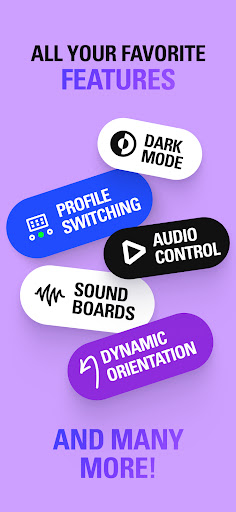
Choose how your keypad adapts as your device rotates, or lock it in place.
MULTITASKING
Use Stream Deck Mobile alongside your favorite apps or websites. You can even run multiple* Stream Deck Mobile keypads at the same time!
*Number of keypads depends on device and settings.
STAY FREE...
Get 6 keys for free — forever!
OR GO PRO...
Unlock up to 64 keys — that’s double the number of our largest device, Stream Deck XL!
Tailor your layout — vertical, horizontal, square. All 64 keys or just one big button (for “MUTE” of course).
Customize your background — choose from our faceplate library or upload your own.
GETTING STARTED IS EASY
Open Stream Deck on your computer, then connect wirelessly from your mobile device.
Don't have the desktop app? Get it free for macOS or Windows.
SYSTEM REQUIREMENTS
• Android 9 or newer
• Stream Deck 6.3 or newer
• macOS 10.15 or newer | Windows 10 or newer
• Stream Deck Mobile requires a Wi-Fi connection
What's New
# Unlock Virtual Stream Deck
This update unlocks Virtual Stream Deck (VSD) in the Stream Deck app on your computer for Stream Deck Mobile Pro users. Make sure you’re running the latest version to take advantage of this powerful new feature!
- Virtual Stream Deck requires Stream Deck 7.0 or later on your computer.
Loving Stream Deck Mobile? Whether it’s the six free keys or 128-key layouts on iPad with Pro, we’d love to hear from you — leave us a review!
In-app purchases
$2.99 - $49.99 per item
Version Information
- Version
- 2.1.0
- Downloads
- 500K+
- Updated on
- Jun 27, 2025
- Released
- Mar 9, 2020
- Requires
- Android 9
Statistics
Google Play Rating History
Rating Distribution
Downloads Over Time
Elgato Stream Deck Mobile has been downloaded times. Over the past 30 days, it averaged downloads per day.
Shaded area shows 30-day prediction based on historical trends
Historical data collection started recently. More data points will be available over time.
Elgato Stream Deck Mobile users say on Google Play
 Chad Caster
The app works great. I have noticed a slight input delay while using it, versus the physical Stream deck, but nothing I would not find acceptable given that I am using a WiFi connection and not a direct connection. My choice of device has also played into the delay, my tablet is a few years older than my phone. Again I find the slight delay more than acceptable.
 Matthew Pennell
Really awesome app! Its nice that there is a basic free version, but I wish there was a cheaper paid version for normal people.
 Tony Dau
Great BUT the features are less than on iOS (1 year behind at least) 😔. I use this all the time for work, automating my workflow... brilliant (I upgraded to pro!) BUT you need WiFi to use it... while mobile or in my work office, my phone and laptop are not on the same wifi. When will the USB direct connection support will be implemented on Android (like it is on iOS since v 2.3.1 -> July 2024? (Android is currently, July 2025, on 2.1.0)
 Michael Carroll
I agree with other that brought a physical device it seems unfair to want so much for this. I do get it as you don't want people only using the app. I'd recommend allowing same button to the owned device on one profile of the mobile app via login account. I do have a issue with the elgato software it poll's drives and prevents hdd power down I Windows. I find I have to exit the app so my drives can idle and not over heat. That's a big issue, why are you polling all my drives? Seems creapy.
 Daevid Vincent
Such BS that you upsell and cripple the app. I already bought your $120 button box. the LEAST you can do is let me have the same buttons and controls in the app. upsell me for multiple virtual ones then if you must, but don't be like this.
ApkTrusted Ratings & Reviews
More from Corsair Memory, Inc.
See more apps

Similar Apps

ScreenStream
Free

DLive · Your Stream Your Rules
Free

Medal - Gaming Clips
Free
VUZ: Live 360 VR Videos
Free

RealVNC Viewer: Remote Desktop
Free

GSMArena
Free
Loudplay — PC games on Android
Free

spacedesk - USB Display for PC
Free

Computer Launcher Pro
Free

fooView - FV Float Viewer
Free

PRISM Live Studio: Games & IRL
Free

mcpro24fps manual video camera
Paid

OXO Gameplay Clips & Community
Free

nzb360 - Media Server Manager
Free

MediaFire
Free

Nixplay App
Free
Scan this QR code to download

Forwarding you to the page at Google Play market in seconds...
Open Google Play market now