EdgeBlock: Block screen edges v2.03
flar2

About this app
Developer Description
Prevent accidental touches on phones with curved screen edges or thin bezels
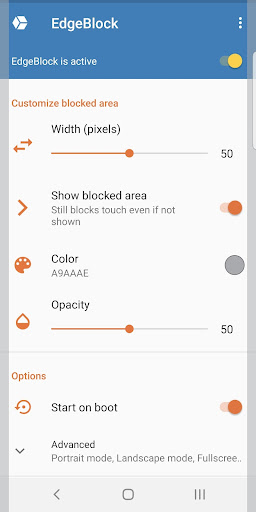
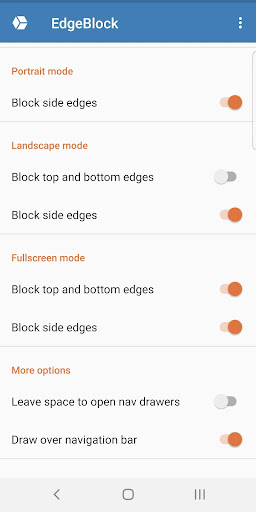
The touch-protected area is adjustable and can be made invisible or any color you like! Adjust the color, opacity and width of the blocked area and specify which edges should be blocked. You can set which edges are blocked separately for portrait, landscape and fullscreen modes.
There are many ways to control EdgeBlock. You can temporarily disable (pause) blocking by tapping the notification. You can turn EdgeBlock on or off with a Quick Settings tile. And finally, you pause/resume or start/stop the service using public intents compatible with automation apps such as Tasker (be sure to specify the package name, flar2.edgeblock)
Public Intents:
flar2.edgeblock.PAUSE_RESUME_SERVICE
flar2.edgeblock.START_STOP_SERVICE
EdgeBlock has no ads and does not collect any of your data. EdgeBlock is lightweight and does not require invasive permissions. It only needs permission to draw or display over other apps.
The free version is fully functional. The only option that requires payment is "Apply on boot." If you want EdgeBlock to automatically start at boot, then you must buy EdgeBlock Pro. If you do not wish to pay, you can start it manually at each boot and still enjoy all other features, ad-free.
What's New
-update for Android 15
2.02:
-bug fixes
2.01:
-independent control of each screen edge
-remove overlapping views in corners
-target latest Android API
-bug fixes and optimizations
In-app purchases
$1.49 per item
Version Information
- Version
- 2.03
- Downloads
- 10K+
- Updated on
- Jul 13, 2024
- Released
- Apr 16, 2020
- Requires
- Android 6.0
Statistics
Google Play Rating History
Rating Distribution
Downloads Over Time
EdgeBlock: Block screen edges has been downloaded times. Over the past 30 days, it averaged downloads per day.
Shaded area shows 30-day prediction based on historical trends
Historical data collection started recently. More data points will be available over time.
EdgeBlock: Block screen edges users say on Google Play
 Æthañ H
For devices with curved edge screens like my old 1+8Pro it's probably the best solution for preventing accidental navigation errors. After I configured the perfect settings, my stress disappeared. On YouTube the slightest accidental touches kept interrupting what I was watching & load unwanted videos. & Thanks to the developers help, the auto boot up glitch was solved. It wasn't EdgeBlock's fault, it's was caused by One Plus. Thanks again Aaron. EdgeBlock Pro & DevCheck Pro are 5 star apps.
 MrTholl
Pretty handy app. One bug I noticed is it will not allow me to pause the feature thru the notifications panel after awhile. I don't know what triggers it but after I can't, it only allows me to turn off the feature in my phone's settings. It would be neat if we can see info in the edge panels like the time or battery info in landscape mode. Thanks for stopping me from accidentally pressing the screen lol.
 Sahin Calis
After a little further testing three of the edges work exactly how I need them to work. But one edge does not. The edge at the top of the phone regardless of orientation does not allow you to touch it and touch something else within the same app. So this is The edge that would have the front facing camera. Basically the edge that would be the top of your phone.
 Personal Usage
I am on OOS 12 by any chance you're on the same OS?
 Jackmeat Whippo
Scroll for full story. Would be excellent if it would start on boot which is what I paid for. Auto start permission granted, set to start on boot, still doesn't. Other than that works perfect on my xiaomi Update: Apparently it should say "works on Xiaomi, just not YOURs. So developers suggestion, chose a different phone next time. Cannot get refund, not like the money is the issue, it is the principle that it does NOT work as advertised. Dev did respond a few times and suggested things I already tried, it won't stay running as supposed to. Too bad though. I think the dev summed it up in his response below "there is problem with the app." His/her words, not mine WOW, you want this to stay public. You know perfectly well those changes were made, they were pointed out in email, YET you make this public acting like I haven't done it, and that you are trying to help? You and your coworkers using it does zero for me, the consumer. In what arrogant world do YOU think it is up to someone to buy a different phone? You make it work on as many as possible AND note which do NOT work. Doing nothing about it is sad. IT DOESN'T WORK.
ApkTrusted Ratings & Reviews
More from flar2
See more apps




Similar Apps
ChargeNow
Free
Hermit — Lite Apps Browser
Free

Quikshort: Shortcut Creator
Free

Weekly Planner Journal
Paid
DAVx⁵ – CalDAV CardDAV WebDAV
Paid

Lib of Dev
Free

ASTRO File Manager & Cleaner
Free

MeisterTask - Task Management
Free

RAYNET CRM
Free

File Manager - File Explorer
Paid

AIO Launcher
Free

Ares Light: Pastel Icon Pack
Paid

Taskbar
Free

Aegis Authenticator - 2FA App
Free
Shortcut Maker
Free

Recycle Right
Paid
Scan this QR code to download

Forwarding you to the page at Google Play market in seconds...
Open Google Play market now