
Rain Bird 2.0 v1.4.1
Rain Bird Corporation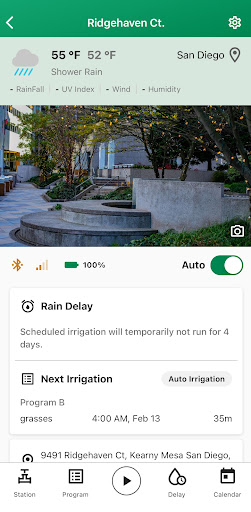

About this app
Developer Description
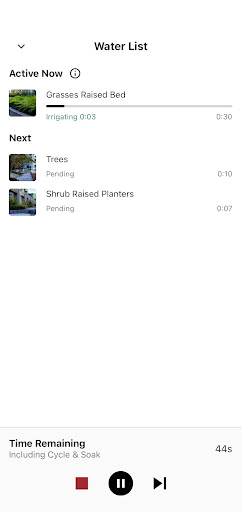
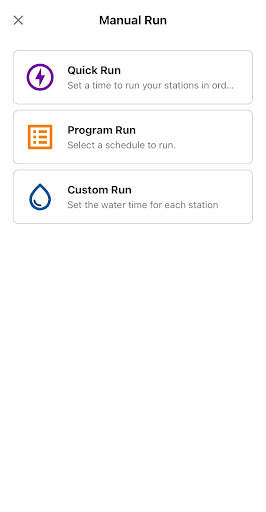
Connect your Rain Bird controller to your mobile device.
New with Rain Bird 2.0 app:
Device mapping – see where your controllers are located on the map
Search and filter -- quickly find the controller to which you want to connect using the search function or commonly used filters
Custom photos – upload photos of your site location or stations
New look -- updated user interface and user experience
Fast connect -- improved controller connection speed
Compatible with the following Rain Bird controller models:
ESP-2WIRE (new!)
ESP-ME3
BAT-BT
RC2
ARC Series
More controller models coming soon!
Creating a free account with the Rain Bird 2.0 app gives you easy, remote access to your system anytime, anywhere. Save your settings securely in the cloud, automate weather adjustments, track watering schedules, and receive updates, ensuring your irrigation runs smoothly and efficiently.
Plus, your data is safe and saved securely in the cloud — Rain Bird respects your privacy and never sells or shares your information.
For more information:
https://www.rainbird.com/products/esp-bat-bt
1-800-RAINBIRD
What's New
Version Information
- Version
- 1.4.1
- Downloads
- 50K+
- Updated on
- Jan 23, 2026
- Released
- Feb 26, 2024
- Requires
- Android 8.0
Statistics
Google Play Rating History
Rating Distribution
Downloads Over Time
Rain Bird 2.0 has been downloaded times. Over the past 30 days, it averaged downloads per day.
Shaded area shows 30-day prediction based on historical trends
Historical data collection started recently. More data points will be available over time.
Rain Bird 2.0 users say on Google Play
 Dean K. Gibson
I bought the ARC8 to replace my working Hunter X-Core controller, because I wanted WiFi remote control with the same functionality. However, the documented way to temporarily disable a program doesn't work. To work around this (as well as provide a program backup capability) is to first create a template for each program you want (including alternate programs). Then copy them as needed to your controller. Hint: Take a picture of your zone wiring & save it in the app as one of the station images!
 Adam
Adam
Update from previous bad review. The app works and is far easier than the old app. Still has major issues in setting up access and controller on initial set up. For about 4h it just kept coming up with transient comms error. I took the remote dongle out for about 90mins and that seemed to reset it. Then went through the process of set up as per the app. Now that it's working the app is much better.
 Dean Mohr
App seems to work okay; I don't generally have issues with it not connecting. My main complaint is that when your selected/running program has built in "soak" periods, it doesn't necessarily tell you in the notifications - it just says it completed. So I get 14 notifications because it will water, then soak, then water, then soak, then water each zone. Otherwise, it seems to be okay.
 Eric Oxley
App has completely hijacked the ".xlsx" file type association on my phone. now anytime I try to open a spreadsheet from google drive or anywhere else rainbird opens thinking I'm trying to import a controller. with the app uninstalled the file type opens in the current app as expected. I also tried disabling the "open supported links" toggle in the app specific settings in the Android settings menu but it doesn't seem to have any impact on the problem. can we please get a fix to this!
 Nick (Foghorn)
I spent a lot of time and effort with the Rainbird support to make this app (v1.3.1) work. It may fail miserably to update the firmware of the LINK2 wifi module of the ESP-ME3 controller and, as a result, fail to connect the module to the local wifi network unless the cellular network is disabled. I have a lot of IoT devices and do not remember that I ever was required to disable cellular network to connect a device to my wifi network.
ApkTrusted Ratings & Reviews
More from Rain Bird Corporation
See more apps

Scan this QR code to download

Forwarding you to the page at Google Play market in seconds...
Open Google Play market now