M20 MixRemote v1.2.4
RCF SpA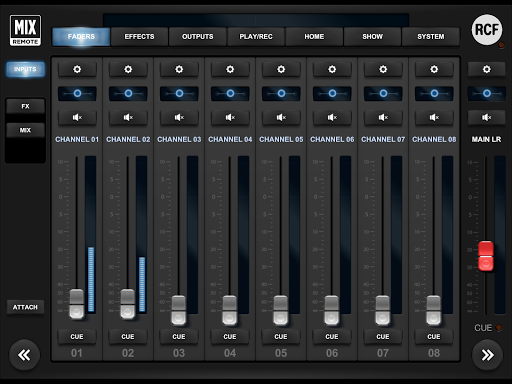


About this app
Developer Description
Remote control app for RCF M 20 Series digital mixers
The M20 MixRemote app for Android allows complete remote control of the M 20 Series digital audio mixers through a USB WiFi dongle or an external WiFi access point connected to its internal LAN.
Please note that a recent firmware version is required on the M20X to allow connection from the M20 MixRemote app (minimum fw version is 158).
All the main features available on the M20X digital mixer are controllable remotely with this app.
Features:
- Intuitive user interface and consistent layout
- Complete recall of all parameters (SHOW)
- 4 FX engines with dedicated send (pre/post-fader) busses arranged as two high-quality Reverbs, a programmable Delay and a 4th effect which can be configured as delay or modulation.
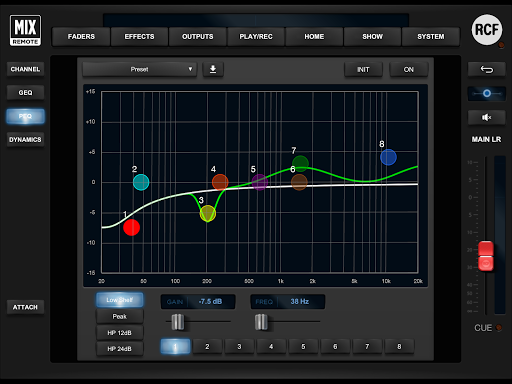
- On all inputs: a 12dB/oct HPF, a versatile Noise Gate, a flexible 4-band Parametric EQ, a Delay line and a channel Presets with copy and paste utilities.
- A flexible and musical Compressor/De-Esser on Ch. 1-16
- On all output busses: a flexible 8-band Parametric EQ with several selectable modes that allow different slopes, a Compressor/Limiter, a Delay line and a channel Presets with copy and paste utilities.
- 30-band Stereo Graphic EQ on MAIN LR outputs
- Real Time Analyzer (RTA) and Delay line on stereo CUE bus
- Read-only and User Presets are available for several processing block (Noise Gate, Input 4-band PEQ, Compressor/De-esser, output Compressor/limiter)
- Read-only presets are available for all four internal FX blocks
- User Presets are available for several processing block (Input channel strip, Output channel strip, Graphic EQ, output 8-band PEQ, routing presets)
- Microphone Preamps with digital remote control, switchable 48V phantom power and phase invert
- All inputs and all outputs can be linked into stereo pairs
- A flexible stereo file player can access USB mass storage devices (up to four different drives), with arbitrary sample rate, in MP3, WAV, and AIFF formats.
- USB drive Stereo Recorder capture 48-kHz, 24 bit WAV files
- SD Card player in multitrack WAV format, up to 20 tracks
- SD Card multitrack recorder with configurable number of tracks (4, 8,10, 16, 20 tracks)
- 4 DCA groups (with dedicate mute) and further 4 Mute groups that can be enabled on any inputs, outputs and FX returns
- Several devices can be connected at once to enable simultaneous control from different performers
- A LAN port is available for connecting an external WiFi client or Access Point
- Tethering USB supported for wired connection
Please note that when using a WiFi USB dongle, a maximum of 5 app instances can connect to the M20X mixer.
Note: no audio is transferred between the Android device and the digital mixer.
What's New
Version Information
- Version
- 1.2.4
- Downloads
- 10K+
- Updated on
- Oct 20, 2025
- Released
- Nov 20, 2019
- Requires
- Android 4.1
Statistics
Google Play Rating History
Rating Distribution
Downloads Over Time
M20 MixRemote has been downloaded times. Over the past 30 days, it averaged downloads per day.
Shaded area shows 30-day prediction based on historical trends
Historical data collection started recently. More data points will be available over time.
M20 MixRemote users say on Google Play
 ernest botchway
I like the m20x it make my sound good and its easy to use
 A Google user
This is how it should be, it's simply great. Easy to use, fast gui, great layout. I use the eth-port, using a travel-router (AP-mode) wired to the usb port for power. This allows the network to be switched on at the same time as the mixer. Stable, reliable connection. Possible improvements: The "attach" switch does not work as advertised. Ability to 'lock' the screen in a specific view would be helpful.
 Philipo Inzaagi
Perfect but we need update with more plugins
ApkTrusted Ratings & Reviews
More from RCF SpA
See more apps

Similar Apps
Music Equalizer - Bass Booster
Paid

Music Equalizer - Bass Booster
Free
Mixcloud: Music, Mixes & Radio
Free

Boom: Bass Booster & Equalizer
Free

Chaos Audio
Free
DJ Mixer - DJ Music Remix Pro
Paid

Video Recorder
Paid
n-Track Studio Pro | DAW
Paid

Songstats: Music Analytics
Free

JAMMATES
Paid

Soundtrap: Music Making Studio
Free

DRC - Polyphonic Synthesizer
Free
Equalizer- Bass Booster&Volume
Free
Neutron Music Player
Paid

Dolby On: Record Audio & Music
Free

Solo - Fretboard Visualization
Paid
Scan this QR code to download

Forwarding you to the page at Google Play market in seconds...
Open Google Play market now