
VRidge v2.7.11
RiftCat Sp. z o.o.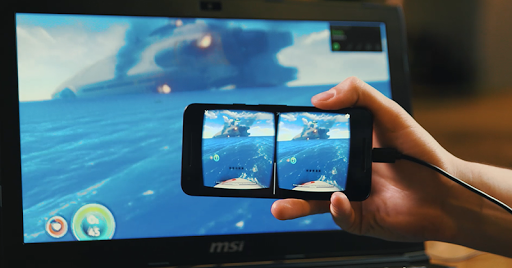


About this app
Developer Description
Play PC VR games inside your mobile VR headset.
This app enables RiftCat's VRidge technology on Android phone. Transforming your phone to a powerful VR headset screen. All you need is to put it inside a headmount like Google Cardboard and have fun.
It uses your desktop PC computing power to handle PC VR games and stream it into your phone via WiFi. It simulates the devices like Oculus Rift etc.
VRidge is capable of displaying high quality PC graphics and perfect handling of head rotations.
To use VRidge you have to download RiftCat client. It's available at https://riftcat.com/vridge
What's New
Version Information
- Version
- 2.7.11
- Downloads
- 500K+
- Updated on
- Oct 26, 2022
- Released
- Dec 7, 2017
- Requires
- Android 5.0
Statistics
Google Play Rating History
Rating Distribution
Downloads Over Time
VRidge has been downloaded times. Over the past 30 days, it averaged downloads per day.
Shaded area shows 30-day prediction based on historical trends
Historical data collection started recently. More data points will be available over time.
VRidge users say on Google Play
 Jikkuryuu
Did what it said it would do. I fooled around a fair bit before starting to get the hang of it. And then 10 minutes just wasn't enough so I bought the full version. So far I've only been using it for some pretty simple Steam experiences, but this is the app that convinced me to try more VR games. My Galaxy S7 isn't exactly new, and when it drifts it drifts a lot. I'm using a bargain bin plastic headset that I picked up for 10$ marked down from 70$+ and it struggles to hold my phone without removing its otterbox. (Which isn't gonna happen) \And my biggest complaint is that I don't have controllers./
 Saji
Saji
I try this app for days now, and I can say it's good enough, tho text looks really blurry I need to get close to them. I hate it when they say it needs usb tethering for usb connection, the reason is the phone gets unexpectedly hot like really hot, you can fry an egg on top of it. While the wifi option is also good, sometimes the connection is kinda janky even with good 5ghz connection. 7/10 for making my phone as a heater in front of my face
 D.J. Saderholm
It works great! I can't get the USB tethering option to work. I used to use iVRy, which supported USB debugging as an alternative wired method. That would definitely be a nice feature to have.
 aggelosk10_gaming
I have the sumsung galaxy a55 5g and for a reason everything works but it doesn't show at the screen of the phone and its just a black screen For example when i move the phone the camera in the game works and the sound also works but the screen is black can you please fix it ?
 Greg F
Great idea. Doesn't work no matter how many times I'm prepared to try. Life is too short for this level of buginess. Can't connect. OR can connect but then drops connection. OR your five minutes has just run out. Fail. There is a lot of dissatisfaction with this product, hence it's star rating. Requires a lot more effort.
ApkTrusted Ratings & Reviews
More from RiftCat Sp. z o.o.
See more apps

Similar Apps






Scan this QR code to download

Forwarding you to the page at Google Play market in seconds...
Open Google Play market now