VRidge Controller v1.0.7
RiftCat Sp. z o.o.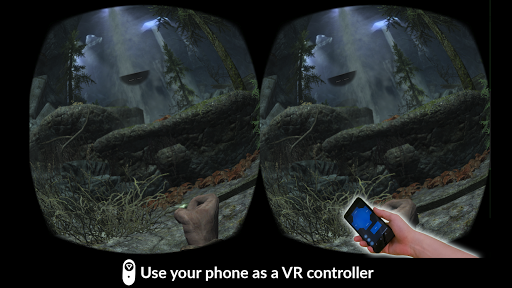

About this app
The VRidge Controller app solves the problem of limited controller options for VR experiences by allowing users to utilize their phone as a controller, which benefits gamers and VR enthusiasts the most. Compared to alternatives in the Entertainment category, VRidge Controller stands out with its innovative approach but falls short in terms of user ratings, indicating potential issues with performance or compatibility. With a paid model and no ads or in-app purchases, the app's monetization seems fair but the low user rating of 2.6/5 raises concerns about its overall quality. The app's unique feature set and the developer's reputation for VR solutions make it a notable option despite its shortcomings.
Pros
- The app's ability to turn a phone into a VR controller is a significant advantage, offering an innovative solution for those seeking more immersive experiences without the need for additional hardware.
- With no permissions required, the app ensures a level of privacy and security that is commendable, especially in an era where data protection is a major concern.
- The paid model without ads or in-app purchases provides a clean and uninterrupted user experience, which is a plus for those who value ad-free environments.
- The developer, RiftCat Sp. z o.o., has a background in VR technology, suggesting a deep understanding of the field and the potential for well-designed and functional products.
- The app's offline capability, implied by the lack of required permissions, means users can enjoy VR experiences without needing a constant internet connection, enhancing accessibility.
Cons
- The low user rating of 2.6/5 is a significant concern, indicating potential issues with the app's performance, compatibility, or overall user experience that need to be addressed by the developer.
- The limited number of downloads, at 5,000+, may suggest that the app has not yet gained widespread acceptance or that there are issues with its visibility or marketing strategy.
- The lack of detailed information about the app's functionality and system requirements beyond Android 4.4 could make it difficult for potential users to assess its compatibility and usefulness for their specific needs.
- Given the paid model, the expectation for a high-quality, bug-free experience is higher, and any significant issues could lead to negative reviews and a loss of customer trust.
Best for: The ideal user for VRidge Controller is a tech-savvy individual, likely between the ages of 18 and 40, who is already invested in VR technology, either for gaming or other immersive experiences, and is looking for a cost-effective and innovative way to enhance their VR interactions without the need for additional hardware controllers.
Developer Description
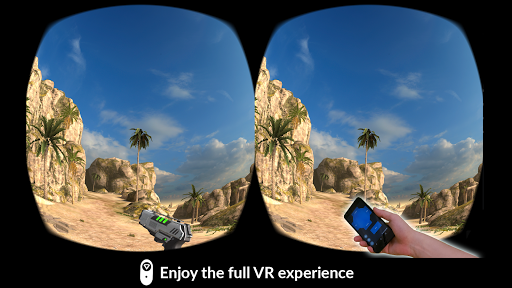
Use the phone as a VR controller with VRidge.
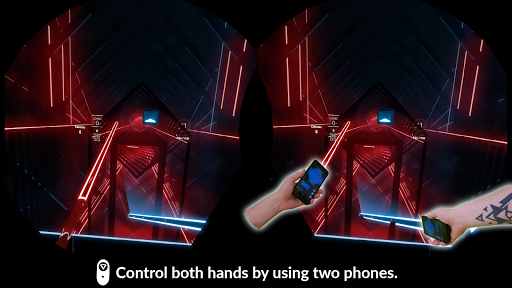
This easy to use app will allow you to use your hands inside virtual reality with VRidge. If you pair two phones you will be able to control both hands! With this solution, you can recreate a full 3-DOF PC VR experience.
The quality of tracking varies based on the phone’s available sensors.
To use this controller, you need a PC VR streaming solution called VRidge, available at: https://riftcat.com/vridge
Privacy
Since VRidge Controller requires no permissions, the risk of data collection or privacy breaches appears to be minimal, making it a safe choice in terms of data security. However, users should still be cautious when purchasing and installing apps, ensuring they are downloading from trusted sources like the official Play Store. Regularly checking the developer's website for updates and security advisories is also a good practice.
Tips
For the best experience with VRidge Controller, ensure your phone and VR headset are fully compatible and meet the necessary system requirements. Setting up the app for the first time may require calibration for optimal performance, so following the in-app instructions carefully is recommended. Additionally, closing other resource-intensive apps can help improve the app's performance and reduce lag during VR sessions.
What's New
Version Information
- Version
- 1.0.7
- Downloads
- 5K+
- Updated on
- Oct 26, 2022
- Released
- Jan 31, 2019
- Requires
- Android 4.4
Statistics
Google Play Rating History
Rating Distribution
Downloads Over Time
VRidge Controller has been downloaded times. Over the past 30 days, it averaged downloads per day.
Shaded area shows 30-day prediction based on historical trends
Historical data collection started recently. More data points will be available over time.
VRidge Controller - Google Play Rankings
Top Rankings
| Rank | Country | Category | List | Change |
|---|---|---|---|---|
| — |
Ranking History in
No ranking data available yet. Rankings are updated daily.
#94 in Top Paid Entertainment in Thailand


#94 in Top Paid Entertainment in Philippines
#94 in Top Paid Entertainment in Argentina


#95 in Top Paid Entertainment in Poland



VRidge Controller users say on Google Play
 Phoebe S
I can't seem to find a vridge connection no matter what I do.. 😤😥😭 -Edit- I figured out my problem. The app works.. I had to manually connect with an IP address.. However I don't have the right device for this app unfortunately.. I have a tablet that works with but, it's too big to hold in my small hands. Then there's the phone that I use for the headset. I might have to see if I can get a couple of cheap phones that have the sensors on them.
 A Google user
Great so far. So most of the vr games I i tried i have been able to play but since you are limited by only able to lift your hands left,right,up and down and there is no forward and backwards making you unable to reach for things which does kinda prohibit you from doing things and i hope this will come in a future update, but so far it is very customizable and easy to set up.
 Ebin Mathew
The first time tried this app, it wouldn't connect to Riftcat but it started working the next day. I tried out best saber at it worked fine, the tracking and everything went well. Idk how good it will be for games needing buttons because the placement can be awkward. The reason why I gave it 3 starts is for the streaming. The streaming quality was a bit low plus there were random stuttering which made everything grainy. I don't think it's my WiFI problem because Virtual Destop works really well.
 Arambour Sikder
I thought I would give this a try despite the bad reviews. The reviews were right. This was unusable. The tracking was horrible, this shouldn't be a paid app.
 Jihwan Oh
I was looking for a low cost solution for VR. and the app sounded promising. However, there was a connectivity issue to the riftcat almost all the time. I thought changing from 5ghz initially to 2.4 ghz may solve the issue, and it ended up connecting and not disconnecting, but the latency was close to half a second or more. (500 to 1000 ms). Already contacted support asking for a refund. If you are looking for a low-cost solution like me, I'd suggest saving money to get a real VR headset + controller. This may get you foot into the door, but definitely not a sustainable option. controller used in: Samsung S3 (maybe too old? but the calibration was way off) Samsung Note 4, LG V40, Pixel (This worked but again, high latency on 2.4 ghz)
ApkTrusted Ratings & Reviews
More from RiftCat Sp. z o.o.
See more apps


Similar Apps







Scan this QR code to download

Forwarding you to the page at Google Play market in seconds...
Open Google Play market now