
Deckboard: Macropad for PC v3.2.0
Riva Farabi





About this app
Developer Description
Power up your stream, productivity, games, and PC setup from your device!
No more windows switching to open the folder or website, get Deckboard to simplify them and power up your productivity!
If you are an avid streamer, enjoy OBS Studio, Streamlabs, and Twitch integration!
Switching scenes, toggling sources, manage chat on stream easily will make Deckboard your new favorite streaming companion tool!
Connect your computer to your device over local WiFi connection by entering IP address or scanning QR code.
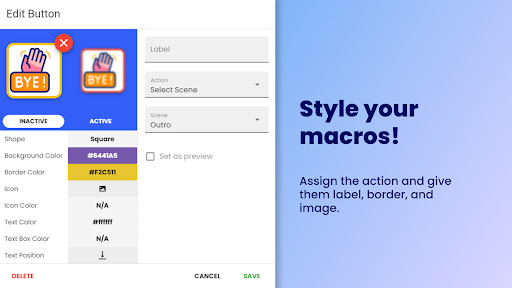
And don't forget to make your macro buttons truly yours by adding image, text, or animated GIF!
IMPORTANT
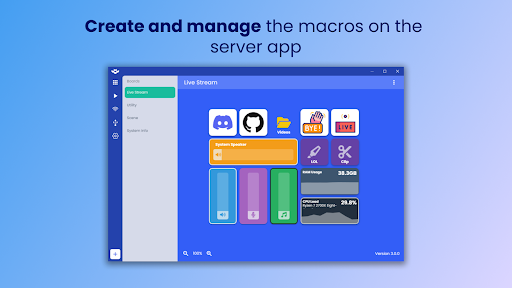
This app required Deckboard desktop server app installed on your computer
- Download Deckboard desktop app https://deckboard.app
Available macros
• Keyboard key press combination
• Opening website and folder
• Multimedia controls (play, next track, previous track , etc)
• Run program or executable
• OBS Studio and Streamlabs control for streaming
• Etc.
Included third party integrations:
• OBS Studio (OBS Websocket plugin required)
• Streamlabs
• Spotify
• Twitch
• Voicemod (Beta)
Need more actions? Just create your own extension! More info here
Have any connection issue? Click here
What's New
- Add setting to enable swipe gestures to change boards
Version Information
- Version
- 3.2.0
- Downloads
- 100K+
- Updated on
- Dec 25, 2025
- Released
- Feb 28, 2018
- Requires
- Android 5.0
Statistics
Google Play Rating History
Rating Distribution
Downloads Over Time
Deckboard: Macropad for PC has been downloaded times. Over the past 30 days, it averaged downloads per day.
Shaded area shows 30-day prediction based on historical trends
Historical data collection started recently. More data points will be available over time.
Deckboard: Macropad for PC users say on Google Play
 Cody Peternell
***big brain - brain hurt*** Fixed after running android adb on pc with phone in developer and debugged. Ran command "adb devices" to start daemon then "adb reverse tcp:8500 tcp:8500" followed by "adb reverse" App now works perfectly. I learned something today. Thank you rivafarabi ^.^
 Gary Bosworth
Got this app earlier this year and it worked perfect. After an update earlier this year, I had to email the app support and they told me to update obs and things worked well, fast response from app support. Most recent update in Nov, I think, made it so phone just will not connect to obs no matter what. Emailed few weeks ago, but still no response. When it's worked, this app is gold, especially free.
 Oliver Schmid
Works great BUT... Although it claims to run via USB I haven't actually managed to get that to work and there is not one word of information on how to set that up. Why is this important? LAG!!! When used over Wi-Fi there is a lag and you have to switch early to compensate. I've gotten this app to work as far back as Android 4.1.1 🙂 Add setup instructions for USB and get 5 Stars.
 Iain McKinnon
This is a great app but the latest update plasters ads over the bottom of the screen making it impossible to use the last row of icons. This was great product ruined by ads.
 Jason Nung
Advertisements are extremely intrusive, and completely ruin the experience of the Deckboard interface. These adverts appear to be created by the same group, due to the high similarity in structure and code. They will appear as a banner underneath the board, obscuring some of the buttons, then suddenly, and automatically, without input, open a webpage in the default browser. It is almost as if they were created by the Deckboard team to push users into purchasing the Pro version. Find a better app
ApkTrusted Ratings & Reviews
More from Riva Farabi
See more apps


Scan this QR code to download

Forwarding you to the page at Google Play market in seconds...
Open Google Play market now