
Deckboard PRO: Macropad for PC v3.2.0
Riva Farabi



About this app
Developer Description
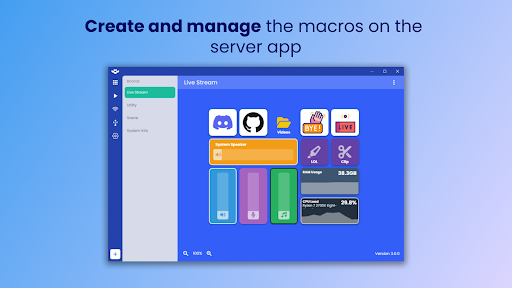
Power up your stream, productivity, games, and PC setup from your device!
No more windows switching to open the folder or website, get Deckboard to simplify them and power up your productivity!
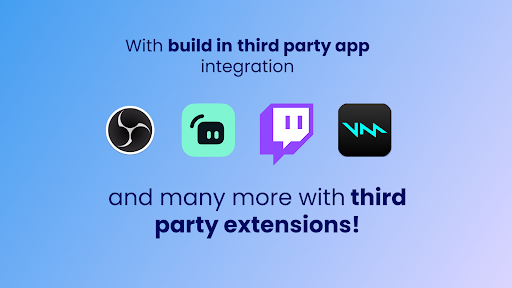
If you are an avid streamer, enjoy OBS Studio, Streamlabs, and Twitch integration!
Switching scenes, toggling sources, manage chat on stream easily will make Deckboard your new favorite streaming companion tool!
Connect your computer to your device over local WiFi connection by entering IP address or scanning QR code.
And don't forget to make your macro buttons truly yours by adding image, text, or animated GIF!
IMPORTANT
This app required Deckboard desktop server app installed on your computer
- Download Deckboard desktop app https://deckboard.app
Available macros
• Keyboard key press combination
• Opening website and folder
• Multimedia controls (play, next track, previous track , etc)
• Run program or executable
• OBS Studio and Streamlabs control for streaming
• Etc.
Included third party integrations:
• OBS Studio (OBS Websocket plugin required)
• Streamlabs
• Spotify
• Twitch
• Voicemod
Need more actions? Just create your own extension! More info here
Have any connection issue? Click here
What's New
- Add setting to enable swipe gestures to change boards
Version Information
- Version
- 3.2.0
- Downloads
- 10K+
- Updated on
- Dec 25, 2025
- Released
- May 5, 2018
- Requires
- Android 5.0
Statistics
Google Play Rating History
Rating Distribution
Downloads Over Time
Deckboard PRO: Macropad for PC has been downloaded times. Over the past 30 days, it averaged downloads per day.
Shaded area shows 30-day prediction based on historical trends
Historical data collection started recently. More data points will be available over time.
Deckboard PRO: Macropad for PC - Google Play Rankings
Top Rankings
| Rank | Country | Category | List | Change |
|---|---|---|---|---|
| — |
Ranking History in
No ranking data available yet. Rankings are updated daily.
#29 in Top Paid Tools in Turkey
Deckboard PRO: Macropad for PC users say on Google Play
 Jonathan Huston
I found this app to work better than Streamdecks without the subscription. It is exactly what I have been looking for to better my workflow in the Adobe CC software. Though it took me 4 hours just to set up my Photoshop shortcuts, and I haven't even customized the buttons, I am extremely happy with the results so far. The PC component is easy to understand and use. My device (Tab S6 Lite)however is not yet compatible with a wired connection, I hope this will be addressed in future updates.
 Adam Keys
Fantastic app, works just as good if not better than a physical Stream Deck for just the price of a coffee. Both the desktop and mobile parts of the app are super easy to use and highly customisable. The only reason for 4 stars is there seems to be no option to disable having your phone display on permanently while the app is open. Phones or tablets with OLED screens will suffer burn-in after short use of this app unless you manually turn your screen off when not using it. The big problem with that is if you turn your screen off then the app goes to 'sleep' and when you turn the phone screen back on the app takes a while to reconnect to the desktop client. For the full 5 stars, I would like an option where the app fades to an all black screen after 30 seconds or a minute so that the screen is still technically on but will not damage an OLED screen and a simple tap of the screen will show your buttons again. The black screen would have to be set as a 'full screen' mode too in order to hide the notification bar which would also burn the screen if left there. Hope this can be added, I'll happily change to 5 stars if it does.
 Twisted Wheelerz
This works great but it's a little hard to use with USB I'm still having struggles. But I use it with both Elite dangerous and Star Citizen and it works as a panel board for all kinds of spaceship functions. Edit: This failed me today on a stream due to an update that cause me to re-install the software on the PC's side =( 11/21/2020 WHAT IS GOING ON WITH THIS APP???? I have to keep uninstalling it and it want's to update like every other day. This is on the paid version. It will not give me an option to bypass the update and the update breaks the app. Grrrrrrr!!!!!
 furkan ozcelik
Really good program but the only issue i have with it is that you have to manually reconnect when you restart the computer or the WiFi connection disappears for a second.
 A Google user
This app crashes when I try to use it on my Huawei P30 I think this app was awesome by all the features but I can't enjoy it nothing if the app doesn't run properly, very very upset with this purchase :( (PD: I hope you fix one issue with the play audio feature, if you press one and another right after the first, the second stops the first, both audio plays doesn't sound at the same time, a feature that elgato streameck has)
ApkTrusted Ratings & Reviews
More from Riva Farabi
See more apps


Scan this QR code to download

Forwarding you to the page at Google Play market in seconds...
Open Google Play market now