
Galaxy Wearable vVARY
Samsung Electronics Co., Ltd.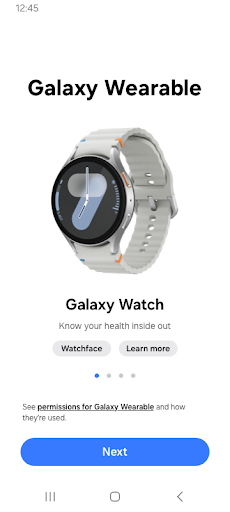

About this app
The Galaxy Wearable app solves the problem of managing wearable devices and gear series from Samsung, benefiting most Samsung smartphone users who own a wearable device. Compared to alternatives in the Tools category, this app stands out due to its seamless integration with Samsung devices and its feature-rich interface. However, it falls short in terms of compatibility with non-Samsung devices, limiting its user base. With over 1 billion downloads and a good user rating, this app is a reliable choice for Samsung wearable device owners.
Pros
- The Galaxy Wearable app has a high download count, indicating its popularity and social proof, which is a significant advantage for users looking for a reliable and widely-used app.
- The app's developer, Samsung Electronics Co., Ltd., is a well-known and reputable company, ensuring a certain level of quality and support.
- The app's feature set is comprehensive, allowing users to manage their wearable devices and gear series with ease, making it a valuable tool for Samsung device owners.
- The app's update frequency is regular, ensuring that users have access to the latest features and security patches, which is essential for a tool that interacts with wearable devices.
Cons
- One concern is the app's compatibility issues with non-Samsung devices, which may limit its user base and make it less versatile than other tools in the category.
- Another concern is the potential for the app to consume battery life, as some users have reported, which could be a drawback for users who are sensitive to battery drain.
- Some users have also reported issues with the app's connectivity and syncing, which may be frustrating for users who rely on the app to manage their wearable devices.
Best for: The ideal user for the Galaxy Wearable app is a Samsung smartphone owner who also owns a Samsung wearable device, such as a smartwatch or fitness tracker, and is looking for a convenient and feature-rich way to manage their device and track their fitness and health metrics.
Developer Description
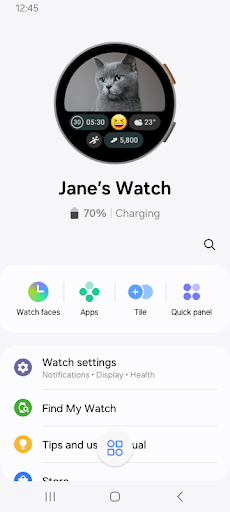
The Galaxy Wearable app manages the wearable devices and gear series to phone.
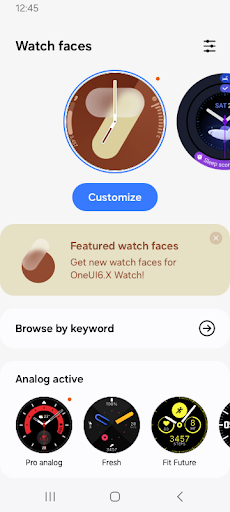
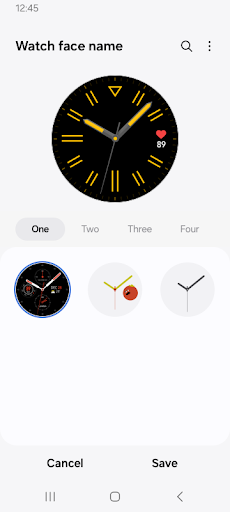
Use the Galaxy Wearable application to set up and manage the following features:
- Mobile device connection/disconnection
- Software updates
- Clock settings
- Application download and settings
- Find my Watch
- Notification type and settings, etc.
Install the Galaxy Wearable application on your mobile device, then pair your wearable devices via Bluetooth to enjoy all of its features.
※ Settings and features provided by the Galaxy Wearable application are only available when your wearable device is connected to your mobile device. Features will not work properly without a stable connection between your wearable device and your mobile device.
※ The Galaxy Wearable application does not support the Gear VR or Gear 360.
※ only for Galaxy Buds models, The Galaxy Wearable application can be used with tablets .
※ Supported devices vary depending on your region, operator, and device model.
※ Please allow the Galaxy Wearable application permissions in Android Settings so you can use all the functions in Android 6.0.
Settings > Apps > Galaxy Wearable > Permissions
※ Access permission information
The following access permissions are required to provide you with this service.
Basic features of the service can be used even if optional access permissions are not granted.
Depending on the wearable device you are connecting, the required access permissions may vary.
[Required access permissions]
- Location: To search for nearby connectable devices to connect to the Gear via Bluetooth (Android 11 or lower)
- Nearby devices: To search for nearby connectable devices to connect to the Gear via Bluetooth (Android 12 or higher)
[Optional access permissions]
* Optional permissions may be required depending on the wearable device you are connecting.
- Phone: To verify the unique identification information of devices for app updates and for installing plug-in apps
- Address book: To provide services that require account syncing by using the registered Samsung account information
- Calendar: To provide schedule syncing with the wearable device
- Call logs: To provide call log syncing with the wearable device
- SMS: To provide SMS syncing with the wearable device
Privacy
Since the Galaxy Wearable app requires no permissions, it is a relatively safe app to use, with minimal risk of data collection or privacy concerns. However, users should still be cautious when downloading and installing the app, ensuring they are downloading from a trusted source. It is also essential to keep the app and the wearable device's software up to date to ensure the latest security patches.
Tips
To get the most out of the Galaxy Wearable app, users should first set up their wearable device and pair it with their Samsung smartphone, then explore the app's features, such as notification management and fitness tracking. Users can also optimize the app's performance by closing unnecessary background apps and ensuring their device has the latest software updates. Additionally, users can customize the app's settings to suit their needs, such as setting up custom notifications or adjusting the app's interface.
What's New
Version Information
- Version
- -
- Downloads
- 1.0B+
- Updated on
- Jan 19, 2026
- Released
- Nov 18, 2013
- Requires
- Android Varies with device
Statistics
Google Play Rating History
Rating Distribution
Downloads Over Time
Galaxy Wearable has been downloaded times. Over the past 30 days, it averaged downloads per day.
Shaded area shows 30-day prediction based on historical trends
Historical data collection started recently. More data points will be available over time.
Galaxy Wearable users say on Google Play
 Omonu Emmanuel
I never had any issues with the app, but since the last software upgrade, my watch doesn't connect with my phone, and I don't receive notifications on my watch anymore. Hopefully, this can be worked on.
 Jovan Joshua Aldas
is this compatible to Android 9?
 Shez B
since the last update I've found that if I click on any app and then switch to a different app, it still shows the previous app. The only way to fix is turn watch off and on but its SO frustrating! please fix this Samsung 🙏
 Cassia B
put the head phones back on the app I want all my "Wearables" in ONE place I hate having to go to settings to check my battery power and headphone settings
 Lisa Ertolahti
Errors have not been fixed. Watch 5 and app consistently show incorrect battery amounts during charging and claim fully charge in less than 10 min. Watch uses far more battery than ever before. Both watch and app always say no app usage ever since the ui 8 update. Sleep tracking doesn't work correctly either and is suddenly confusing sitting watching tv for sleeping. Struggles to read resting hr. Have cleared cache on the watch already and it made no difference. Please fix this!!
ApkTrusted Ratings & Reviews
More from Samsung Electronics Co., Ltd.
See more apps
Smart Tutor for SAMSUNG Mobile
Free

One Hand Operation +
Free

POWERbot-S
Free

Samsung WE VoIP
Free

Galaxy Buds Core Manager
Free
Samsung Accessory Service
Free

Galaxy Buds FE Manager
Free
Galaxy Buds FE Manager
Free

Galaxy Buds Pro Manager
Free

Galaxy Buds3 Manager
Free

Galaxy Buds2 Manager
Free

Galaxy Buds Manager
Free

Samsung Plus 2
Free

Galaxy Buds3 FE Manager
Free

POWERbot-E
Free

Galaxy Buds3 Pro Manager
Free
Similar Apps














Scan this QR code to download

Forwarding you to the page at Google Play market in seconds...
Open Google Play market now