
Link to Windows v1.25122.117.0
Microsoft Corporation




About this app
The Link to Windows app solves the problem of seamless integration between Android devices and Windows PCs, benefiting users who frequently switch between their phone and computer. It stands out in the Productivity category due to its ability to access phone notifications, calls, apps, photos, and texts directly on the PC, making it a valuable tool for individuals who rely heavily on both devices. Compared to alternatives, Link to Windows offers a unique integration experience, but its effectiveness depends on the user's investment in the Microsoft ecosystem. The app's high download numbers and good user rating indicate a generally positive user experience.
Pros
- With over 1 billion downloads, Link to Windows has demonstrated its value to a large user base, indicating a high level of social proof and trust in the app's functionality.
- The app's ability to access a wide range of phone data and features directly on the PC enhances productivity and convenience for users who frequently need to switch between devices.
- As a product from Microsoft Corporation, users can expect a level of quality, security, and support that is consistent with the company's reputation for delivering reliable software solutions.
- The absence of ads and in-app purchases ensures a clean and uninterrupted user experience, allowing users to focus on the app's core functionality without distractions.
- Regular updates, as indicated by the version number, suggest that the developer is committed to maintaining and improving the app, which is crucial for an app that integrates closely with both Android and Windows ecosystems.
Cons
- Despite its many benefits, the app's usefulness is heavily dependent on the user having both an Android device and a Windows PC, limiting its appeal to users who do not use both platforms.
- Some users may find the initial setup and configuration of the app to be somewhat complex, particularly if they are not familiar with Microsoft's ecosystem of products and services.
- The lack of permissions requested by the app could be seen as a positive from a privacy perspective, but it also means that the app's functionality might be limited compared to other productivity apps that require more permissions to offer additional features.
- User complaints and negative reviews often highlight issues with connectivity and synchronization between devices, which can hinder the app's performance and overall user experience.
Best for: The ideal user for Link to Windows is a professional or student who frequently works on both their Android device and Windows PC, values convenience and productivity, and is already invested in the Microsoft ecosystem, making them likely to appreciate the seamless integration and functionality the app offers.
Developer Description
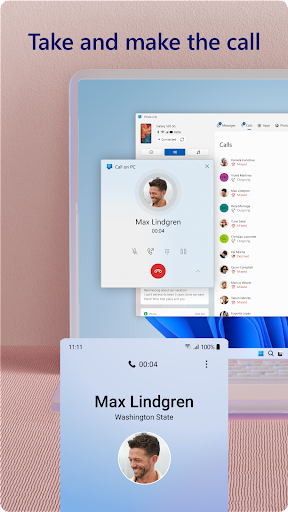
Access your phone's notifications, calls, apps, photos & texts on your PC
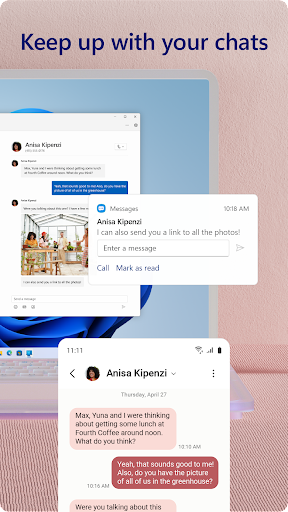
Link your Android phone and PC to view and reply to text messages, make and receive calls*, view your notifications, and more.
Make emailing yourself photos a thing of the past as you share your favorite images between your phone and PC. Copy, edit, and even drag and drop photos without ever touching your phone.
Phone Link features:
• Make and receive calls from your PC*
• Manage your Android phone's notifications on your PC
• Access your favorite mobile apps** on your PC
• Read and reply to text messages from your PC
• Drag files between your PC and phone**
• Copy and paste content between your PC and phone**
• Instantly access the photos on your phone from your PC
• Use your PC's bigger screen, keyboard, mouse, and touch screen to interact with your phone from your PC.
Integrated with select** Microsoft Duo, Samsung, and HONOR phones for an even better experience:
The Link to Windows app comes integrated so no additional apps need to be downloaded from the Play Store.
Link to Windows is easy to find in the Quick Access tray (swipe down from the top of your screen to access it).
Exclusive features like cross-device copy and paste, Phone screen, file drag-and-drop, and Apps.
Let us know what features you'd like to see next by selecting “Send feedback” in the Phone Link settings.
*Calls requires a Windows 10 PC with Bluetooth capability.
**Drag and drop, Phone screen and Apps all require a compatible Microsoft Duo, Samsung or HONOR device (full list and breakdown of capabilities: aka.ms/phonelinkdevices). The multiple apps experience requires a Windows 10 PC running the May 2020 Update or later and has at least 8GB of RAM, and your Android device must be running Android 11.0.
The Link to Windows accessibility service is for those using a screen reading tool on the PC. When the service is enabled, it lets you control all your phone’s apps from your PC using Android keyboard navigation while receiving spoken feedback from your PC speakers. No personal or sensitive data is collected via Accessibility Service.
By installing this app, you agree to the Microsoft Terms of Use https://go.microsoft.com/fwlink/?LinkID=246338 and Privacy Statement https://go.microsoft.com/fwlink/?LinkID=248686.
Privacy
Given that Link to Windows requires no permissions, it presents a low risk to user privacy and security. However, users should still be cautious about the data they access and manage through the app, ensuring they are comfortable with Microsoft's data collection and usage policies. It's also advisable to keep both the Android device and Windows PC updated with the latest security patches to minimize potential vulnerabilities.
Tips
To get the most out of Link to Windows, users should initially invest time in setting up the app correctly, ensuring that all desired features and data are accessible from their PC. Utilizing the app's ability to mirror phone notifications on the PC can help users stay focused on their work by minimizing the need to check their phone frequently. Additionally, exploring the app's settings can reveal options for customizing the integration experience, such as choosing which notifications to prioritize or how to handle incoming calls.
Version Information
- Version
- 1.25122.117.0
- Downloads
- 1.0B+
- Updated on
- Jan 21, 2026
- Released
- Dec 16, 2015
- Requires
- Android 10
Statistics
Google Play Rating History
Rating Distribution
Downloads Over Time
Link to Windows has been downloaded times. Over the past 30 days, it averaged downloads per day.
Shaded area shows 30-day prediction based on historical trends
Historical data collection started recently. More data points will be available over time.
Link to Windows - Google Play Rankings
Top Rankings
| Rank | Country | Category | List | Change |
|---|---|---|---|---|
| — |
Ranking History in
No ranking data available yet. Rankings are updated daily.
#49 in Top Free Productivity in United States
#26 in Top Free Productivity in Japan


#32 in Top Free Productivity in Australia


#36 in Top Free Productivity in Poland


Link to Windows users say on Google Play
 Emmanuel Iheanyi
good
 Mittal Shah
good
 Omer Duzyol
Good but it could be better...
 Anthony Bovian
D!
 Robert Sero Jr
why can't I uninstall the app?
ApkTrusted Ratings & Reviews
More from Microsoft Corporation
See more apps
Microsoft Authenticator
Free

Microsoft Bing Search
Free

Microsoft Azure
Free

MSN
Free

Microsoft Clarity
Free

MSN Money- Stock Quotes & News
Free

IoT Plug and Play
Free

MSN Weather - Forecast & Maps
Free

Microsoft Build
Free

Microsoft Bing Webmaster Tools
Free

Warehouse Management
Free

Bing Wallpapers
Free

Microsoft Advertising
Free

Microsoft Identity Pass
Free

As Dusk Falls Companion App
Free

SMS Organizer
Free
Similar Apps

Samsung Smart Switch Mobile
Free

Xiaomi Home
Free

SmartThings
Free

Dropbox: Secure Cloud Storage
Free

Samsung Members
Free

TeamViewer Remote Control
Free

AnyDesk Remote Desktop
Free

Samsung Email
Free
RAR
Free

Galaxy Wearable
Free

TeamViewer QuickSupport
Free

Samsung Notes
Free

Slack
Free

Xiaomi Community
Free

MEGA
Free

Zoom Workplace
Free
Scan this QR code to download

Forwarding you to the page at Google Play market in seconds...
Open Google Play market now