
Microsoft Advertising v2.22.20
Microsoft Corporation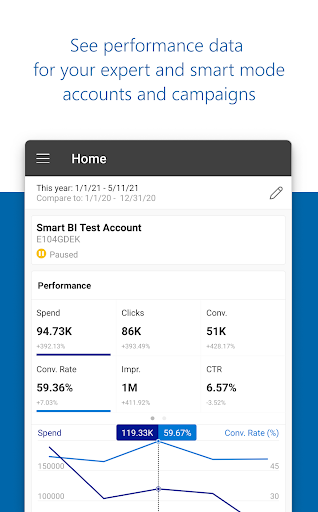


About this app
The Microsoft Advertising app solves the problem of campaign management on-the-go for marketers and business owners, allowing them to monitor and adjust their ad campaigns remotely. This app benefits most those who are already invested in the Microsoft ecosystem and utilize Bing Ads for their advertising needs. Compared to other business apps, Microsoft Advertising stands out due to its simplicity and direct integration with Microsoft's advertising platform, but may fall short in terms of feature richness compared to more comprehensive marketing management tools. Its focus on ease of use makes it a solid choice for those looking for a straightforward campaign management experience.
Pros
- With over 100,000 downloads and a 3.5-star rating, Microsoft Advertising has demonstrated moderate social proof and a generally positive user reception, indicating a reliable and useful tool for its intended purpose.
- The app's lack of permissions requests is a significant advantage, ensuring that users' data privacy is respected and minimizing potential security risks associated with unnecessary permission grants.
- As a product from Microsoft Corporation, the app benefits from the reputation and trust associated with a major technology company, suggesting a level of quality and support not always found in apps from smaller developers.
- The absence of in-app purchases and ads within the app contributes to a clean and distraction-free user experience, allowing marketers to focus on managing their campaigns without interruptions.
- Regular updates, as indicated by the version number, suggest that the developer is actively maintaining and improving the app, which is crucial for an app that needs to keep pace with changes in advertising technologies and user needs.
Cons
- One concern is the app's limited feature set compared to more comprehensive marketing and advertising management platforms, which might limit its usefulness for complex campaigns or those requiring a wide range of analytics and optimization tools.
- Users have reported some issues with the app's performance and stability in reviews, which could be a significant drawback for those relying on the app for critical campaign monitoring and adjustments.
- The requirement for Android 5.0 or higher might exclude some older devices, potentially limiting the app's accessibility to users who have not upgraded their devices or prefer not to, which could be a consideration for marketers targeting a broad audience.
- Despite its strengths, the app's user interface and user experience could be improved, as some users have noted difficulties in navigating and utilizing all the features effectively, which might hinder the app's adoption and regular use.
Best for: The ideal user for the Microsoft Advertising app is a digital marketer or small to medium-sized business owner who is already utilizing Bing Ads for their online advertising needs, possesses a moderate level of technical skill, and requires a straightforward, on-the-go solution for monitoring and managing their ad campaigns without needing an extensive suite of marketing analytics tools.
Developer Description
Microsoft Ads helps you stay on top of your campaigns while you’re on the go.
• Monitor your favorite campaigns and get performance data on the go
• Quickly make changes to update your status, budgets and bids
• Get notified to know when your automatic rules have ran or credit cards are about to expire
• Visualize how your account or ads are performing and compare metrics side by side
• Get in touch with Microsoft Advertising support whenever you need help
Note: Some of the above mentioned features may not be available for Smart Campaign customers
Privacy
Given that the Microsoft Advertising app requests no permissions, it presents a very low risk in terms of data privacy and security, making it a safe choice for users concerned about their personal data. However, as with any app, it's essential to ensure that the device itself is secure and that the app is downloaded from a trusted source like the Google Play Store. Users should also be cautious of any phishing attempts or fake apps impersonating Microsoft Advertising.
Tips
To get the most out of Microsoft Advertising, users should first ensure they have a Bing Ads account set up, as the app is designed to work in tandem with this service. Regularly checking the app for updates and campaign performance can help marketers stay on top of their advertising efforts. Additionally, exploring all the features and settings within the app can reveal useful tools and insights that might not be immediately apparent, such as customizing notifications for critical campaign events.
What's New
Version Information
- Version
- 2.22.20
- Downloads
- 100K+
- Updated on
- Jan 8, 2026
- Released
- Aug 31, 2015
- Requires
- Android 5.0
Statistics
Google Play Rating History
Rating Distribution
Downloads Over Time
Microsoft Advertising has been downloaded times. Over the past 30 days, it averaged downloads per day.
Shaded area shows 30-day prediction based on historical trends
Historical data collection started recently. More data points will be available over time.
Microsoft Advertising users say on Google Play
 Rami Matar
Easy to use.
 Ven Alex Madjar
Works well enough to quickly check on how your ad campaigns are doing, but the app cannot be used to manage your ads. To do anything other than pause them, you'll need to use a laptop
 Sam Garvin
I'm not sure why but I'm seeing Chinese characters inside the app alongside English... Is there not a native English version of the app? There is no way to turn off the Chinese characters in settings.....
 Sean Taylor
In terms of the basic needs, it's all there. But there's a lot of work to do in terms of being able to really make changes like you can on Google Ads. You only have some metrics, you can only customize columns so much, you rarely have any visualisations, overall it is pretty lacking.
 Matthew Coley
Absolute nightmare! A rep called me and walked me through the set-up. That evening my account got suspended. I went through the recommended channels to resolve and that has turned into a customer service deficit that is still unresolved. The girl told me they don't have to tell me why my account is suspended and refused to put me in touch with someone who could actually resolve the issue. The survey you get is a joke! *Edit* Responded to above email and NOTHING has happened. Dead in the water!
ApkTrusted Ratings & Reviews
More from Microsoft Corporation
See more apps
Microsoft Authenticator
Free

Microsoft Bing Search
Free

Microsoft Azure
Free

MSN
Free

Microsoft Clarity
Free

MSN Money- Stock Quotes & News
Free

MSN Weather - Forecast & Maps
Free

IoT Plug and Play
Free

Microsoft Build
Free

Microsoft Bing Webmaster Tools
Free

Link to Windows
Free

Warehouse Management
Free

Bing Wallpapers
Free

Microsoft Identity Pass
Free

As Dusk Falls Companion App
Free

SMS Organizer
Free
Similar Apps

Content - Workspace ONE
Free

Email Blue Mail - Calendar
Free

Boxer - Workspace ONE
Free

Viva Engage
Free

Mattermost
Free

Mailchimp Email Marketing
Free

RAYNET CRM
Free

Spark Mail: AI Email, Calendar
Free

Udemy Business
Free

Pocket CRM - Customers & Leads
Free

Wrike - Where Work Flows
Free

Mindbook Pro
Paid

Rydoo
Free

Kizeo Forms, Mobile forms
Free

HubSpot
Free

Email Aqua Mail - Fast, Secure
Free
Scan this QR code to download

Forwarding you to the page at Google Play market in seconds...
Open Google Play market now