
Secure Folder – Secure files v1.1.5
Safe Folder - Lock Folder






About this app
The Secure Folder – Secure files app solves the problem of keeping personal files, photos, and videos private and secure on Android devices, benefiting individuals who value their digital privacy and security. Compared to other tools in the category, it stands out with its simple and user-friendly interface, but may fall short in terms of advanced features. With a 4.1/5 user rating and over 50,000 downloads, it has shown promise, but its limited permissions and lack of in-app purchases raise questions about its long-term viability. Overall, it's a good option for those seeking basic file security.
Pros
- The app's high user rating of 4.1/5 indicates a well-received and reliable tool, with many users appreciating its simplicity and effectiveness in securing their files.
- With no permissions required, the app ensures that user data is not unnecessarily accessed or shared, enhancing its security and privacy appeal.
- The free-to-use model with ads provides an accessible solution for users who want to protect their files without incurring additional costs.
- The developer's presence and contact information, including a website and email, suggest a level of accountability and support, which is reassuring for users.
- The app's offline capability, implied by its functionality, means that users can secure their files even without an internet connection, enhancing its usability.
Cons
- The lack of in-app purchases and limited monetization options may restrict the app's ability to offer advanced features or regular updates, potentially affecting its long-term sustainability.
- The presence of ads, while understandable given the free model, may detract from the user experience, especially if they are intrusive or frequent.
- The app's basic feature set, while easy to use, may not meet the needs of advanced users seeking more sophisticated security solutions, such as encryption or cloud backup integration.
- The limited download numbers, despite a good rating, suggest that the app may not have reached a wide audience yet, which could impact its community support and feedback loop.
Best for: The ideal user for Secure Folder – Secure files is an individual, likely between the ages of 18 and 50, with basic technical skills, who values their digital privacy and seeks a simple, user-friendly solution to secure personal files, photos, and videos on their Android device, without needing advanced security features or complex setup processes.
Developer Description
Keep Phone Safe and Hide Photos, Videos, file and folder with advance security
Protect your personal files, photos, videos, and documents with Secure Folder, the ultimate app for safeguarding your private data. Whether you want to hide photos, lock videos, or secure personal files, this app offers advanced protection with double-layer security for unmatched privacy.
Simply import your phone's pictures or videos into the Photo Vault, and view them securely within. Here, there's an advanced application password lock that provides high-level security for your privacy and photos.
🔒 Preserve beautiful memories
🔒 Secure & Hide Your device data with various folders
🔒 Secure Folders, Images, Videos, Apps, Audios, Contacts, Documents type of various categories.
🔒 Recycle bin folder to restore deleted data or permanently delete.
🔒 Permanently delete or move to trash option.
🔒 Lock device installed apps with Pattern or Pin lock.
🔒 Store photos of family and friends
🔒 Protect copies of your ID, credit cards, and driver's license
🔒 Save important documents
🔒 PIN/PATTERN protect your photo vault
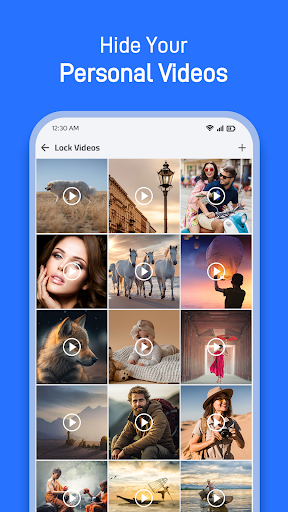
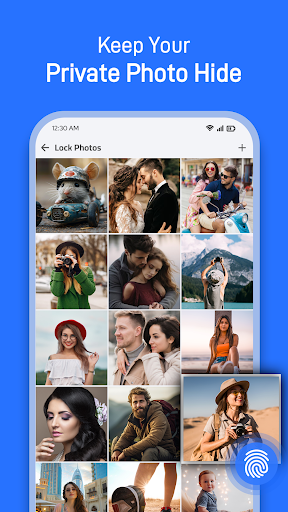
🖼️ Hide Photos & Videos
• Protect personal images, short clips, or full-length videos with Photo Vault and Video Vault.
• Organize your media in secure folders for easy access.
• Hide multiple files at once with advanced protection.
🔒 Double Security for Folders
• Add an extra layer of security by setting separate passwords for specific albums or folders.
• Enjoy double-layer protection for your most sensitive files, ensuring only you can access them.
🎥 Secure Personal Media with Vault Lock
• Lock photos, videos, and other files with a PIN or Pattern Lock.
• Restore hidden photos and videos anytime or export them as needed.
📱 After-Call Privacy Feature
• Instantly access app functions post-call to hide files quickly.
• Protect your privacy seamlessly after any conversation.
🔍 Gallery Lock & File Security
• Keep your personal assets safe with Gallery Lock and File Manager Lock.
• Lock apps, contacts, audios, and documents for comprehensive protection.
📸 Camera Intruder Snap
• Capture photos of intruders when they enter the wrong password.
• Keep a log of unauthorized access attempts for enhanced security.
♻️ Recycle Bin
• Recover deleted files or permanently delete sensitive data.
📂 Flexible Folder Management
• Create secure folders to store various types of data, including images, videos, audio, and documents.
• Move files to the trash or delete them permanently as needed.
🔒 Password Recovery & App Disguise
• Set up a recovery email to retrieve your password if forgotten.
• Hide the Secure Folder app icon to ensure no one knows it exists on your device.
🌍 Multiple Language Support
• Available in all major languages, ensuring users from different regions can enjoy the app effortlessly.
📂 Hide the Secure Folder
• When you don't want anyone even to know the Secure Folder lock exists on your phone, you can hide Secure Folder App from your phone home screen & make your photos or videos data safe.
🚀 Why Choose Secure Folder?
• Gallery Vault: Hide photos and videos securely with advanced encryption.
• Video Lock & File Manager: Protect files with simple yet powerful tools.
• Double Security: Add separate passwords for albums or folders for extra privacy.
• Privacy After Calls: Manage and secure files immediately after every call.
• Recycle Bin: Recover deleted media files or documents with ease.
• Intruder Alert: Capture unauthorized access attempts automatically.
• Comprehensive Protection: Lock apps, photos, videos, and files of all formats.
Hopefully you will enjoy this amazing app. Calculator Lock is still in development period so your feedback is welcome. If you have any questions, don't hesitate to contact us via email safefolderlockfolder@gmail.com.
Privacy
Given that the app requires no permissions, it poses minimal risk in terms of data collection or unauthorized access. However, users should still be cautious with the information they store within the app, ensuring it does not contain sensitive data that could be compromised in the event of device loss or unauthorized access. Regularly reviewing and updating the app, as well as using strong device security measures, is also advisable.
Tips
To get the most out of Secure Folder – Secure files, users should initially set up the app by creating a strong password and familiarizing themselves with its interface. Regularly backing up secured files to an external drive or cloud service can also enhance data security. Additionally, users should monitor the app's performance and report any issues to the developer to help improve the app's functionality and security.
Version Information
- Version
- 1.1.5
- Downloads
- 50K+
- Updated on
- Nov 28, 2025
- Released
- Apr 3, 2024
- Requires
- Android 7.0
Statistics
Google Play Rating History
Rating Distribution
Downloads Over Time
Secure Folder – Secure files has been downloaded times. Over the past 30 days, it averaged downloads per day.
Shaded area shows 30-day prediction based on historical trends
Historical data collection started recently. More data points will be available over time.
Secure Folder – Secure files users say on Google Play
 MR.Qorsheye
This is the best but my vedio was daleted and I don't know the problem
 ABI (Olyforgius)
Pretty good and serves my purpose. My only issue is that there is an option to get rid of ads permanently.
 Alexander Bugotu
Not yet used
 Minahil Amir
I started to use the app and it is good but suddenly one day my all data is erased and i didn't find it
ApkTrusted Ratings & Reviews
More from Safe Folder - Lock Folder
See more apps

Similar Apps
LockMyPix Photo Vault PREMIUM
Paid

AT&T Personal Cloud
Free

Enpass Password Manager
Free

LockTrip
Free
My Folder : Safe Secure Hidden
Free

Vivint
Free

Verizon Home
Free
Applock - lock apps - pin lock
Free

Video Downloader Stream Saver
Paid

AT&T ActiveArmor®
Free

Verizon Call Filter
Free

Boxer - Workspace ONE
Free

PRIVARY Secure Photo Vault
Free

Keeper Password Manager
Free
LockMyPix Safe Photo Vault
Free

SafeInCloud 1
Paid
Scan this QR code to download

Forwarding you to the page at Google Play market in seconds...
Open Google Play market now