
Quick Timer vVARY
Andrei Shpakouski


About this app
Developer Description
Set and manage timer directly from your Quick Settings - no regular app screen!
Add it to your Quick Settings, and you're ready to go – no app icon or traditional interface. Everything happens through a timer dialog and notification.
How to get started:
1. Add the Timer to Quick Settings:
• Swipe down from the top of your screen to open Quick Settings.
• Tap the pencil icon or "Edit" to customize your tiles.
• Drag the "Timer" tile into the active area.
2. Set up your timer:
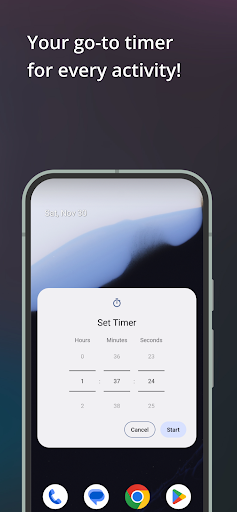
• Tap the "Timer" tile to open the timer setup dialog.
• Grant notifications permission (if needed).
• Use the pickers to set the desired time and press "Start".
3. Follow the Timer in Notifications:
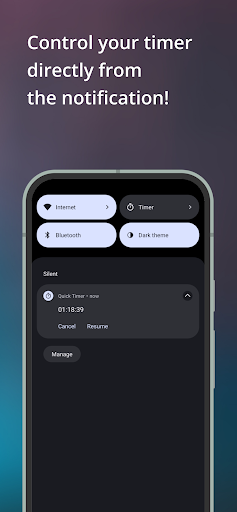
• Once the timer starts, a notification shows the remaining time.
• Pause, resume, or cancel the timer directly from the notification with one tap.
Why use Quick Timer?
• Quick access: start a timer in seconds straight from Quick Settings.
• No clutter: no app screen or icon – just a clean, efficient experience.
• Convenient notification: always know how much time is left at a glance.
Perfect for cooking, workouts, or any activity where timing matters!
Version Information
- Version
- -
- Downloads
- 100+
- Updated on
- -
- Released
- Dec 8, 2024
- Requires
- Android Varies with device
Statistics
Google Play Rating History
Rating Distribution
Downloads Over Time
Quick Timer has been downloaded times. Over the past 30 days, it averaged downloads per day.
Shaded area shows 30-day prediction based on historical trends
Historical data collection started recently. More data points will be available over time.
Quick Timer users say on Google Play
 GreenFlashAtSunsetッ
ugh you have no idea -- I had to download 16 apps before I found this, just what I'm looking for ... a quick timer to instantly activate when I click from the taskbar or notification panel 😮💨
ApkTrusted Ratings & Reviews
More from Andrei Shpakouski
See more apps
Similar Apps





Scan this QR code to download

Forwarding you to the page at Google Play market in seconds...
Open Google Play market now