
RoboForm Password Manager vVARY
Siber Systems Inc




About this app
RoboForm Password Manager solves the problem of password fatigue by securely storing and auto-filling login credentials, benefiting individuals with multiple online accounts. Compared to alternatives in the Productivity category, RoboForm stands out with its robust feature set and high user rating, but may fall short due to its limited free version and somewhat aggressive in-app purchase model. Overall, it's a solid choice for those seeking a reliable password manager. Its lack of permissions requests is a significant advantage, indicating a focus on user privacy.
Pros
- With over 1,000,000 downloads and a 4.4/5 rating, RoboForm has demonstrated its reliability and effectiveness in managing passwords, earning the trust of a large user base.
- The app's zero-permission requirement is a significant advantage, alleviating concerns about data collection and privacy breaches, making it an attractive option for security-conscious users.
- RoboForm's feature set, including form filling and password generation, is comprehensive and well-implemented, streamlining the process of managing online identities.
- The developer, Siber Systems Inc, has a reputation for maintaining and updating the app regularly, ensuring it stays compatible with the latest Android versions and security standards.
- The absence of ads within the app enhances the user experience, providing an uninterrupted and clean interface for managing sensitive information.
Cons
- The in-app purchase model, with prices ranging from $29.99 to $47.99 per item, may be seen as somewhat aggressive, potentially deterring users who are looking for a free or low-cost solution.
- Some users might find the limited functionality of the free version restrictive, pushing them towards purchasing the full version or seeking alternatives with more generous free plans.
- Despite its strong security features, the lack of transparency about data storage and encryption methods might raise concerns among highly security-conscious users who prefer open-source or more detailed explanations of security protocols.
- The app's requirement for Android 9 or later might exclude users with older devices, limiting its accessibility to a broader range of Android users.
Best for: The ideal user for RoboForm Password Manager is a technically savvy individual, likely between the ages of 25 and 50, who actively manages multiple online accounts for personal or professional purposes, values data security, and is willing to invest in a premium password management solution to safeguard their digital identities.
Developer Description
Password Manager and Form Filler that remembers passwords so you don't have to.
PASSWORD MANAGER
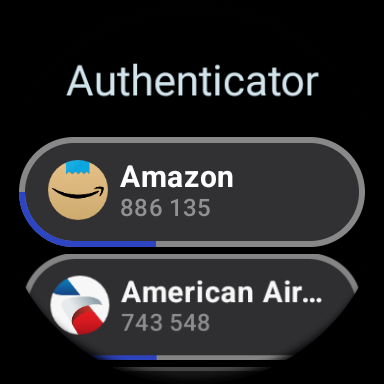
• Wear OS version available (needs companion Android app to access data).
• Tile surface for quick access is included for Wear OS version.
• The embedded RoboForm browser logs in to websites with one tap and offers to AutoSave new passwords.
• Automatically fill in passwords in apps and sites visited using Chrome or other browsers.
• AutoSave passwords directly within Chrome and supported apps, starting with Android 8.
• Keep all your passwords in one secure location.
• Arrange your go-to passwords in any order you wish using Pinned view.
• Stay organized with folders and sub-folders.
• RoboForm's password generator creates unique and hard to guess passwords for each site.
• Support for multi-step logins.
• Security Center finds your weak, re-used, or duplicate passwords.
ULTIMATE CONVENIENCE
• Your passwords are always with you. Add, view, and edit your Logins, Identities, and Safenotes from any device.
• Keep your passwords in sync across all devices and computers. Robust clients and extensions for Windows, Mac, iOS, Linux, and Chrome OS. (Premium feature).
• Import easily from all major password managers and browsers using the Windows or Mac client. CSV import and export available.
• Import passwords from Chrome on android.
• Securely share and sync changes to individual items (Premium feature).
• Appoint a trusted contact to access your data in case of Emergency (Premium feature).
• Purchase a Family plan and get up to 5 Premium accounts for one low price.
• Light and dark color themes available.
NOT JUST FOR PASSWORDS
• Securely store and edit credit cards, bank accounts, or any other personal information.
• AutoFill long checkout forms with one tap.
• Store license keys, wi-fi passwords, or any other important information using Safenotes.
• Sync Bookmarks for your favorite websites.
• Store contact information for your friends and colleagues.
SECURITY
• Your data is protected with AES 256 encryption.
• You are the only one who knows your Master Password. We don’t save or store that information anywhere, giving you complete protection.
• Two factor authentication (2FA).
• App locks after inactivity. Only you can access your data even if your device is misplaced.
• Unlock using Touch ID or PIN.
RELIABILITY
• We’ve been mastering password management for 15+ years.
• Expert reviews include the Wall Street Journal, New York Times, ZDNet, Bloomberg, Financial Times, NBC TV, ABC News and more.
• 24/7/365 email support.
• Live chat support available during US business hours.
• Loved and used by millions.
IN-APP PURCHASE TERMS
• RoboForm is free for unlimited Logins and web form fill on a single device.
• RoboForm Premium and RoboForm Family are available as one year renewable subscriptions.
• RoboForm Premium adds automatic sync across all devices and browsers, secure cloud backup, two factor authentication, secure sharing, web access, and priority 24/7 support.
• RoboForm Family: Up to 5 RoboForm Premium accounts under a single subscription.
Accessibility Services Disclosure: RoboForm offers the ability to use the Accessibility Service to augment AutoFill on older devices or in cases when AutoFill is not working correctly. When enabled, the Accessibility Service is used to look for login fields in apps and web sites. This establishes the appropriate field IDs and captions when a match for the app or web site is found and fills credentials. When the Accessibility Service is active RoboForm does not store information and it does not control any on-screen elements beyond filling credentials.
Privacy
Given that RoboForm requests zero permissions, the risk of data leakage or unauthorized access is significantly minimized. However, users should still be cautious when setting up and using the app, ensuring they use strong, unique passwords for the master password and any other sensitive information. Regularly reviewing and updating stored passwords can also enhance security.
Tips
For first-time setup, users should prioritize setting a strong and unique master password, then systematically import or manually add their existing login credentials. To get the most out of RoboForm, explore its form filling capabilities and password generator to streamline online interactions. Additionally, regularly syncing the app across devices ensures access to the latest password updates.
What's New
- Added support for a 6-digit PIN code to improve account security.
- Improved stability and performance with numerous crash, ANR, and compatibility fixes across Android versions.
In-app purchases
$29.99 - $47.99 per item
Version Information
- Version
- -
- Downloads
- 1M+
- Updated on
- Dec 22, 2025
- Released
- Feb 2, 2011
- Requires
- Android 9
Statistics
Google Play Rating History
Rating Distribution
Downloads Over Time
RoboForm Password Manager has been downloaded times. Over the past 30 days, it averaged downloads per day.
Shaded area shows 30-day prediction based on historical trends
Historical data collection started recently. More data points will be available over time.
RoboForm Password Manager users say on Google Play
 Tom Vice
EDIT: Tryptophan overdose; 2025 Seems like the ones having problems just don't know how to work their equipment! By Far ! THIS IS the BEST Password Manager in Internet Land ! PERIOD 😍 I have used it for 17+ years. Updates are Precise & Accurate. Be Sure to get their Premium Plan, so you can use it on Every Platform from ANY device. IF you ever have a problem, (🤣) their Zen Desk is Right on it AND communicate ''with'' you... EXCELLENT PROGRAM & CUSTOMER SERVICE !!! ( Remember what that is ? ) ❤
 Epyon001
Better than other password managers for the simple fact that the software is accessible offline, it does not require a cloud connection for your password library to work, meaning of the Internet goes out, youre not locked out of your accounts. It does struggle with some auto-fill functions with some apps but I'm okay with copy/paste, so it's cool. I removed a star due to minor issueswith Windows Hello tokens. You have to click past a few prompts and it takes awhile to authenticat. It gets old.
 Karen Engell
It's nice to have all my passwords in one place but the app does not work without flaws. The latest app added a confirmation of filling your password that takes up half or more of the screen when it used to be a simple pop up window. Also if it doesn't match a password to the login screen that I'm on and I choose to "browse all logins" when I try to search my logins it closes and goes back to the webpage that I'm trying to login to.
 Michael Thompson
Still not integrated - Nov 24. Doesn't seem to be integrated with Firefox in Android, nor with Duck Duck Go. Virtually useless as it has to be selected individually for each password. Not well integrated with any browser I have used (Edge, Chrome, IE, Firefox). Used to be much better. After 4 years I can say that the same applies. Jan 24 21 Still fails to integrate with Firefox, but Roboform informed me it never will, and to use Chrome based browsers. Also fails to store generated password.
 Christie
since the latest update now you can't get to the password reset tool when you're trying to create a new login. getting really frustrated with this app
ApkTrusted Ratings & Reviews
More from Siber Systems Inc
See more apps

Similar Apps
1Password: Password Manager
Free

Bitwarden Password Manager
Free

LastPass Password Manager
Free

Keeper Password Manager
Free
Thunderbird Beta for Testers
Free

IronVest - Security & Privacy
Free

LockTrip
Free

One Key: password manager
Free

Termius - Modern SSH Client
Free

Enpass Password Manager
Free

Passwords & passkeys-Safe
Free

Nextcloud
Free

SafeInCloud 1
Paid

UniFi
Free

Startpage
Free

Nuki Smart Lock
Free
Scan this QR code to download

Forwarding you to the page at Google Play market in seconds...
Open Google Play market now